CloudGate UNO for Google Chrome
CloudGate UNO for Google Chrome
Qu'est-ce que CloudGate UNO for Google Chrome ?
CloudGate UNO for Google Chrome est une extension Chrome développée par International Systems Research Co., Ltd., et sa fonction principale est "CloudGate UNO for Google Chrome".
Captures d'Écran de l'Extension

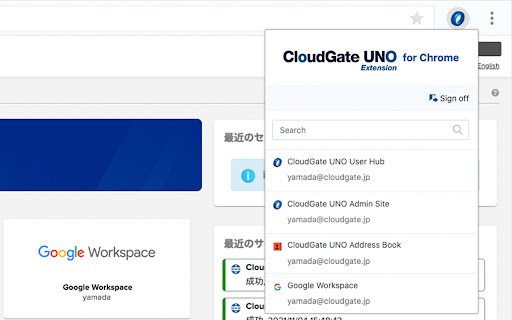
Télécharger le fichier CRX de l'extension CloudGate UNO for Google Chrome
Téléchargez les fichiers d'extension CloudGate UNO for Google Chrome au format crx, installez manuellement les extensions Chrome dans le navigateur ou partagez les fichiers crx avec des amis pour installer facilement les extensions Chrome.
Instructions d'Utilisation de l'Extension
                        CloudGate UNO for Google Chrome expands the number of services supported by CloudGate UNO beyond those adhering to the SAML and
OpenID Connect protocols.  It automatically detects and provides a seamless single sign-on (SSO) experience for all of your registered
our services.

Our service is an identity and access management solution that provides high-level security across all devices allowing for improved user
flexibility and productivity. It provides various access restrictions and strong authentication to secure your access to your cloud services.
Informations de Base sur l'Extension
| Nom |  CloudGate UNO for Google Chrome CloudGate UNO for Google Chrome |
| ID | iccafhamlplmkmobidnbmehnmeonakli |
| URL Officiel | https://chromewebstore.google.com/detail/cloudgate-uno-for-google/iccafhamlplmkmobidnbmehnmeonakli |
| Description | CloudGate UNO for Google Chrome |
| Taille du Fichier | 93.76 KB |
| Nombre d'Installations | 4,000 |
| Version Actuelle | 1.8.1 |
| Dernière Mise à Jour | 2023-02-21 |
| Date de Publication | 2019-12-01 |
| Évaluation | 4.67/5 Total 6 Évaluations |
| Développeur | International Systems Research Co., Ltd. |
| [email protected] | |
| Type de Paiement | free |
| URL de la Page de Politique de Confidentialité | https://www.isr.co.jp/privacy |
| Langues Prises en Charge | en,ja |
| manifest.json | |
{
    "update_url": "https:\/\/clients2.google.com\/service\/update2\/crx",
    "name": "CloudGate UNO for Google Chrome",
    "version": "1.8.1",
    "description": "CloudGate UNO for Google Chrome",
    "default_locale": "en",
    "incognito": "split",
    "key": "MIIBIjANBgkqhkiG9w0BAQEFAAOCAQ8AMIIBCgKCAQEArPN2mW3R0KrXPM0CIrS1nQTz0l4xjqNOYtyGSKF2ARk1EdIqk2lq1qaILbTVHHTrbd2TV8Cs1ADb5ktjD1hpRH3R3UG5s0CMpVOY84PrPtVP3oBiivUztV6euulQvdzX4xThNY37pmWFsOALx3FaXKFQ26xIX4zV\/T8NjR\/USsLbPHiREzahdc89UxVF\/kRrjvqzi2M67id4mzWZ1w3R1NcBLGU2XIWmSxnBeKudYSuzVP+Ynmzlrrh9Wi02aC16lvYnG8E2FrVstHIOJSHt30S1gqsMWKgJwqB9s4IcRSuZeD4pVOjRxeNNUzS2UuPHlnMJ2DoF\/qEncNhf3rRitQIDAQAB",
    "icons": {
        "16": "images\/cloudgate-48.png",
        "48": "images\/cloudgate-48.png",
        "128": "images\/cloudgate-128.png"
    },
    "permissions": [
        "tabs",
        "storage"
    ],
    "host_permissions": [
        "http:\/\/*\/",
        "https:\/\/*\/"
    ],
    "content_scripts": [
        {
            "matches": [
                "http:\/\/*\/*",
                "https:\/\/*\/*"
            ],
            "css": [
                "css\/notification.css"
            ],
            "images": [
                "images\/cg-extension.png"
            ],
            "js": [
                "js\/lib\/prototypes.js",
                "js\/lib\/autocomplete.js",
                "js\/lib\/utils.js",
                "js\/lib\/common.js",
                "js\/notification.js"
            ],
            "run_at": "document_end"
        }
    ],
    "background": {
        "service_worker": "js\/cgListeners.js"
    },
    "action": {
        "default_icon": {
            "16": "images\/cloudgate-48.png",
            "32": "images\/cloudgate-48.png"
        },
        "default_popup": "popup.html"
    },
    "options_page": "options.html",
    "manifest_version": 3,
    "web_accessible_resources": [
        {
            "resources": [
                "images\/*.png",
                "images\/svg\/*.svg",
                "css\/notification.css",
                "options.html"
            ],
            "matches": [
                "http:\/\/*\/*",
                "https:\/\/*\/*"
            ]
        }
    ],
    "externally_connectable": {
        "matches": [
            "*:\/\/*.cloudgate.jp\/*",
            "*:\/\/*.isr.co.jp\/*"
        ]
    }
} | |