Bookmark Desktop
Create your bookmark desktop!
Qu'est-ce que Bookmark Desktop ?
Bookmark Desktop est une extension Chrome développée par Serdar Kuzucu, et sa fonction principale est "Create your bookmark desktop!".
Captures d'Écran de l'Extension
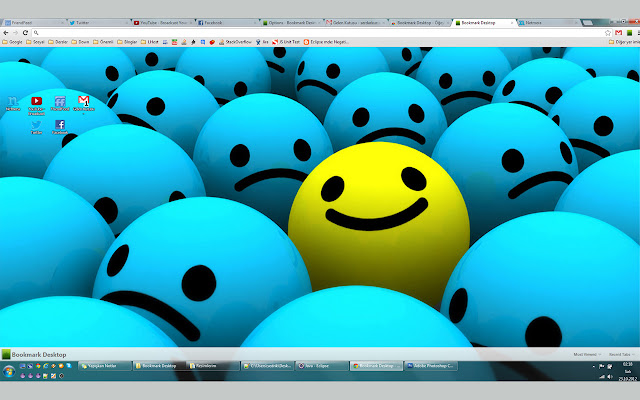

Télécharger le fichier CRX de l'extension Bookmark Desktop
Téléchargez les fichiers d'extension Bookmark Desktop au format crx, installez manuellement les extensions Chrome dans le navigateur ou partagez les fichiers crx avec des amis pour installer facilement les extensions Chrome.
Instructions d'Utilisation de l'Extension
                        Add your favorite web pages and bookmarks to your Bookmark Desktop, which is like your Windows' desktop.

New things in v1.0 are:
- Options page is created.
- Changing background image/color of the desktop is added.
- Changing icons' text color is added.
- 'Recently Closed Tabs' and 'Most Viewed Pages' menu is added.
- Now you can decide opening in new tab or in current tab from options page.
- You can change the number of 'most viewed pages' and the number of 'recently closed tabs' shown in the menus.
- You can add some url's to the 'ignore list' not to see them in most viewed pages menu.
- Synchronization between tabs is added. Now when you do something(add, remove, move, rename) in a Bookmark Desktop tab, it's done automatically in other Bookmark Desktop tabs.
Informations de Base sur l'Extension
| Nom |  Bookmark Desktop Bookmark Desktop |
| ID | icjefgkakambanhdkeocfkgnmegbmcpg |
| URL Officiel | https://chrome.google.com/webstore/detail/bookmark-desktop/icjefgkakambanhdkeocfkgnmegbmcpg |
| Description | Create your bookmark desktop! |
| Taille du Fichier | 440 KB |
| Nombre d'Installations | 552 |
| Version Actuelle | 1.0 |
| Dernière Mise à Jour | 2012-10-22 |
| Date de Publication | 2012-10-22 |
| Évaluation | 4.23/5 Total 22 Évaluations |
| Développeur | Serdar Kuzucu |
| Type de Paiement | free |
| Langues Prises en Charge | en-US |
| manifest.json | |
{
    "update_url": "http:\/\/clients2.google.com\/service\/update2\/crx",
    "name": "Bookmark Desktop",
    "version": "1.0",
    "description": "Create your bookmark desktop!",
    "background": {
        "scripts": [
            "jquery.js",
            "background.js"
        ]
    },
    "options_page": "options.html",
    "permissions": [
        "tabs",
        "storage",
        "unlimitedStorage",
        "chrome:\/\/favicon\/",
        "history"
    ],
    "icons": {
        "48": "logo48.png",
        "128": "logo128.png"
    },
    "browser_action": {
        "default_title": "Add to Bookmark Desktop",
        "default_icon": "logo19.png"
    },
    "chrome_url_overrides": {
        "newtab": "blank.html"
    },
    "manifest_version": 2
} | |