Pay the Piper
Pay the Piper keeps you productive by making you "pay" to visit distracting sites. The cost? One completed task from your task list.
Qu'est-ce que Pay the Piper ?
Pay the Piper est une extension Chrome développée par roufamatic, et sa fonction principale est "Pay the Piper keeps you productive by making you "pay" to visit distracting sites. The cost? One completed task from your task list.".
Captures d'Écran de l'Extension


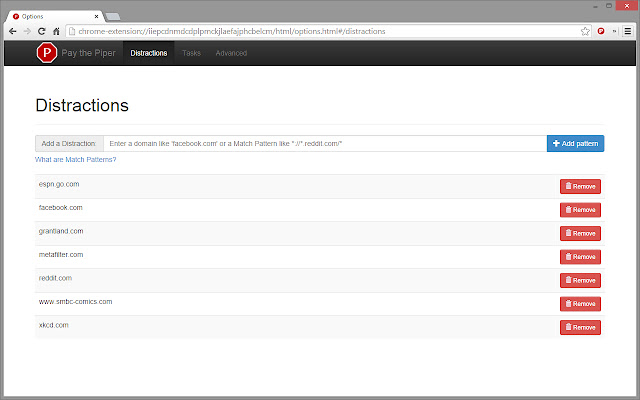
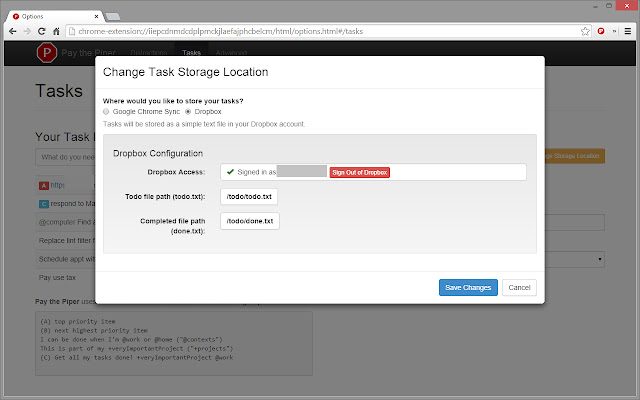
Télécharger le fichier CRX de l'extension Pay the Piper
Téléchargez les fichiers d'extension Pay the Piper au format crx, installez manuellement les extensions Chrome dans le navigateur ou partagez les fichiers crx avec des amis pour installer facilement les extensions Chrome.
Instructions d'Utilisation de l'Extension
                        Do you have trouble remembering to look at your to do list? Ever go onto your computer to accomplish some small task, only to emerge hours later with the task still unfinished but a greater appreciation for cats than you ever dreamed possible? Do you ever wish you could just get a reminder to call the dentist BEFORE you started looking at pictures of your ex on Facebook?

If this sounds like you, then it's time to Pay the Piper!

Pay the Piper protects you from your own bad habits by keeping you away from sites you know are distracting and focusing you back on your task list. Like a web blocker, you decide what sites are distractions to you, and Pay the Piper prevents you from viewing them. Unlike those other blockers, Pay the Piper replaces the distraction with a task from your task list. Completing any of your tasks grants you a few minutes to browse the distracting site. Hey, you've earned it!

Pay the Piper was built to augment the power of the todo.txt system and its Android/iOS apps. If you are a todo.txt user and your files are stored on Dropbox, Pay the Piper can use that task list as its source. But don't worry if you don't store your tasks there -- you can also create your own list inside of Chrome. Thanks to the power of Google Chrome Sync, all of your logged in Chrome browsers will share the same task list.

"I got things done this weekend that I didn't think I would have!" Jessie Rymph, founder, Works Progress Seattle
Informations de Base sur l'Extension
| Nom |  Pay the Piper Pay the Piper |
| ID | iiepcdnmdcdplpmckjlaefajphcbelcm |
| URL Officiel | https://chrome.google.com/webstore/detail/pay-the-piper/iiepcdnmdcdplpmckjlaefajphcbelcm |
| Description | Pay the Piper keeps you productive by making you "pay" to visit distracting sites. The cost? One completed task from your task list. |
| Taille du Fichier | 1.65 MB |
| Nombre d'Installations | 44 |
| Version Actuelle | 1.1.7.5 |
| Dernière Mise à Jour | 2014-09-29 |
| Date de Publication | 2014-09-29 |
| Évaluation | 4.00/5 Total 7 Évaluations |
| Développeur | roufamatic |
| Type de Paiement | free |
| Langues Prises en Charge | en-US |
| manifest.json | |
{
"update_url": "https:\/\/clients2.google.com\/service\/update2\/crx",
"manifest_version": 2,
"name": "Pay the Piper",
"description": "Pay the Piper keeps you productive by making you \"pay\" to visit distracting sites. The cost? One completed task from your task list.",
"version": "1.1.7.5",
"key": "MIIBIjANBgkqhkiG9w0BAQEFAAOCAQ8AMIIBCgKCAQEAwsSsh2C6Xt6VezgYfikaYirQYF4rfPTUnrNv6mngJws81vidCspo92tLYJY9njNJeLIGg8Us\/6Lhon9DY7sMGlgFxRo1TS+3mt5hm\/1Yrq9haUWyfA8p57uf0pDAV1seOdmwdnJzl04JCTYiZqjRzyoabhZo\/64iSQoOJRth+8OH5Qwk9mSVKjMLrrGcIM0sbDqJaz1InngzOFB6M81P41HJ8\/6xUSt9x75ZrY0+TMvvGVY46VyfcQHdeODLW+kpZMnLffp1WuTRBNQ3OJPb3guSx\/leZ5EBB5VbjTDjWrcB0CL66E9wcYFyfUclLbsH\/zH1UKydkmsvCMkxXJ7sLwIDAQAB",
"permissions": [
"notifications",
"storage",
"tabs",
"webRequest",
"webRequestBlocking",
"webNavigation",
" | |