Jetstream
Blockchain Chrome Extension Wallet. It provides the most Seamless & Ultra-connected Experience for ALL web services.
Qu'est-ce que Jetstream ?
Jetstream est une extension Chrome développée par http://jetstream.world, et sa fonction principale est "Blockchain Chrome Extension Wallet. It provides the most Seamless & Ultra-connected Experience for ALL web services.".
Captures d'Écran de l'Extension


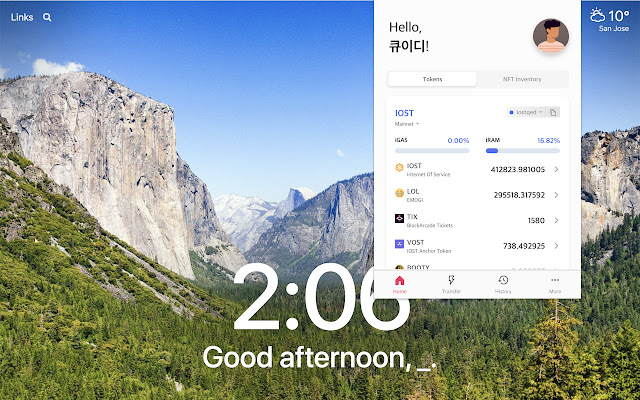
Télécharger le fichier CRX de l'extension Jetstream
Téléchargez les fichiers d'extension Jetstream au format crx, installez manuellement les extensions Chrome dans le navigateur ou partagez les fichiers crx avec des amis pour installer facilement les extensions Chrome.
Instructions d'Utilisation de l'Extension
                        Jetstream: Blockchain Chrome Extension Wallet

Jetstream helps you interact with blockchain-based web application.

Jetstream provides following features:

1) Multichain Access
Jetstream is not limited to only one blockchain platform, it supports multi blockchain platform.
Currently Jetstream is supporting Klaytn & IOST blockchain.

2) NFT-enabled (IRC721, KRC721)
Jetstream supports Non-fungible token!
*NFT(Non-fungible token):
A non-fungible token (NFT) is a special type of cryptographic token which represents something unique.

3) Dapp Signing
Users can sign transactions through Jetstream, which enables them to access a blockchain-based service, DApp.

4) Fee delegation service
Transaction fees are incurred when using the blockchain service. To reduce this cost burden, we provide a fee delegation service that pays the transaction fee for the user.

5) KCT (Klaytn-compatible Token), IRC20 token Support
KCT is Klaytn-compatible token, user can deposit or withdraw their KCT.

6) Easy Onboarding ("Non-Blockchain-Like Experience")
To use a blockchain service, you need a password called a private key. This password is a long string of more than 64 digits and is hard to remember.

Through the Google Oauth2 service, we offer users the option to double-encrypt their passwords and store them in their Google Cloud. (Of course, using this feature is optional.)

This allows users to use blockchain services as they log into traditional services without having to know the difficult grammar of blockchain.

Privacy Policy https://github.com/nujabes403/jetstream_public/blob/master/Privacy%20Policy.md

Website: https://jetstream.world
Medium: https://medium.com/jetstream-official
Telegram: https://t.me/jetstreamworld
Twitter: https://twitter.com/Jetstream__
Informations de Base sur l'Extension
| Nom |  Jetstream Jetstream |
| ID | ijancdlmlahmfgcimhocmpibadokcdfc |
| URL Officiel | https://chrome.google.com/webstore/detail/ijancdlmlahmfgcimhocmpibadokcdfc |
| Description | Blockchain Chrome Extension Wallet. It provides the most Seamless & Ultra-connected Experience for ALL web services. |
| Taille du Fichier | 29.22 MB |
| Nombre d'Installations | 2,782 |
| Version Actuelle | 0.0.8 |
| Dernière Mise à Jour | 2020-04-20 |
| Date de Publication | 2020-04-16 |
| Évaluation | 4.66/5 Total 106 Évaluations |
| Développeur | http://jetstream.world |
| [email protected] | |
| Type de Paiement | free |
| Site Web de l'Extension | https://jetstream.world |
| URL de la Page d'Aide | https://t.me/jetstreamworld |
| URL de la Page de Politique de Confidentialité | https://github.com/nujabes403/jetstream_public/blob/master/Privacy%20Policy.md |
| Langues Prises en Charge | en |
| manifest.json | |
{
    "update_url": "https:\/\/clients2.google.com\/service\/update2\/crx",
    "name": "Jetstream",
    "short_name": "Jetstream",
    "version": "0.0.8",
    "manifest_version": 2,
    "author": "https:\/\/jetstream.world",
    "description": "Blockchain Chrome Extension Wallet. It provides the most Seamless & Ultra-connected Experience for ALL web services.",
    "commands": {
        "_execute_browser_action": {
            "suggested_key": {
                "windows": "Alt+Shift+J",
                "mac": "Alt+Shift+J",
                "chromeos": "Alt+Shift+J",
                "linux": "Alt+Shift+J"
            }
        }
    },
    "browser_action": {
        "default_icon": {
            "16": "assets\/favicon_16.png",
            "19": "assets\/favicon_19.png",
            "38": "assets\/favicon_38.png",
            "48": "assets\/favicon_48.png",
            "128": "assets\/favicon_128.png"
        },
        "default_popup": "index.html",
        "default_title": "Jetstream"
    },
    "icons": {
        "16": "assets\/favicon_16.png",
        "19": "assets\/favicon_19.png",
        "38": "assets\/favicon_38.png",
        "48": "assets\/favicon_48.png",
        "128": "assets\/favicon_128.png"
    },
    "permissions": [
        "notifications",
        "storage",
        "identity",
        "tabs",
        "https:\/\/api.jetstream.world\/"
    ],
    "optional_permissions": [
        "http:\/\/*\/*",
        "https:\/\/*\/*"
    ],
    "background": {
        "scripts": [
            "app\/background.js"
        ]
    },
    "content_scripts": [
        {
            "matches": [
                "http:\/\/*\/*",
                "https:\/\/*\/*"
            ],
            "js": [
                "app\/content-script.js"
            ],
            "run_at": "document_end",
            "all_frames": false
        }
    ],
    "web_accessible_resources": [
        "app\/inpage.js",
        "bundle-pagemanager.css",
        "\/static\/images\/*"
    ],
    "oauth2": {
        "client_id": "1043510029495-1b76r8uqnlt01ohguqupi2vjfoqkj3tq.apps.googleusercontent.com",
        "scopes": [
            "https:\/\/www.googleapis.com\/auth\/drive.file",
            "https:\/\/www.googleapis.com\/auth\/youtube.readonly"
        ]
    },
    "content_security_policy": "connect-src *; script-src 'self' 'unsafe-eval' https:\/\/*.jetstream.world https:\/\/ssl.google-analytics.com https:\/\/cdn4.mxpnl.com\/libs\/mixpanel-2-latest.min.js; object-src 'self'"
} | |