HTML Style Quick Viewer
HTML DOM element style quick viewer
Qu'est-ce que HTML Style Quick Viewer ?
HTML Style Quick Viewer est une extension Chrome développée par _(:з」∠)_, et sa fonction principale est "HTML DOM element style quick viewer".
Captures d'Écran de l'Extension
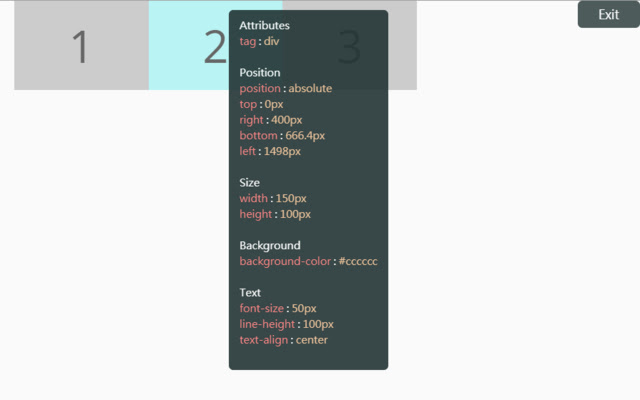
Télécharger le fichier CRX de l'extension HTML Style Quick Viewer
Téléchargez les fichiers d'extension HTML Style Quick Viewer au format crx, installez manuellement les extensions Chrome dans le navigateur ou partagez les fichiers crx avec des amis pour installer facilement les extensions Chrome.
Instructions d'Utilisation de l'Extension
                        How about viewing the HTML DOM styles in a different way?
Just move your mouse and it shows the target's styles.

After installation, you may have to reload tabs to for the extension to take effect.

Instructions:
1. Click HTML Style Quick Viewer in the toolbar, then click 'run' button to start.
2. Move mouse to see the element's styles.
3. Mouse left click to close the popup panel.
4. Mouse middle click to pin the popup panel.
5. Click the 'Exit' button at the top-right or click 'Stop' button through the toolbar to stop.
Informations de Base sur l'Extension
| Nom |  HTML Style Quick Viewer HTML Style Quick Viewer |
| ID | inafmkpmbkldliccdbeieeafnbkcmmap |
| URL Officiel | https://chrome.google.com/webstore/detail/html-style-quick-viewer/inafmkpmbkldliccdbeieeafnbkcmmap |
| Description | HTML DOM element style quick viewer |
| Taille du Fichier | 15.88 KB |
| Nombre d'Installations | 271 |
| Version Actuelle | 1.0.2 |
| Dernière Mise à Jour | 2018-08-26 |
| Date de Publication | 2018-08-26 |
| Évaluation | 5.00/5 Total 3 Évaluations |
| Développeur | _(:з」∠)_ |
| [email protected] | |
| Type de Paiement | free |
| Langues Prises en Charge | en |
| manifest.json | |
{
    "update_url": "https:\/\/clients2.google.com\/service\/update2\/crx",
    "name": "HTML Style Quick Viewer",
    "description": "HTML DOM element style quick viewer",
    "version": "1.0.2",
    "permissions": [
        "activeTab"
    ],
    "content_scripts": [
        {
            "matches": [
                "http:\/\/*\/*",
                "https:\/\/*\/*"
            ],
            "js": [
                "content\/content.js"
            ],
            "css": [
                "content\/content.css"
            ],
            "run_at": "document_start"
        }
    ],
    "browser_action": {
        "default_title": "HTML Style Quick Viewer\nRight click (Close)\nMiddle click (Pin)",
        "default_icon": {
            "16": "icons\/icon_16.png",
            "32": "icons\/icon_32.png",
            "48": "icons\/icon_48.png",
            "128": "icons\/icon_128.png"
        },
        "default_popup": "popup\/popup.html"
    },
    "manifest_version": 2
} | |