Danganronpa V3 Wallpaper Custom New Tab
Danganronpa V3 wallpaper turn new tab to Danganronpa V3 background for Free. Danganronpa V3 wallpaper background theme for game fans
Qu'est-ce que Danganronpa V3 Wallpaper Custom New Tab ?
Danganronpa V3 Wallpaper Custom New Tab est une extension Chrome développée par https://coolthemestores.com, et sa fonction principale est "Danganronpa V3 wallpaper turn new tab to Danganronpa V3 background for Free. Danganronpa V3 wallpaper background theme for game fans".
Captures d'Écran de l'Extension
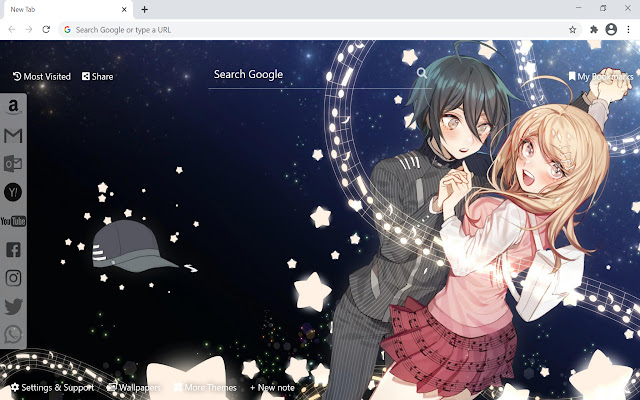


Télécharger le fichier CRX de l'extension Danganronpa V3 Wallpaper Custom New Tab
Téléchargez les fichiers d'extension Danganronpa V3 Wallpaper Custom New Tab au format crx, installez manuellement les extensions Chrome dans le navigateur ou partagez les fichiers crx avec des amis pour installer facilement les extensions Chrome.
Instructions d'Utilisation de l'Extension
                        This extension features some of the cool Danganronpa V3 background to make you feel good on your Chrome browser for FREE. The extension shuffle Danganronpa V3 wallpaper every time you open a new tab.

Turn your Chrome new tab into beautiful and powerful utility browser with Danganronpa V3 Wallpaper extension. Background theme for chromebook, laptop, desktop or pc.

Extension Features:

1. Shuffle Danganronpa V3 wallpaper every time you open a new tab.
2. Randomize Danganronpa V3 background theme in settings option.
3. Get easy access to popular sites with custom web search.
4. Quick access to your emails and social media accounts.
5. Show current date and time automatically.
6. Sticky notes give you the Danganronpa V3 feels in completing real-life tasks.
7. Get easy access to your most frequently visited websites.
8. Get easy access to your bookmarks websites.
9. Quick access to Google apps.
10. Quick access to More Themes.
11. Easy Sharing to Social Media.
12. Enable fun snow, rain, falling leaves, fireworks animation in new tab.

If you have any questions about our Danganronpa V3 wallpaper new tab extension or just want to give us some feedback, feel free to send us a message or write a review! We'd love to hear from you. You can mouse over to Support tab on the extension, then click on "visit the developer's support site" to contact us.

If you wish to remove this new tab extension, follow this steps:
1. Click the 3-dot icon at the top-right corner of your screen.
2. Hover your mouse on More tools then click Extensions.
3. Find the wallpaper extension.
4. Press "Remove"

- OR -
Right-click the extension icon on the extension bar (next to the URL bar) and select Remove from Chrome.

If you like our Danganronpa V3 wallpaper extension, check out other CoolThemeStores extensions that are also available on the CWS!
Informations de Base sur l'Extension
| Nom |  Danganronpa V3 Wallpaper Custom New Tab Danganronpa V3 Wallpaper Custom New Tab |
| ID | iocojakkogknoonlgfeophljhobmgdpf |
| URL Officiel | https://chrome.google.com/webstore/detail/danganronpa-v3-wallpaper/iocojakkogknoonlgfeophljhobmgdpf |
| Description | Danganronpa V3 wallpaper turn new tab to Danganronpa V3 background for Free. Danganronpa V3 wallpaper background theme for game fans |
| Taille du Fichier | 15.98 MB |
| Nombre d'Installations | 439 |
| Version Actuelle | 1.30.24.21 |
| Dernière Mise à Jour | 2021-10-14 |
| Date de Publication | 2021-09-22 |
| Évaluation | 5.00/5 Total 4 Évaluations |
| Développeur | https://coolthemestores.com |
| [email protected] | |
| Type de Paiement | free |
| Site Web de l'Extension | https://coolthemestores.com/danganronpa-v3-wallpaper-hd-new-tab |
| URL de la Page d'Aide | https://coolthemestores.com/contact-us |
| URL de la Page de Politique de Confidentialité | https://coolthemestores.com/privacy-policy |
| Langues Prises en Charge | de,en,fil,fr,ca,es,it,zh-CN,zh-TW,ja,ko |
| manifest.json | |
{
    "update_url": "https:\/\/clients2.google.com\/service\/update2\/crx",
    "manifest_version": 3,
    "description": "__MSG_appDesc__",
    "default_locale": "en",
    "name": "__MSG_appName__",
    "offline_enabled": true,
    "background": {
        "service_worker": "bg.js"
    },
    "action": {
        "default_icon": "img\/icon128.png"
    },
    "chrome_url_overrides": {
        "newtab": "index.html"
    },
    "icons": {
        "128": "img\/icon128.png",
        "48": "img\/icon48.png"
    },
    "version": "1.30.24.21",
    "author": "coolthemestores",
    "permissions": [
        "topSites",
        "bookmarks",
        "unlimitedStorage",
        "storage"
    ]
} | |