Memeify
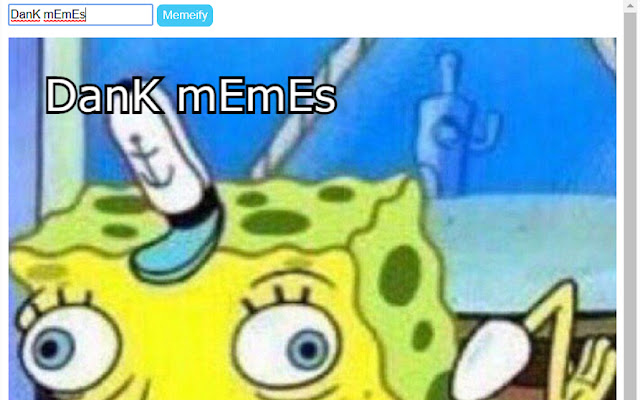
This app is an easy and convenient way to use the Spongebob mocking meme on the go. Just type whatever text you what memeified into…
Qu'est-ce que Memeify ?
Memeify est une extension Chrome développée par jjrylearn, et sa fonction principale est "This app is an easy and convenient way to use the Spongebob mocking meme on the go. Just type whatever text you what memeified into…".
Captures d'Écran de l'Extension
Télécharger le fichier CRX de l'extension Memeify
Téléchargez les fichiers d'extension Memeify au format crx, installez manuellement les extensions Chrome dans le navigateur ou partagez les fichiers crx avec des amis pour installer facilement les extensions Chrome.
Instructions d'Utilisation de l'Extension
This app is an easy and convenient way to use the Spongebob mocking meme on the go. Just type whatever text you what memeified into the extensions text box, then press enter and voila! You have a meme'd up picture of spongebob with your text ready to copy and paste. Informations de Base sur l'Extension
| Nom |  Memeify Memeify |
| ID | iogidijblegigcogjjbdhbmalmimofad |
| URL Officiel | https://chrome.google.com/webstore/detail/memeify/iogidijblegigcogjjbdhbmalmimofad |
| Description | This app is an easy and convenient way to use the Spongebob mocking meme on the go. Just type whatever text you what memeified into… |
| Taille du Fichier | 44.87 KB |
| Nombre d'Installations | 859 |
| Version Actuelle | 1.2 |
| Dernière Mise à Jour | 2017-11-14 |
| Date de Publication | 2017-11-14 |
| Évaluation | 2.33/5 Total 3 Évaluations |
| Développeur | jjrylearn |
| Type de Paiement | free |
| Langues Prises en Charge | en |
| manifest.json | |
{
"update_url": "https:\/\/clients2.google.com\/service\/update2\/crx",
"manifest_version": 2,
"name": "Memeify",
"version": "1.2",
"content_scripts": [
{
"matches": [
" | |