canopy companion css selector tool
This extensions helps you create quality css, jquery, and xpath selectors
Qu'est-ce que canopy companion css selector tool ?
canopy companion css selector tool est une extension Chrome développée par http://lefthandedgoat.github.io/canopy, et sa fonction principale est "This extensions helps you create quality css, jquery, and xpath selectors".
Captures d'Écran de l'Extension
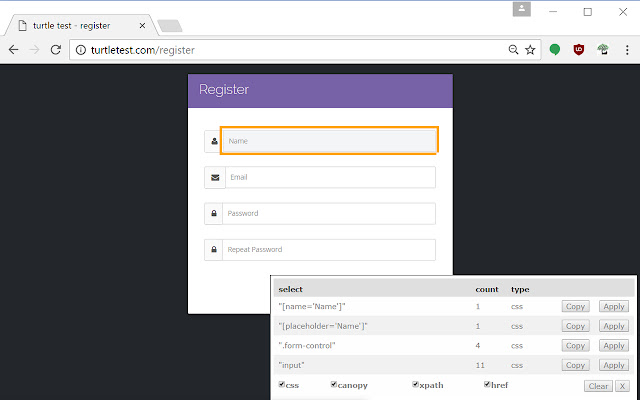
Télécharger le fichier CRX de l'extension canopy companion css selector tool
Téléchargez les fichiers d'extension canopy companion css selector tool au format crx, installez manuellement les extensions Chrome dans le navigateur ou partagez les fichiers crx avec des amis pour installer facilement les extensions Chrome.
Instructions d'Utilisation de l'Extension
                        This extensions helps you create quality css, jquery, and xpath selectors

Learn more about the canopy ui automation and testing library here: http://lefthandedgoat.github.io/canopy/
Informations de Base sur l'Extension
| Nom |  canopy companion css selector tool canopy companion css selector tool |
| ID | jehfnloleecojodohcdfpbhjahhaplje |
| URL Officiel | https://chrome.google.com/webstore/detail/canopy-companion-css-sele/jehfnloleecojodohcdfpbhjahhaplje |
| Description | This extensions helps you create quality css, jquery, and xpath selectors |
| Taille du Fichier | 333 KB |
| Nombre d'Installations | 62 |
| Version Actuelle | 0.2 |
| Dernière Mise à Jour | 2017-02-02 |
| Date de Publication | 2017-02-02 |
| Évaluation | 5.00/5 Total 2 Évaluations |
| Développeur | http://lefthandedgoat.github.io/canopy |
| Type de Paiement | free |
| Site Web de l'Extension | http://lefthandedgoat.github.io/canopy/ |
| Langues Prises en Charge | en-US |
| manifest.json | |
{
    "update_url": "https:\/\/clients2.google.com\/service\/update2\/crx",
    "manifest_version": 2,
    "name": "canopy companion css selector tool",
    "description": "This extensions helps you create quality css, jquery, and xpath selectors",
    "version": "0.2",
    "browser_action": {
        "default_icon": "icon.png"
    },
    "permissions": [
        "tabs",
        "http:\/\/*\/*",
        "https:\/\/*\/*"
    ],
    "background": {
        "scripts": [
            "background.js"
        ],
        "persistent": false
    }
} | |