Translect
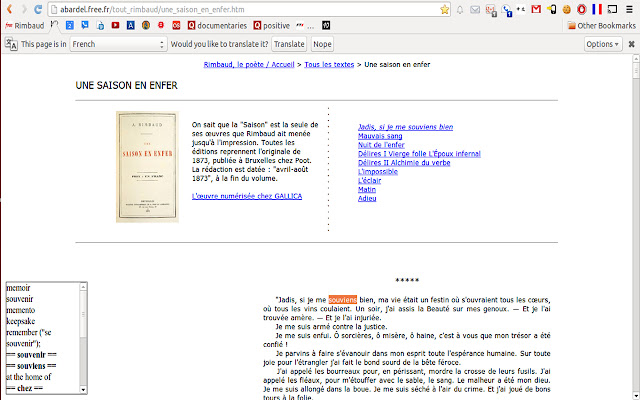
Allows you to quickly and easily translate French words to English.
Qu'est-ce que Translect ?
Translect est une extension Chrome développée par 8enmann, et sa fonction principale est "Allows you to quickly and easily translate French words to English.".
Captures d'Écran de l'Extension
Télécharger le fichier CRX de l'extension Translect
Téléchargez les fichiers d'extension Translect au format crx, installez manuellement les extensions Chrome dans le navigateur ou partagez les fichiers crx avec des amis pour installer facilement les extensions Chrome.
Instructions d'Utilisation de l'Extension
                        Makes it fast and easy to translate word by word from French to English. Based on Wiktionary data.

Doesn't work on all word forms yet.

This project is open source! To contribute please see https://github.com/8enmann/translect

This app can be extended to support other languages as well.
Informations de Base sur l'Extension
| Nom |  Translect Translect |
| ID | jmeginlikpfohfopfnfpbdbcghcoodic |
| URL Officiel | https://chrome.google.com/webstore/detail/translect/jmeginlikpfohfopfnfpbdbcghcoodic |
| Description | Allows you to quickly and easily translate French words to English. |
| Taille du Fichier | 45.74 KB |
| Nombre d'Installations | 48 |
| Version Actuelle | 1.0 |
| Dernière Mise à Jour | 2013-08-05 |
| Date de Publication | 2013-08-05 |
| Évaluation | 3.00/5 Total 3 Évaluations |
| Développeur | 8enmann |
| Type de Paiement | free |
| Langues Prises en Charge | en |
| manifest.json | |
{
    "update_url": "https:\/\/clients2.google.com\/service\/update2\/crx",
    "manifest_version": 2,
    "name": "Translect",
    "description": "Allows you to quickly and easily translate French words to English.",
    "version": "1.0",
    "icons": {
        "16": "images\/icon16.png",
        "48": "images\/icon48.png",
        "128": "images\/icon128.png"
    },
    "permissions": [
        "https:\/\/fr.wiktionary.org\/",
        "tabs",
        "http:\/\/*\/*"
    ],
    "content_security_policy": "script-src 'self' https:\/\/fr.wiktionary.org; object-src 'self'",
    "browser_action": {
        "default_icon": "images\/icon.png",
        "default_popup": "translect.html"
    }
} | |