vidREACH for Gmail
Insert a vidREACH video into a message draft with just a couple of clicks
Qu'est-ce que vidREACH for Gmail ?
vidREACH for Gmail est une extension Chrome développée par https://vidreach.io, et sa fonction principale est "Insert a vidREACH video into a message draft with just a couple of clicks".
Captures d'Écran de l'Extension


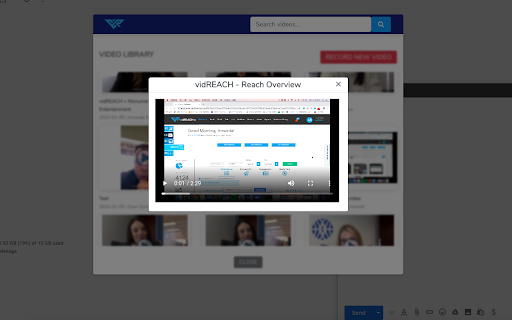
Télécharger le fichier CRX de l'extension vidREACH for Gmail
Téléchargez les fichiers d'extension vidREACH for Gmail au format crx, installez manuellement les extensions Chrome dans le navigateur ou partagez les fichiers crx avec des amis pour installer facilement les extensions Chrome.
Instructions d'Utilisation de l'Extension
                        Record and send video emails directly in Gmail. With just a few clicks you can send personalized video messages and track engagement.

Stand out in the inbox with video email and the power of vidREACH for Gmail.

With vidREACH for Gmail, you can easily create and send personalized videos that set you apart from the competition and make your cold leads a little warmer. vidREACH gives you the personal edge you need to make an impression and crush your goals.

It’s easy to get started:
●	Download the vidREACH for Gmail plugin from the Chrome Store
●	Log in to your vidREACH account
●	Record or upload a video and share it across any platform

At vidREACH, it’s our mission to make sure that using video as a communication tool is easy and hassle-free. We believe in the power of personalized video to change the way people communicate with each other.
vidREACH integrates seamlessly with tools you already use, like Gmail, Office 365, Salesforce, social media platforms, and more. You will benefit from helpful features like:

●	Real-time notifications for when someone opens your email or watches your video
●	Analytics to show you which videos are resonating with your audience
●	A video library that houses uploaded videos or videos recorded within the platform
●	The ability to record videos directly in Gmail for maximum productivity.

Watch your numbers skyrocket with vidREACH. Sending custom video campaigns not only helps you stand out from the crowd, but exponentially boosts your open and click rates.

Ready to stand out in the inbox with vidREACH? Get started today for free.
Informations de Base sur l'Extension
| Nom |  vidREACH for Gmail vidREACH for Gmail |
| ID | kdokcioofhoghcdigmiimacnghfogpkd |
| URL Officiel | https://chromewebstore.google.com/detail/vidreach-for-gmail/kdokcioofhoghcdigmiimacnghfogpkd |
| Description | Insert a vidREACH video into a message draft with just a couple of clicks |
| Taille du Fichier | 1.87 MB |
| Nombre d'Installations | 63 |
| Version Actuelle | 0.2.2 |
| Dernière Mise à Jour | 2023-03-27 |
| Date de Publication | 2020-03-09 |
| Développeur | https://vidreach.io |
| [email protected] | |
| Type de Paiement | free |
| Site Web de l'Extension | https://www.vidreach.io |
| URL de la Page de Politique de Confidentialité | https://vidreach.io/privacy |
| Langues Prises en Charge | en-US |
| manifest.json | |
{
    "update_url": "https:\/\/clients2.google.com\/service\/update2\/crx",
    "name": "vidREACH for Gmail",
    "description": "Insert a vidREACH video into a message draft with just a couple of clicks",
    "version": "0.2.2",
    "content_scripts": [
        {
            "matches": [
                "https:\/\/mail.google.com\/*",
                "https:\/\/inbox.google.com\/*"
            ],
            "all_frames": true,
            "js": [
                "bundle.js"
            ],
            "run_at": "document_end"
        }
    ],
    "background": {
        "service_worker": "background\/background.messaging.sw.js"
    },
    "permissions": [
        "scripting",
        "cookies"
    ],
    "action": {
        "default_title": "vidREACH for GMail",
        "default_icon": "vidGmail.png"
    },
    "host_permissions": [
        "https:\/\/mail.google.com\/",
        "https:\/\/*.hirenami.com\/*",
        "https:\/\/*.vidreach.io\/*",
        "https:\/\/hirenami-video.s3.amazonaws.com\/*",
        "https:\/\/play.google.com\/*"
    ],
    "manifest_version": 3,
    "web_accessible_resources": [
        {
            "resources": [
                "video.html",
                "VRlogo.png",
                "VRlogodark.png",
                "*.gif",
                "*.svg",
                "bootstrap.min.css",
                "bundle.js",
                "jquery.scoped.js",
                "pageWorld.js"
            ],
            "matches": [
                "https:\/\/mail.google.com\/*",
                "https:\/\/inbox.google.com\/*"
            ],
            "extension_ids": []
        }
    ],
    "icons": {
        "128": "vidGmail.png"
    }
} | |