«CLEVER QR Code» — Scan And Create
Creating and decrypting the QR-code of text and web pages. Immediate export of information at mobile phone.
Qu'est-ce que «CLEVER QR Code» — Scan And Create ?
«CLEVER QR Code» — Scan And Create est une extension Chrome développée par https://f.ua, et sa fonction principale est "Creating and decrypting the QR-code of text and web pages. Immediate export of information at mobile phone.".
Captures d'Écran de l'Extension
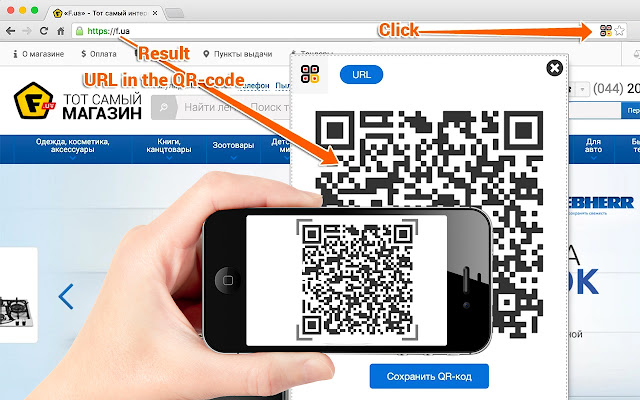


Télécharger le fichier CRX de l'extension «CLEVER QR Code» — Scan And Create
Téléchargez les fichiers d'extension «CLEVER QR Code» — Scan And Create au format crx, installez manuellement les extensions Chrome dans le navigateur ou partagez les fichiers crx avec des amis pour installer facilement les extensions Chrome.
Instructions d'Utilisation de l'Extension
                        Generate and decode QR-codes

1. QR-code from URL. Click on the icon of the extensions and get QR
2. Text on the page in QR-code. Select text, right-click and select in the context menu "Transform into QR-code".
3. How to make a QR-code from an image? Right-click on the image, select in the context menu "Decode/Encode".
4. Click "Generate" and generate a QR-code from your text
5. Decode another`s QR-code. Right-click on an image and select "Decode/Encode".
Informations de Base sur l'Extension
| Nom |  «CLEVER QR Code» — Scan And Create «CLEVER QR Code» — Scan And Create |
| ID | kmbejocmjefdpeapjgdfcacpphlgecbj |
| URL Officiel | https://chrome.google.com/webstore/detail/%C2%ABclever-qr-code%C2%BB-%E2%80%94-%D1%81%D0%BA%D0%B0%D0%BD%D0%B8%D1%80/kmbejocmjefdpeapjgdfcacpphlgecbj |
| Description | Creating and decrypting the QR-code of text and web pages. Immediate export of information at mobile phone. |
| Taille du Fichier | 162 KB |
| Nombre d'Installations | 603 |
| Version Actuelle | 0.31 |
| Dernière Mise à Jour | 2016-09-21 |
| Date de Publication | 2016-09-21 |
| Évaluation | 4.29/5 Total 17 Évaluations |
| Développeur | https://f.ua |
| Type de Paiement | free |
| URL de la Page de Politique de Confidentialité | http://plazma.tv/clever-fua-privacy-policy.html |
| Langues Prises en Charge | en,ru,uk |
| manifest.json | |
{
    "update_url": "https:\/\/clients2.google.com\/service\/update2\/crx",
    "manifest_version": 2,
    "name": "__MSG_application_title__",
    "description": "__MSG_application_description__",
    "version": "0.31",
    "default_locale": "ru",
    "page_action": {
        "default_icon": "img\/icon48.png",
        "default_title": "__MSG_page_action_default_title__"
    },
    "content_scripts": [
        {
            "matches": [
                "*:\/\/*\/*"
            ],
            "js": [
                "js\/vendor\/jquery\/jquery.js",
                "js\/vendor\/jquery.qrcode\/jquery.qrcode.js",
                "js\/vendor\/lazarsoft\/grid.js",
                "js\/vendor\/lazarsoft\/version.js",
                "js\/vendor\/lazarsoft\/detector.js",
                "js\/vendor\/lazarsoft\/formatinf.js",
                "js\/vendor\/lazarsoft\/errorlevel.js",
                "js\/vendor\/lazarsoft\/bitmat.js",
                "js\/vendor\/lazarsoft\/datablock.js",
                "js\/vendor\/lazarsoft\/bmparser.js",
                "js\/vendor\/lazarsoft\/datamask.js",
                "js\/vendor\/lazarsoft\/rsdecoder.js",
                "js\/vendor\/lazarsoft\/gf256poly.js",
                "js\/vendor\/lazarsoft\/gf256.js",
                "js\/vendor\/lazarsoft\/decoder.js",
                "js\/vendor\/lazarsoft\/qrcode.js",
                "js\/vendor\/lazarsoft\/findpat.js",
                "js\/vendor\/lazarsoft\/alignpat.js",
                "js\/vendor\/lazarsoft\/databr.js",
                "js\/common\/common.constant.js",
                "js\/common\/common.base-data.js",
                "js\/common\/decode-parse-formats\/bizcard.js",
                "js\/common\/decode-parse-formats\/mecard.js",
                "js\/common\/decode-parse-formats\/vcard.js",
                "js\/common\/common.parse-decode-text.js",
                "js\/content\/content.js",
                "js\/content\/content.context-menu.js"
            ],
            "css": [
                "css\/content.css"
            ]
        }
    ],
    "background": {
        "scripts": [
            "js\/vendor\/jquery\/jquery.js",
            "js\/common\/common.constant.js",
            "js\/background\/background.storage.js",
            "js\/background\/backbround.global-variables.js",
            "js\/common\/common.base-data.js",
            "js\/background\/background.js",
            "js\/background\/messages.js",
            "js\/background\/background.context-menu.js"
        ]
    },
    "icons": {
        "16": "img\/icon16.png",
        "128": "img\/icon128.png"
    },
    "permissions": [
        "http:\/\/*\/*",
        "https:\/\/*\/*",
        "storage",
        "tabs",
        "contextMenus",
        "geolocation",
        "cookies",
        "notifications",
        "downloads"
    ],
    "web_accessible_resources": [
        "img\/*.png",
        "css\/*.png"
    ]
} | |