Reader Mode Pro
A feature-packed distraction-free web reader with dyslexia support and research tools
Qu'est-ce que Reader Mode Pro ?
Reader Mode Pro est une extension Chrome développée par https://readermode.io, et sa fonction principale est "A feature-packed distraction-free web reader with dyslexia support and research tools".
Captures d'Écran de l'Extension
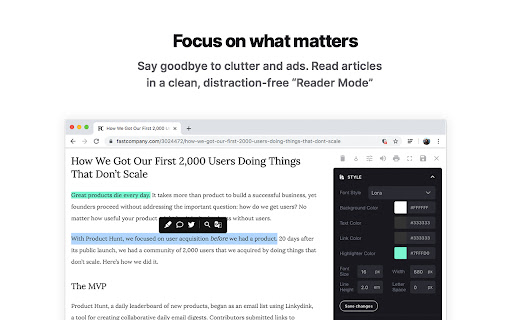


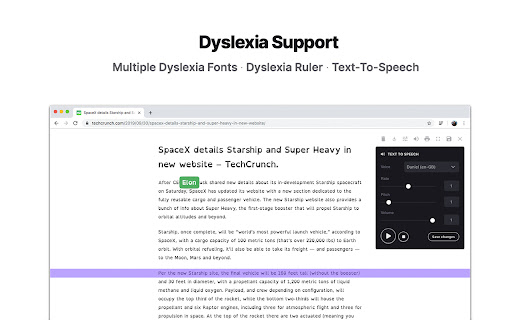
Télécharger le fichier CRX de l'extension Reader Mode Pro
Téléchargez les fichiers d'extension Reader Mode Pro au format crx, installez manuellement les extensions Chrome dans le navigateur ou partagez les fichiers crx avec des amis pour installer facilement les extensions Chrome.
Instructions d'Utilisation de l'Extension
                        Reader Mode is a feature-packed Chrome reading extension and web app that removes clutter, ads and distractions, while also includes dyslexia support, bookmarking, annotating, highlighting, text-to-speech and many other features all in one tool.

This is the PRO and paid version of the Reader Mode extension and requires a license to use it. You can buy yours at https://readermode.io

Features:
✔ Distraction-free and ad-free "Reader Mode"
✔ Deletion of unwanted elements
✔ Theme customization
✔ Custom theme
✔ Custom CSS
✔ Print pages
✔ Fullscreen mode
✔ Auto-run ability
✔ Save edited pages
✔ Share To Twitter
✔ Dyslexia Fonts
✔ Dyslexia Ruler
✔ Text To Speech
✔ Article Outline
✔ Text annotating and highlighting
✔ Notes List
✔ Auto-scroll functionality
✔ Dark Panel Mode
✔ Google Search
✔ Google Translate
✔ Remove footer option
✔ Cloud storage
✔ Share pages in Reader Mode format
✔ Read-it-later mode
✔ Full-text search
✔ Favourites
✔ Organization folders
✔ Tags for pages
✔ Sync styles

To see all the features and learn more, check out https://readermode.io

##### Changelog #####
Version 1.2.7 (11/11/2021)
- Upgraded to manifest v3

Version 1.2.6 (13/9/2020)
-Added Lexend fonts

Version 1.2.5 (22/4/2020)
-Fixed syntax error when there’s no author found

Version 1.2.4 (22/4/2020)
-Fixed links not working after deletion mode
-Set max-width for all elements to 100%

Version 1.2.3 (15/4/2020)
-Author is default to “Unknown author” if not found
-Show “Saved” notice if article is already saved
-Auto-saved page when highlighting
-Added pre tags styles for codes

Version 1.2.2 (19/3/2020)
-Fixed Toolbar css affected issue

Version 1.2.1
-Fixed empty Auto-run issue

Version 1.2.0
-Fixed outline li default style
-Removed default line-height css from default and app
-Removed inline css styles
-Removed Headings from settings
-Removed cr-saved-info and cd-footer default colors
-Removed updateTheme function
-Fixed highlighter color for Dark Theme issue
-Fixed Auto Scroll setting not saving issue
-Fixed  TTS Pitch not saving issue
-Removed “DId you know…” popup

Version 1.1.9
-Fixed font style options

Version 1.1.8
-Fixed color queries

Version 1.1.7
-Fixed Saved Panel button colors
-Renamed "Auto-run Domain Rules" to "Auto-run Rules"

Version 1.1.6
-Fixed background color & text color conflict issue
-Added Headings style setting
-Added Themes
-Fixed sans-serif font not saving issue
-Increased maximum Dyslexia Ruler height to 250px

Version 1.1.5
-Added indicator when the main menu is active
-Moved Custom CSS settings panel to the bottom
-Fixed auto height for options panel
-Fixed some font styles not saving issue
-Rearranged font options position

Version 1.1.4
-Rearranged main menu for better readability
-Used global address for Google Search
-Included li tag in text color changes

Version 1.1.3
-Added Saved/Removed Info Panel
-Allow Note panel to be resizable

Version 1.1.2
-Fixed Meta not saving issue

Version 1.1.1
- Removed Analytics

Version 1.1.0
- Updated description

Version 1.0.9
- Fixed reader’s width not-saving issue
- Fixed overflow text for meta info
- Added style for quotes content
- Fixed auto-run rules grammar mistakes
- Removed Helvetica Neue font
- Set default font as Arial
- Notes List is set to “Show” by default
Informations de Base sur l'Extension
| Nom |  Reader Mode Pro Reader Mode Pro |
| ID | koddbhkhginnhnfnhgldkampappgmmje |
| URL Officiel | https://chromewebstore.google.com/detail/reader-mode-pro/koddbhkhginnhnfnhgldkampappgmmje |
| Description | A feature-packed distraction-free web reader with dyslexia support and research tools |
| Taille du Fichier | 2.79 MB |
| Nombre d'Installations | 3,134 |
| Version Actuelle | 1.2.7 |
| Dernière Mise à Jour | 2022-11-14 |
| Date de Publication | 2020-04-22 |
| Évaluation | 4.42/5 Total 12 Évaluations |
| Développeur | https://readermode.io |
| [email protected] | |
| Type de Paiement | in_app |
| Site Web de l'Extension | https://readermode.io |
| URL de la Page d'Aide | https://airtable.com/shrJZYDwevtCoqck5 |
| URL de la Page de Politique de Confidentialité | https://readermode.io/privacy |
| Langues Prises en Charge | en |
| manifest.json | |
{
"update_url": "https:\/\/clients2.google.com\/service\/update2\/crx",
"manifest_version": 3,
"name": "Reader Mode Pro",
"short_name": "Reader Mode Pro",
"version": "1.2.7",
"description": "A feature-packed distraction-free web reader with dyslexia support and research tools",
"homepage_url": "https:\/\/readermode.io",
"icons": {
"16": "assets\/images\/icon16.png",
"48": "assets\/images\/icon48.png",
"128": "assets\/images\/icon128.png"
},
"permissions": [
"tabs",
"activeTab",
"contextMenus",
"storage",
"scripting"
],
"content_security_policy": {
"sandbox": "sandbox allow-scripts; 'unsafe-inline' 'self'"
},
"host_permissions": [
" | |