okdice
kdice tools
Qu'est-ce que okdice ?
okdice est une extension Chrome développée par muddylemon, et sa fonction principale est "kdice tools".
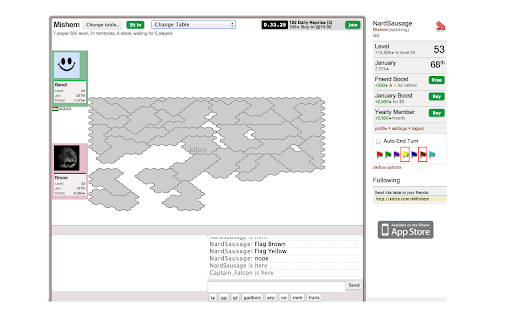
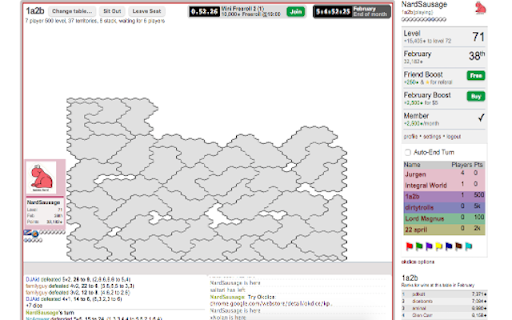
Captures d'Écran de l'Extension

Télécharger le fichier CRX de l'extension okdice
Téléchargez les fichiers d'extension okdice au format crx, installez manuellement les extensions Chrome dans le navigateur ou partagez les fichiers crx avec des amis pour installer facilement les extensions Chrome.
Instructions d'Utilisation de l'Extension
                        Okdice is a set of tools for players of the online strategy game kDice. Okdice includes features such as flagging buttons, chat buttons, an auto-end-turn button, an improved table selector and several theme improvements.

These are the currently implemented features:

Chat Buttons
    Configurable buttons that "say" common phrases like gg, gt, thank you, etc
    Choose your own phrases on the options page

Links are *clickable* in chat
    The links open in a new tab
    Long urls are truncated to avoid breaking the chat box

Table Selector
    Change tables with a single click
    Optionally, sit in to the new table immediately upon arriving at the table

Flag Buttons
    Buttons that looks like flags of the appropriate colors
    Clicking it says "Flag [color]"
    Flag is highlighted to remind you who you flagged

Player Buttons
    Flag and Mute a player with a click
    Visible when you mouseover a player

Configurable Theming
    Optionally hide the header of the page to give more room for the board
    Color the players info boxes
    Embiggening of the chat text

These are the features that are ready for the next release:

Local storage of user accounts
    Switch accounts with the click of a button

Chat History
    Save and scroll through your chat history

Chat Bubbles
    have chat statements appear in bubbles over the speakers before fading out

Keyboard shortcuts
    Focus chat on keyboard shortcut (c?)
    End turn
    Flag (1,2,3... )

Highlight your turn in tab
    Favicon alert
    Tab title changes
Informations de Base sur l'Extension
| Nom |  okdice okdice |
| ID | kpneanfianllkhblmddglckbanoifamb |
| URL Officiel | https://chromewebstore.google.com/detail/okdice/kpneanfianllkhblmddglckbanoifamb |
| Description | kdice tools |
| Taille du Fichier | 117 KB |
| Nombre d'Installations | 42 |
| Version Actuelle | 0.0.28 |
| Dernière Mise à Jour | 2016-03-18 |
| Date de Publication | 2016-03-17 |
| Évaluation | 5.00/5 Total 1 Évaluations |
| Développeur | muddylemon |
| [email protected] | |
| Type de Paiement | free |
| Site Web de l'Extension | http://muddylemon.github.io/okdice |
| URL de la Page d'Aide | https://github.com/muddylemon/okdice/issues |
| Langues Prises en Charge | en |
| manifest.json | |
{
    "update_url": "https:\/\/clients2.google.com\/service\/update2\/crx",
    "name": "__MSG_appName__",
    "permissions": [
        "storage"
    ],
    "version": "0.0.28",
    "manifest_version": 2,
    "description": "__MSG_appDescription__",
    "icons": {
        "16": "images\/icon-16.png",
        "128": "images\/icon-128.png"
    },
    "default_locale": "en",
    "background": {
        "scripts": [
            "scripts\/background.js"
        ]
    },
    "web_accessible_resources": [
        "options.html"
    ],
    "options_page": "options.html",
    "content_scripts": [
        {
            "matches": [
                "http:\/\/kdice.com\/*",
                "https:\/\/kdice.com\/*",
                "http:\/\/*.kdice.com\/*",
                "https:\/\/*.kdice.com\/*"
            ],
            "css": [
                "styles\/main.css"
            ],
            "js": [
                "bower_components\/jquery\/dist\/jquery.js",
                "bower_components\/underscore\/underscore.js",
                "bower_components\/backbone\/backbone.js",
                "bower_components\/Autolinker.js\/dist\/Autolinker.js",
                "bower_components\/bacon\/dist\/Bacon.js",
                "scripts\/okdice.js",
                "scripts\/contentscript.js"
            ],
            "run_at": "document_end",
            "all_frames": false
        }
    ]
} | |