Journal access through HKU library
A simple chrome extension that let you access journal through HKU library resources (HKU ID needed).
Qu'est-ce que Journal access through HKU library ?
Journal access through HKU library est une extension Chrome développée par junyichen, et sa fonction principale est "A simple chrome extension that let you access journal through HKU library resources (HKU ID needed).".
Captures d'Écran de l'Extension


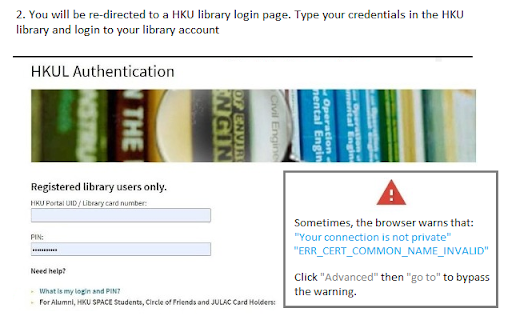
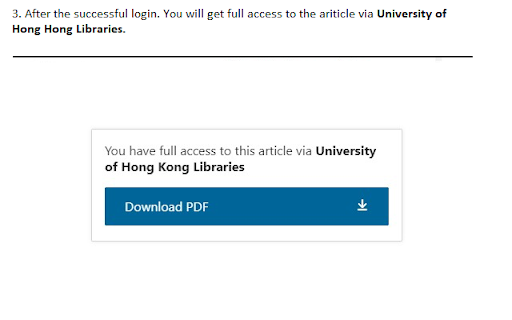
Télécharger le fichier CRX de l'extension Journal access through HKU library
Téléchargez les fichiers d'extension Journal access through HKU library au format crx, installez manuellement les extensions Chrome dans le navigateur ou partagez les fichiers crx avec des amis pour installer facilement les extensions Chrome.
Instructions d'Utilisation de l'Extension
An extension that redirect you from the journal page to the HKU library portal. You need to login the HKU library. The extension will automatically parse the current URL of the current paper page to the HKU library address. Informations de Base sur l'Extension
| Nom |  Journal access through HKU library Journal access through HKU library |
| ID | lcnnijjgcjfpcfjgnahbcpapbmkiceld |
| URL Officiel | https://chromewebstore.google.com/detail/journal-access-through-hk/lcnnijjgcjfpcfjgnahbcpapbmkiceld |
| Description | A simple chrome extension that let you access journal through HKU library resources (HKU ID needed). |
| Taille du Fichier | 47.64 KB |
| Nombre d'Installations | 135 |
| Version Actuelle | 0.0.1 |
| Dernière Mise à Jour | 2021-09-02 |
| Date de Publication | 2021-08-04 |
| Développeur | junyichen |
| [email protected] | |
| Type de Paiement | free |
| Langues Prises en Charge | en-US |
| manifest.json | |
{
    "update_url": "https:\/\/clients2.google.com\/service\/update2\/crx",
    "manifest_version": 2,
    "name": "Journal access through HKU library",
    "short_name": "HKULibJ",
    "description": "A simple chrome extension that let you access journal through HKU library resources (HKU ID needed).",
    "version": "0.0.1",
    "minimum_chrome_version": "38",
    "permissions": [
        "contextMenus",
        "tabs"
    ],
    "icons": {
        "16": "assets\/icon16.png",
        "128": "assets\/icon128.png"
    },
    "background": {
        "page": "background.html"
    }
} | |