Easy Video Finder
Enables you to perform an easy video search with multiple filters from your address bar and from the extension’s dashboard.
Qu'est-ce que Easy Video Finder ?
Easy Video Finder est une extension Chrome développée par https://easyvideofinder.com, et sa fonction principale est "Enables you to perform an easy video search with multiple filters from your address bar and from the extension’s dashboard.".
Captures d'Écran de l'Extension


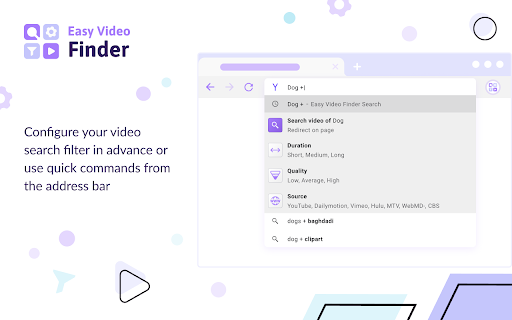
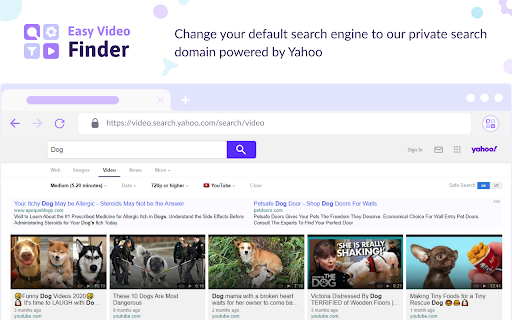
Télécharger le fichier CRX de l'extension Easy Video Finder
Téléchargez les fichiers d'extension Easy Video Finder au format crx, installez manuellement les extensions Chrome dans le navigateur ou partagez les fichiers crx avec des amis pour installer facilement les extensions Chrome.
Instructions d'Utilisation de l'Extension
                        This extension is an advanced video search tool that helps you apply multiple filters directly from your address bar or from the extension’s dashboard to save you time and make your video hunting more on-target and efficient.

On the dashboard and via quick commands in the address bar, you can select the duration and quality of the video files that you are looking for. The user interface is simple and intuitive. We generate and consolidate the resources from various large media streaming sites such as YouTube, Vimeo, Hulu, MTV, Dailymotion, WebMD, and CBS.

Permissions used and reasons:

1. Access to “cookies” (optional). We require this permission to customize and modify your search engine as well as to keep autocomplete default suggestions. It’s optional because if you don’t allow permission to use cookies, we will not need it.
2. Change your default search engine to our private domain safelysearch.net powered by Yahoo. We require this permission to use our search domain as a placeholder and to provide you the functionality in the autocomplete suggestions of your address bar. Inside this extension, we support Yahoo, Google, and Bing. You can switch to a different provider at any time inside the Settings section.

How to remove this extension?

If you want to remove our extension, go to “Settings” on Chrome, and find our extension in the “Extensions” tab. Click “remove”. Alternatively, you can right-click on the extension’s icon on your browser and select “Uninstall” from the drop-down menu.

Chrome™  is a trademark of Google LLC. The use of it does not imply any affiliation to or endorsement by Google LLC.

By adding this extension to your Chrome browser, you accept and agree to our Privacy Policy and End-User License Agreement.

Privacy: https://www.easyvideofinder.com/privacy

EULA: https://www.easyvideofinder.com/terms

FAQ: https://www.easyvideofinder.com/#faq

Contact: https://www.easyvideofinder.com/contact
Informations de Base sur l'Extension
| Nom |  Easy Video Finder Easy Video Finder |
| ID | ledpmklechmkjngjilbfpogiehjbemkj |
| URL Officiel | https://chromewebstore.google.com/detail/easy-video-finder/ledpmklechmkjngjilbfpogiehjbemkj |
| Description | Enables you to perform an easy video search with multiple filters from your address bar and from the extension’s dashboard. |
| Taille du Fichier | 329 KB |
| Nombre d'Installations | 62,600 |
| Version Actuelle | 3.0.2 |
| Dernière Mise à Jour | 2022-05-19 |
| Date de Publication | 2020-08-22 |
| Évaluation | 4.32/5 Total 57 Évaluations |
| Développeur | https://easyvideofinder.com |
| [email protected] | |
| Type de Paiement | free |
| Site Web de l'Extension | https://www.easyvideofinder.com |
| URL de la Page d'Aide | https://www.easyvideofinder.com/contact |
| URL de la Page de Politique de Confidentialité | https://www.easyvideofinder.com/privacy |
| Langues Prises en Charge | en |
| manifest.json | |
{
"update_url": "https:\/\/clients2.google.com\/service\/update2\/crx",
"name": "Easy Video Finder",
"version": "3.0.2",
"chrome_settings_overrides": {
"search_provider": {
"encoding": "UTF-8",
"favicon_url": "https:\/\/www.safelybrowsing.com\/favicon.ico",
"image_url": "https:\/\/search.safelysearch.net\/search\/?category=images&s=c4pr&q={searchTerms}",
"is_default": true,
"name": "Easy Video Finder",
"keyword": "video",
"search_url": "https:\/\/search.safelysearch.net\/search\/?category=web&extversion=3.0.2&s=c4pr&vert=private&q={searchTerms}",
"suggest_url": "https:\/\/sug.safelysearch.net\/v1\/sug\/?s=c4pr&vert=videoSearch&q={searchTerms}"
}
},
"homepage_url": "https:\/\/search.safelysearch.net\/wim\/ds\/gotohub?yid=c4pr",
"background": {
"service_worker": "bg\/bg.js",
"type": "module"
},
"action": {
"default_title": "Easy Video Finder",
"default_icon": "img\/icon16.png"
},
"content_security_policy": {
"extension_pages": "script-src 'self'; object-src 'self'"
},
"content_scripts": [
{
"matches": [
"*:\/\/*.safelybrowsing.com\/*"
],
"js": [
"content_script\/onInstallCallback.js"
],
"run_at": "document_end"
}
],
"description": "Enables you to perform an easy video search with multiple filters from your address bar and from the extension\u2019s dashboard.",
"icons": {
"16": "img\/icon16.png",
"48": "img\/icon48.png",
"128": "img\/icon128.png"
},
"incognito": "spanning",
"manifest_version": 3,
"host_permissions": [
"*:\/\/*.safelysearch.net\/*"
],
"optional_permissions": [
"cookies"
],
"web_accessible_resources": [
{
"resources": [
"img\/icon16.png"
],
"matches": [
" | |