Nasa Space HD New Tab Popular Theme
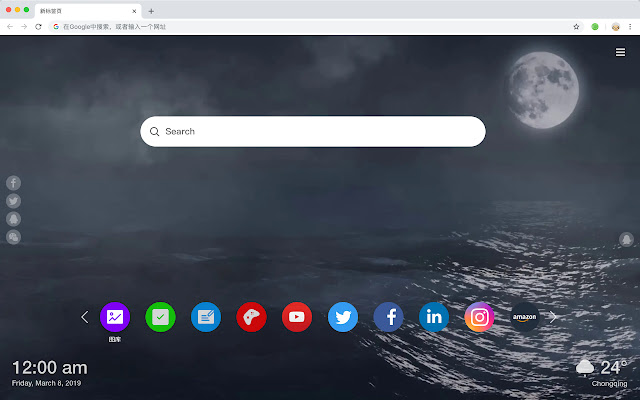
Every time you open a new tab, you will get different HD wallpapers from Nasa Space. This new theme includes clock and more.
Qu'est-ce que Nasa Space HD New Tab Popular Theme ?
Nasa Space HD New Tab Popular Theme est une extension Chrome développée par http://mytab.me, et sa fonction principale est "Every time you open a new tab, you will get different HD wallpapers from Nasa Space. This new theme includes clock and more.".
Captures d'Écran de l'Extension


Télécharger le fichier CRX de l'extension Nasa Space HD New Tab Popular Theme
Téléchargez les fichiers d'extension Nasa Space HD New Tab Popular Theme au format crx, installez manuellement les extensions Chrome dans le navigateur ou partagez les fichiers crx avec des amis pour installer facilement les extensions Chrome.
Instructions d'Utilisation de l'Extension
                        Here's a list of other features you'll get:
 - To-do list
 - Set your favorite wallpapers
 - Discover new hot spots
 - Bookmarks
 - Social network notifications
 - High quality wallpaper for each new label
 - Clock showing date and time
 - Weather widget
 - Open to search
Informations de Base sur l'Extension
| Nom |  Nasa Space HD New Tab Popular Theme Nasa Space HD New Tab Popular Theme |
| ID | legdpidiifgbfgjcfmaoncbogafijfjn |
| URL Officiel | https://chrome.google.com/webstore/detail/nasa-space-hd-new-tab-pop/legdpidiifgbfgjcfmaoncbogafijfjn |
| Description | Every time you open a new tab, you will get different HD wallpapers from Nasa Space. This new theme includes clock and more. |
| Taille du Fichier | 36.65 KB |
| Nombre d'Installations | 54 |
| Version Actuelle | 1.1.1.0 |
| Dernière Mise à Jour | 2019-06-23 |
| Date de Publication | 2019-06-23 |
| Développeur | http://mytab.me |
| Type de Paiement | free |
| Langues Prises en Charge | en,zh-CN,zh-TW |
| manifest.json | |
{
    "name": "__MSG_ext_name__",
    "manifest_version": 2,
    "description": "__MSG_ext_desc__",
    "browser_action": {
        "default_icon": {
            "48": "icons\/48.png"
        },
        "default_title": "__MSG_ext_name__"
    },
    "chrome_url_overrides": {
        "newtab": "pages\/newtab\/index.html"
    },
    "background": {
        "scripts": [
            "app.js",
            "pages\/background\/index.js"
        ],
        "persistent": false
    },
    "default_locale": "en",
    "icons": {
        "48": "icons\/48.png",
        "128": "icons\/128.png"
    },
    "minimum_chrome_version": "57",
    "offline_enabled": true,
    "update_url": "https:\/\/clients2.google.com\/service\/update2\/crx",
    "version": "1.1.1.0"
} | |