Goose
Inspect Google Analytics payloads and highlight clickable elements
Qu'est-ce que Goose ?
Goose est une extension Chrome développée par neporozhniy, et sa fonction principale est "Inspect Google Analytics payloads and highlight clickable elements".
Captures d'Écran de l'Extension


Télécharger le fichier CRX de l'extension Goose
Téléchargez les fichiers d'extension Goose au format crx, installez manuellement les extensions Chrome dans le navigateur ou partagez les fichiers crx avec des amis pour installer facilement les extensions Chrome.
Instructions d'Utilisation de l'Extension
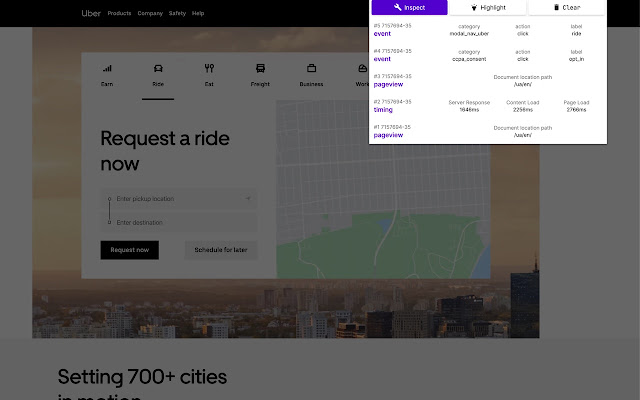
                        Logs payload data to popup.

In addition, it provides highlighting DOM nodes:

1. Add data-analytics-click="event_category|event_action|event_label" attribute to tags, which on click send event to google analytics
2. Add JS code to handle clicks on these tags, eg: https://github.com/bravecow/goose/blob/master/click.js
3. Click Highlight button
Informations de Base sur l'Extension
| Nom |  Goose Goose |
| ID | ljbmomkmbpbfcplcakpknmllhkcbkecc |
| URL Officiel | https://chrome.google.com/webstore/detail/goose/ljbmomkmbpbfcplcakpknmllhkcbkecc |
| Description | Inspect Google Analytics payloads and highlight clickable elements |
| Taille du Fichier | 52.62 KB |
| Nombre d'Installations | 132 |
| Version Actuelle | 1.1 |
| Dernière Mise à Jour | 2020-04-05 |
| Date de Publication | 2020-04-05 |
| Évaluation | 5.00/5 Total 1 Évaluations |
| Développeur | neporozhniy |
| Type de Paiement | free |
| Site Web de l'Extension | https://github.com/bravecow/goose |
| Langues Prises en Charge | en-US |
| manifest.json | |
{
    "update_url": "https:\/\/clients2.google.com\/service\/update2\/crx",
    "name": "Goose",
    "version": "1.1",
    "description": "Inspect Google Analytics payloads and highlight clickable elements",
    "permissions": [
        "tabs",
        "activeTab",
        "webRequest",
        "*:\/\/www.google-analytics.com\/",
        "*:\/\/stats.g.doubleclick.net\/"
    ],
    "background": {
        "scripts": [
            "background.js"
        ],
        "persistent": true
    },
    "browser_action": {
        "default_popup": "popup.html",
        "default_icon": {
            "32": "icon32.png"
        }
    },
    "icons": {
        "16": "icon16.png",
        "48": "icon48.png",
        "128": "icon128.png"
    },
    "manifest_version": 2
} | |