Note Friendly
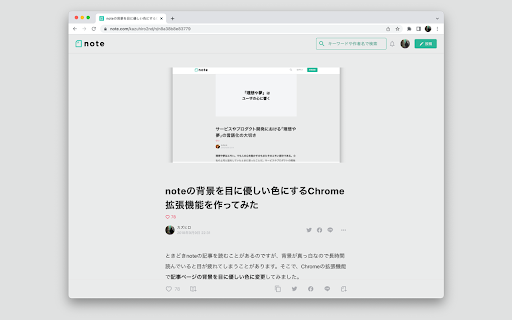
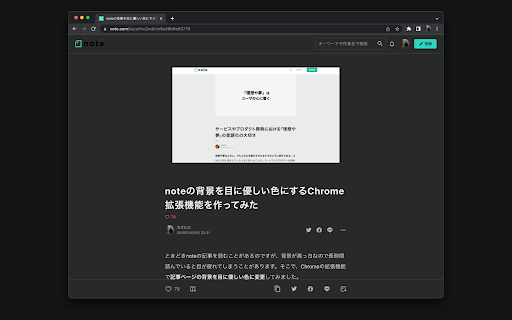
Changes the background of Note to the more eye-friendly colors.
Qu'est-ce que Note Friendly ?
Note Friendly est une extension Chrome développée par Kazuhiro, et sa fonction principale est "Changes the background of Note to the more eye-friendly colors.".
Captures d'Écran de l'Extension

Télécharger le fichier CRX de l'extension Note Friendly
Téléchargez les fichiers d'extension Note Friendly au format crx, installez manuellement les extensions Chrome dans le navigateur ou partagez les fichiers crx avec des amis pour installer facilement les extensions Chrome.
Instructions d'Utilisation de l'Extension
                        背景色を真っ白からグレーに変更することで、長時間記事を読んでも疲れにくくします。また、背景色をグレーにするも最適なコントラスト比を維持することで、色覚に問題があっても読みやすさを損ねないようにしています。

さらに、ダークモードにも対応しています。OSの外観モードがダークに設定されているとき、背景は黒く、文字は白くなります。暗い環境でも快適に読むことができます。

最新の更新情報 — バージョン3.1、2023年5月
noteの仕様変更により背景色が変更されなくなったため、正常に背景色が変更されるよう対応しました。

過去の更新情報は https://github.com/k-miyata/note-friendly/releases でご覧いただけます。

注意事項:この拡張機能はnoteが公式に提供しているものではありません。この拡張機能についてnoteへ問い合わせることはご遠慮ください。
Informations de Base sur l'Extension
| Nom |  Note Friendly Note Friendly |
| ID | lmfhfgllepkjlgilfimmibkkphaafgnk |
| URL Officiel | https://chromewebstore.google.com/detail/note-friendly/lmfhfgllepkjlgilfimmibkkphaafgnk |
| Description | Changes the background of Note to the more eye-friendly colors. |
| Taille du Fichier | 6.85 KB |
| Nombre d'Installations | 318 |
| Version Actuelle | 3.1 |
| Dernière Mise à Jour | 2023-05-04 |
| Date de Publication | 2019-04-20 |
| Évaluation | 4.00/5 Total 2 Évaluations |
| Développeur | Kazuhiro |
| [email protected] | |
| Type de Paiement | free |
| Site Web de l'Extension | https://github.com/k-miyata/note-friendly |
| URL de la Page d'Aide | https://github.com/k-miyata/note-friendly/issues |
| Langues Prises en Charge | en,ja |
| manifest.json | |
{
    "update_url": "https:\/\/clients2.google.com\/service\/update2\/crx",
    "manifest_version": 3,
    "name": "__MSG_extension_name__",
    "description": "__MSG_extension_description__",
    "version": "3.1",
    "icons": {
        "128": "icon_128.png"
    },
    "default_locale": "en",
    "content_scripts": [
        {
            "matches": [
                "https:\/\/*\/*"
            ],
            "css": [
                "main.css"
            ],
            "js": [
                "main.js"
            ]
        }
    ]
} | |