Lock it
Extension allows you to lock tabs based on address. If you lock a website you'll be asked for prompt on close.
Qu'est-ce que Lock it ?
Lock it est une extension Chrome développée par Tigran Sargsyan, et sa fonction principale est "Extension allows you to lock tabs based on address. If you lock a website you'll be asked for prompt on close.".
Captures d'Écran de l'Extension
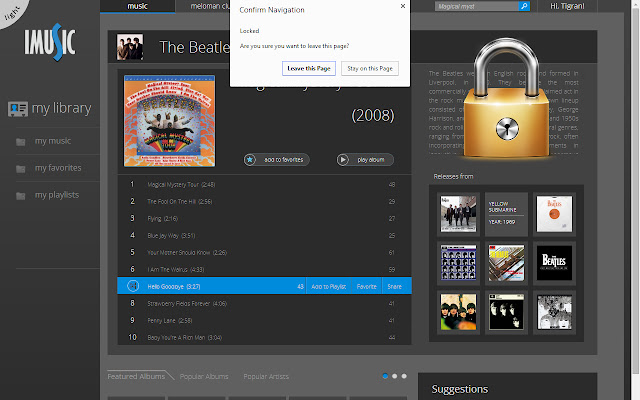
Télécharger le fichier CRX de l'extension Lock it
Téléchargez les fichiers d'extension Lock it au format crx, installez manuellement les extensions Chrome dans le navigateur ou partagez les fichiers crx avec des amis pour installer facilement les extensions Chrome.
Instructions d'Utilisation de l'Extension
Update: Added deadlock feature, allows you to have your tabs reopened even if you close them after warning. Selecting this option is not recommended. Deadlock can be found in Lock it extension options. Informations de Base sur l'Extension
| Nom |  Lock it Lock it |
| ID | magjmoeipkknhmpcojpeomlfgaofhfho |
| URL Officiel | https://chrome.google.com/webstore/detail/lock-it/magjmoeipkknhmpcojpeomlfgaofhfho |
| Description | Extension allows you to lock tabs based on address. If you lock a website you'll be asked for prompt on close. |
| Taille du Fichier | 118 KB |
| Nombre d'Installations | 9,000 |
| Version Actuelle | 0.3 |
| Dernière Mise à Jour | 2014-10-08 |
| Date de Publication | 2014-10-08 |
| Évaluation | 3.30/5 Total 103 Évaluations |
| Développeur | Tigran Sargsyan |
| Type de Paiement | free |
| Langues Prises en Charge | en |
| manifest.json | |
{
    "update_url": "https:\/\/clients2.google.com\/service\/update2\/crx",
    "background": {
        "scripts": [
            "background.js"
        ]
    },
    "content_scripts": [
        {
            "js": [
                "content.js"
            ],
            "matches": [
                "http:\/\/*\/*",
                "https:\/\/*\/*"
            ]
        }
    ],
    "description": "Extension allows you to lock tabs based on address. If you lock a website you'll be asked for prompt on close.",
    "icons": {
        "256": "icon_256.png",
        "128": "icon_128.png",
        "16": "icon_16.png",
        "48": "icon_48.png"
    },
    "manifest_version": 2,
    "name": "Lock it",
    "page_action": {
        "default_icon": "unlocked_19.png",
        "default_title": "Unlocked"
    },
    "permissions": [
        "storage",
        "tabs",
        "management",
        "http:\/\/*\/*",
        "https:\/\/*\/*"
    ],
    "options_page": "options.html",
    "version": "0.3"
} | |