Laziest Load
Load only the active tab when booting up an old session of Chrome.
Qu'est-ce que Laziest Load ?
Laziest Load est une extension Chrome développée par hwangas, et sa fonction principale est "Load only the active tab when booting up an old session of Chrome.".
Captures d'Écran de l'Extension
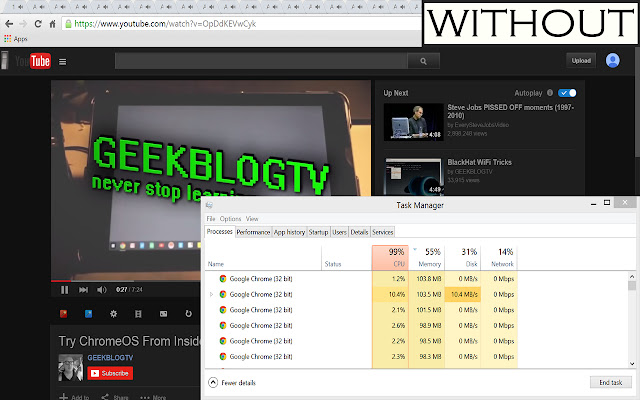

Télécharger le fichier CRX de l'extension Laziest Load
Téléchargez les fichiers d'extension Laziest Load au format crx, installez manuellement les extensions Chrome dans le navigateur ou partagez les fichiers crx avec des amis pour installer facilement les extensions Chrome.
Instructions d'Utilisation de l'Extension
                        Chrome by default upon restart loads every tab that is currently open, which takes much more memory and time required than necessary. This extension allows only the tab currently selected to be loaded at restart, making Chrome load up much faster.

This extension does not require any actions in part by the user to work.

VERSION 1.1 CHANGES
 - Tabs load faster when switched to.

INITIAL USE: please restart your Chrome browser in order to have the extension work properly.

To view the source, go to https://github.com/hwangas/lazyload
Informations de Base sur l'Extension
| Nom |  Laziest Load Laziest Load |
| ID | mgmkfbapiafkaebchhbghgffkfcmolhb |
| URL Officiel | https://chrome.google.com/webstore/detail/laziest-load/mgmkfbapiafkaebchhbghgffkfcmolhb |
| Description | Load only the active tab when booting up an old session of Chrome. |
| Taille du Fichier | 33.34 KB |
| Nombre d'Installations | 346 |
| Version Actuelle | 1.1 |
| Dernière Mise à Jour | 2015-06-24 |
| Date de Publication | 2015-06-23 |
| Évaluation | 4.55/5 Total 11 Évaluations |
| Développeur | hwangas |
| Type de Paiement | free |
| Site Web de l'Extension | https://github.com/hwangas/lazyload |
| Langues Prises en Charge | en-US |
| manifest.json | |
{
    "update_url": "https:\/\/clients2.google.com\/service\/update2\/crx",
    "manifest_version": 2,
    "name": "Laziest Load",
    "description": "Load only the active tab when booting up an old session of Chrome.",
    "version": "1.1",
    "author": "Anna Hwang",
    "icons": {
        "16": "16_laziest_load.png",
        "48": "48_laziest_load.png",
        "128": "128_laziest_load.png"
    },
    "background": {
        "persistent": true,
        "scripts": [
            "lazy.js"
        ]
    },
    "permissions": [
        "tabs",
        "webRequest",
        "webRequestBlocking",
        "http:\/\/*\/*",
        "https:\/\/*\/*",
        "https:\/\/ajax.googleapis.com\/"
    ]
} | |