Brick Out Game
Brick Out is a HTML5 Arcade Game - Destroy all the bricks and collect any falling power-ups to move to the next level.
Qu'est-ce que Brick Out Game ?
Brick Out Game est une extension Chrome développée par https://retrobowl.me, et sa fonction principale est "Brick Out is a HTML5 Arcade Game - Destroy all the bricks and collect any falling power-ups to move to the next level.".
Captures d'Écran de l'Extension

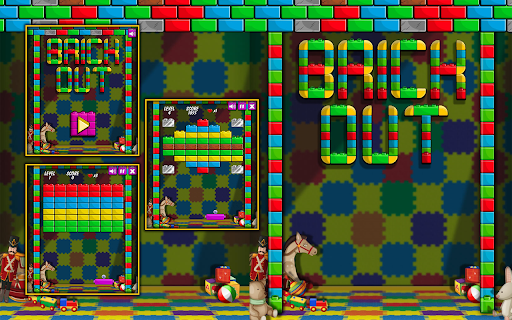
Télécharger le fichier CRX de l'extension Brick Out Game
Téléchargez les fichiers d'extension Brick Out Game au format crx, installez manuellement les extensions Chrome dans le navigateur ou partagez les fichiers crx avec des amis pour installer facilement les extensions Chrome.
Instructions d'Utilisation de l'Extension
                        INTRODUCTION
Play Brick Out on your Google Chrome Browser with our simple & lightweight extension - No Internet required, no ADS, and 100% Free!

HOW TO INSTALL?
1. Click "Add to Chrome" to install the extension
2. Pin the Brick Out extension icon to the Chrome toolbar
3. Click the Brick Out icon on the Chrome toolbar, the Brick Out popup will open.
That's all you need to do! Have fun!

HOW TO PLAY?
See on the game

CONTACT
Please feel free to contact us at: https://www.w3technic.com/contact

PRIVACY POLICY
Read at: https://www.w3technic.com/privacy-policy

USER'S REVIEWS
....

WHAT'S NEW?
v1.0.0
- First release
Informations de Base sur l'Extension
| Nom |  Brick Out Game Brick Out Game |
| ID | oagmhjncdmfpbhgdfpigfgdfmphkdanc |
| URL Officiel | https://chromewebstore.google.com/detail/brick-out-game/oagmhjncdmfpbhgdfpigfgdfmphkdanc |
| Description | Brick Out is a HTML5 Arcade Game - Destroy all the bricks and collect any falling power-ups to move to the next level. |
| Taille du Fichier | 2.45 MB |
| Nombre d'Installations | 1,326 |
| Version Actuelle | 1.0.0 |
| Dernière Mise à Jour | 2023-11-23 |
| Date de Publication | 2022-02-24 |
| Évaluation | 5.00/5 Total 5 Évaluations |
| Développeur | https://retrobowl.me |
| [email protected] | |
| Type de Paiement | free |
| Site Web de l'Extension | https://retrobowl.me/ |
| URL de la Page d'Aide | https://retrobowl.me/contact |
| URL de la Page de Politique de Confidentialité | https://retrobowl.me/privacy-policy |
| Langues Prises en Charge | en |
| manifest.json | |
{
    "update_url": "https:\/\/clients2.google.com\/service\/update2\/crx",
    "manifest_version": 3,
    "name": "__MSG_AppName__",
    "version": "1.0.0",
    "version_name": "1.0.0",
    "action": {
        "default_icon": {
            "16": "img\/16x16.png",
            "48": "img\/48x48.png",
            "128": "img\/128x128.png",
            "256": "img\/256x256.png"
        },
        "default_title": "Click to open the popup",
        "default_popup": "index.html?mode=popup"
    },
    "background": {
        "service_worker": "update.js"
    },
    "offline_enabled": true,
    "default_locale": "en",
    "description": "__MSG_AppDesc__",
    "icons": {
        "16": "img\/16x16.png",
        "48": "img\/48x48.png",
        "128": "img\/128x128.png",
        "256": "img\/256x256.png"
    },
    "options_page": "index.html",
    "homepage_url": "https:\/\/w3technic.com\/game"
} | |