Article Analyst
Helps you make sense of what you read online.
Qu'est-ce que Article Analyst ?
Article Analyst est une extension Chrome développée par Matt Youell, et sa fonction principale est "Helps you make sense of what you read online.".
Captures d'Écran de l'Extension
Télécharger le fichier CRX de l'extension Article Analyst
Téléchargez les fichiers d'extension Article Analyst au format crx, installez manuellement les extensions Chrome dans le navigateur ou partagez les fichiers crx avec des amis pour installer facilement les extensions Chrome.
Instructions d'Utilisation de l'Extension
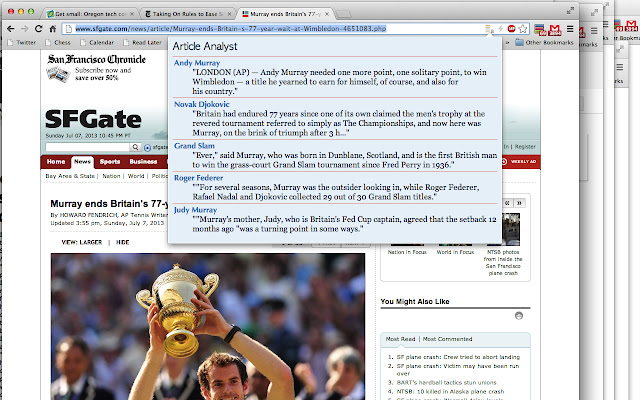
                        If you've ever lost track of who a person was while reading a news story, you'll want Article Analyst in your browser. Try it!

NEW version!

* Simple, clean design. Easy to understand and use.

* Hand-coded support for some of the most popular US news sites including:

New York Times
USA Today
The Guardian (US & UK)
Washington Post
Bloomberg
Wall Street Journal
LA Times
New York Post
Chicago Sun-Times
NY Daily News
SF Gate / San Francisco Chronicle
Christian Science Monitor
San Jose Mercury News
Vancouver Sun
Sacramento Bee
Seattle Times
Oregonian


Have you ever lost track of who a person was in a news story or blog post? Perhaps someone was mentioned earlier in the article but you're a screen or two past that point. You see a person quoted but don't know how they fit into the story. This simple extension solves that problem.

Online news follows the same traditional news format that newspapers have used for over 200 years. It's easy to lose track of the details of who and what you're reading about when you read content online.

Make sense of what you read online. Identify the most important topics in any article you read and reference those topics quickly and easily. Article Analyst works with all sorts of online written content, including news articles and blog posts.

It's easy to use and the analysis is completely automatic. If the software detects an article and can identify important topics, an icon will appear in the browser bar. The icon looks like a printed page that has been highlighted. To see the report for a given article, just click on the icon. Each important topic will be listed. Click on any topic to search Google for more information.

Article Analyst is new and still under development. Feedback is appreciated!
Informations de Base sur l'Extension
| Nom |  Article Analyst Article Analyst |
| ID | ochdgfcjleejnijggkjghkdmledepjdd |
| URL Officiel | https://chrome.google.com/webstore/detail/article-analyst/ochdgfcjleejnijggkjghkdmledepjdd |
| Description | Helps you make sense of what you read online. |
| Taille du Fichier | 199 KB |
| Nombre d'Installations | 224 |
| Version Actuelle | 1.0.1.0 |
| Dernière Mise à Jour | 2013-09-10 |
| Date de Publication | 2013-09-10 |
| Évaluation | 5.00/5 Total 2 Évaluations |
| Développeur | Matt Youell |
| Type de Paiement | free |
| Langues Prises en Charge | en-US |
| manifest.json | |
{
    "update_url": "https:\/\/clients2.google.com\/service\/update2\/crx",
    "manifest_version": 2,
    "name": "Article Analyst",
    "description": "Helps you make sense of what you read online.",
    "version": "1.0.1.0",
    "minimum_chrome_version": "22",
    "icons": {
        "16": "icons\/logo_16x16.png",
        "48": "icons\/logo_48x48.png",
        "128": "icons\/logo_128x128.png"
    },
    "permissions": [
        "tabs",
        "contextMenus"
    ],
    "web_accessible_resources": [
        "icons\/logo_16x16.png"
    ],
    "page_action": {
        "default_icon": "icons\/logo_16x16.png",
        "default_popup": "popup.html",
        "default_title": "Article Analyst"
    },
    "content_scripts": [
        {
            "matches": [
                "http:\/\/*\/*",
                "https:\/\/*\/*",
                "file:\/\/\/*"
            ],
            "js": [
                "require.js",
                "jquery.js",
                "underscore-min.js",
                "stopwords.js",
                "aalib.js",
                "aa.js"
            ]
        }
    ],
    "background": {
        "scripts": [
            "jquery.js",
            "background.js"
        ]
    }
} | |