Multiple File Download
This extension enables the user to select all the documents present in the web page for download.
Qu'est-ce que Multiple File Download ?
Multiple File Download est une extension Chrome développée par prabhushan, et sa fonction principale est "This extension enables the user to select all the documents present in the web page for download.".
Captures d'Écran de l'Extension

Télécharger le fichier CRX de l'extension Multiple File Download
Téléchargez les fichiers d'extension Multiple File Download au format crx, installez manuellement les extensions Chrome dans le navigateur ou partagez les fichiers crx avec des amis pour installer facilement les extensions Chrome.
Instructions d'Utilisation de l'Extension
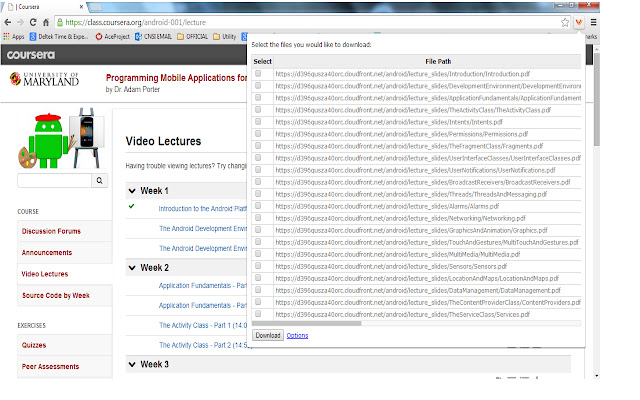
                        Many times we encounter situations where multiple files need to be downloaded from a web page. For example, user can download all the files in Coursera lessons in one shot. This would save lot of time.

Multiple file downloader facilitates the same. It scans through the web page and displays all the files, which user can download. User can select multiple files and click download.
It allows user to customize what file extensions should be downloaded in the web page.The user can also add custom extensions using the options page. User can also decide whether files need to be downloaded to default folder set in Chrome browser or prompt for each file.
BENEFITS FOR END USERS
1) Multi Select files in one go
2) Customise and also add your own extensions to download
KNOWN ISSUE
The extension scans for hyperlink across the web page. As per the design of the page, the hyperlink can be a button or image or both. So there are chances that duplicate links can appear on the extension.
Informations de Base sur l'Extension
| Nom |  Multiple File Download Multiple File Download |
| ID | opncjdadngnekakilfcgjlgbmekljdbm |
| URL Officiel | https://chrome.google.com/webstore/detail/multiple-file-download/opncjdadngnekakilfcgjlgbmekljdbm |
| Description | This extension enables the user to select all the documents present in the web page for download. |
| Taille du Fichier | 154 KB |
| Nombre d'Installations | 10,000 |
| Version Actuelle | 1.3 |
| Dernière Mise à Jour | 2014-09-09 |
| Date de Publication | 2014-09-09 |
| Évaluation | 2.56/5 Total 55 Évaluations |
| Développeur | prabhushan |
| Type de Paiement | free |
| Langues Prises en Charge | en-US |
| manifest.json | |
{
"update_url": "https:\/\/clients2.google.com\/service\/update2\/crx",
"manifest_version": 2,
"name": "Multiple File Download",
"description": "This extension enables the user to select all the documents present in the web page for download. ",
"short_name": "File download",
"version": "1.3",
"background": {
"page": "popup.html"
},
"icons": {
"16": "sonicdownload.png",
"48": "sonicdownload.png",
"128": "sonicdownload.png"
},
"permissions": [
"tabs",
" | |