Yung GIF
Top 25 gifs (and more) on reddit - one click away.
Qu'est-ce que Yung GIF ?
Yung GIF est une extension Chrome développée par Tom, et sa fonction principale est "Top 25 gifs (and more) on reddit - one click away.".
Captures d'Écran de l'Extension
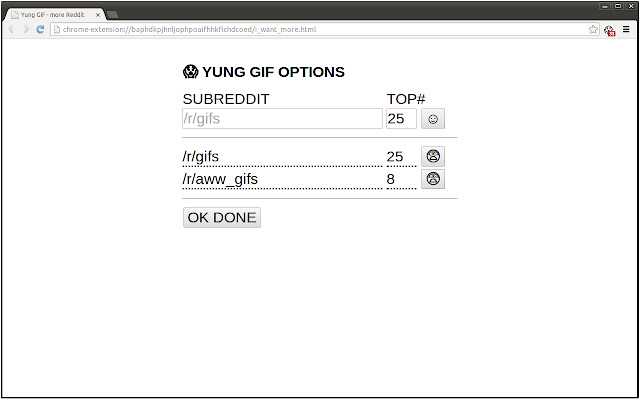
Télécharger le fichier CRX de l'extension Yung GIF
Téléchargez les fichiers d'extension Yung GIF au format crx, installez manuellement les extensions Chrome dans le navigateur ou partagez les fichiers crx avec des amis pour installer facilement les extensions Chrome.
Instructions d'Utilisation de l'Extension
                        Get notified when there is new amazingness on the web.

Pick as many subreddits U like (e.g. /r/gifs, /r/earthporn, /r/aww_gifs) and Yung GIF will non-intrusively notify you when new GIFs appeared.
Informations de Base sur l'Extension
| Nom |  Yung GIF Yung GIF |
| ID | pcbjhjfodgcbadhdpponooolomfhlamg |
| URL Officiel | https://chrome.google.com/webstore/detail/pcbjhjfodgcbadhdpponooolomfhlamg |
| Description | Top 25 gifs (and more) on reddit - one click away. |
| Taille du Fichier | 88.85 KB |
| Nombre d'Installations | 36 |
| Version Actuelle | 0.3.1 |
| Dernière Mise à Jour | 2016-10-16 |
| Date de Publication | 2016-10-16 |
| Évaluation | 5.00/5 Total 7 Évaluations |
| Développeur | Tom |
| Type de Paiement | free |
| Site Web de l'Extension | https://github.com/Tomtomgo/Yung-gif |
| URL de la Page d'Aide | https://github.com/Tomtomgo/Yung-gif |
| Langues Prises en Charge | en |
| manifest.json | |
{
    "update_url": "https:\/\/clients2.google.com\/service\/update2\/crx",
    "manifest_version": 2,
    "name": "Yung GIF",
    "description": "Top 25 gifs (and more) on reddit - one click away.",
    "version": "0.3.1",
    "short_name": "Yung GIF",
    "permissions": [
        "tabs",
        "storage",
        "alarms"
    ],
    "background": {
        "persistent": false,
        "scripts": [
            "jquery-2.1.0.min.js",
            "pingu.js",
            "yung_gif.js"
        ]
    },
    "browser_action": {
        "default_icon": "crapicon.png",
        "tooltip": "Let's find GIFs."
    },
    "options_page": "i_want_more.html",
    "icons": {
        "16": "assets\/logo16.png",
        "48": "assets\/logo48.png",
        "128": "assets\/logo.png"
    }
} | |