K's resource downloader
For downloading resources on the web.
Qu'est-ce que K's resource downloader ?
K's resource downloader est une extension Chrome développée par http://www.thecreatorss.xyz, et sa fonction principale est "For downloading resources on the web.".
Captures d'Écran de l'Extension
Télécharger le fichier CRX de l'extension K's resource downloader
Téléchargez les fichiers d'extension K's resource downloader au format crx, installez manuellement les extensions Chrome dans le navigateur ou partagez les fichiers crx avec des amis pour installer facilement les extensions Chrome.
Instructions d'Utilisation de l'Extension
                        Hello, there.
안녕하세요.

This is K's resource downloader, but most of features havn't developed yet.
이 Chrome 확장 프로그램은 K.의 리소스 다운로더입니다. 다만 대부분의 기능이 아직 덜 개발되었습니다.

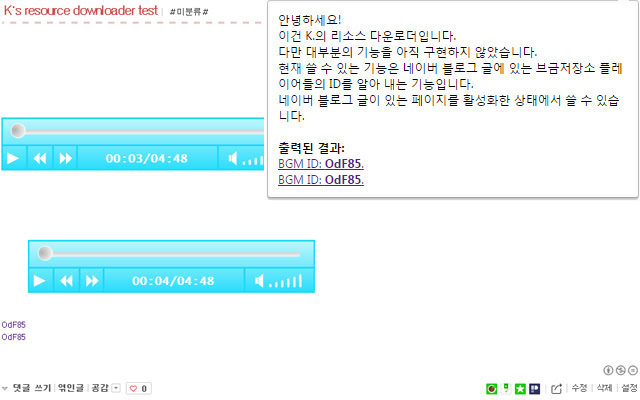
Current available feature: getting the IDs from BGMStore(브금저장소) player URIs on a Naver blog post(You can use it when you are activating a Naver blog post page tab.).
현재 쓸 수 있는 기능은 네이버 블로그 글에 있는 브금저장소 플레이어들의 ID를 얻어 그 SWF 파일을 내려받는 것을 돕는 기능입니다(네이버 블로그 글 페이지가 있는 탭을 활성화해 둔 상태에서 쓸 수 있습니다.).


K.([email protected]).
Informations de Base sur l'Extension
| Nom |  K's resource downloader K's resource downloader |
| ID | pfaoofenjiodlndadcmdmelikhmipkll |
| URL Officiel | https://chrome.google.com/webstore/detail/ks-resource-downloader/pfaoofenjiodlndadcmdmelikhmipkll |
| Description | For downloading resources on the web. |
| Taille du Fichier | 31.38 KB |
| Nombre d'Installations | 81 |
| Version Actuelle | The first version |
| Dernière Mise à Jour | 2015-12-11 |
| Date de Publication | 2015-12-11 |
| Évaluation | 3.67/5 Total 3 Évaluations |
| Développeur | http://www.thecreatorss.xyz |
| [email protected] | |
| Type de Paiement | free |
| Langues Prises en Charge | en,ko |
| manifest.json | |
{
    "update_url": "https:\/\/clients2.google.com\/service\/update2\/crx",
    "manifest_version": 2,
    "author": "K.",
    "name": "K's resource downloader",
    "version": "1.0",
    "version_name": "The first version",
    "description": "For downloading resources on the web.",
    "default_locale": "en",
    "icons": {
        "16": "icon16.png",
        "32": "icon32.png",
        "48": "icon48.png",
        "64": "icon64.png",
        "128": "icon128.png",
        "320": "icon320.png"
    },
    "permissions": [
        "tabs",
        "http:\/\/blog.naver.com\/*"
    ],
    "browser_action": {
        "default_title": "K's resource downloader",
        "default_icon": {
            "16": "icon16.png",
            "32": "icon32.png",
            "48": "icon48.png",
            "64": "icon64.png",
            "128": "icon128.png",
            "320": "icon320.png"
        },
        "default_popup": "page.html"
    },
    "content_scripts": [
        {
            "matches": [
                "http:\/\/blog.naver.com\/*"
            ],
            "js": [
                "K's resource downloader page analyser.js"
            ]
        }
    ]
} | |