As Seen In
Matches watched anime with Voice Actor performances
Qu'est-ce que As Seen In ?
As Seen In est une extension Chrome développée par clarysse.jarne, et sa fonction principale est "Matches watched anime with Voice Actor performances".
Captures d'Écran de l'Extension



Télécharger le fichier CRX de l'extension As Seen In
Téléchargez les fichiers d'extension As Seen In au format crx, installez manuellement les extensions Chrome dans le navigateur ou partagez les fichiers crx avec des amis pour installer facilement les extensions Chrome.
Instructions d'Utilisation de l'Extension
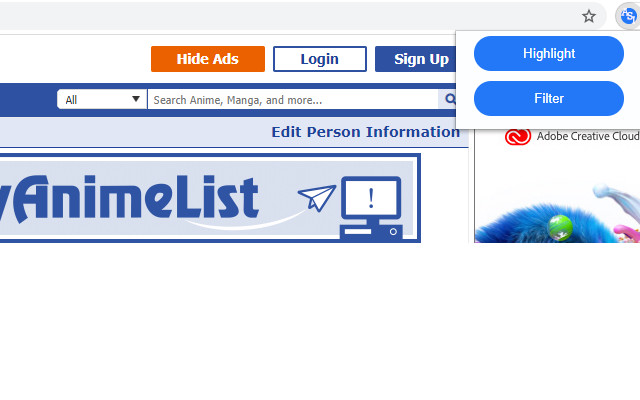
                        This is a google chrome extension for www.myanimelist.net that allows the user to highlight and filter voice actor character roles.

The extension is only useable on the people page of myanimelist
There are 2 functionalities provided by this extension.


The first one simply highlights all the voice acting roles that match with the anime you have listed in your animelist.

The second functionality is to filter the roles and only show the roles of anime that you have listed in your list

Visit the options menu to customize certain details.
In this menu you are able to change:

- The highlight color

- Add your exported animelist from the site. This can be done by going to https://myanimelist.net/panel.php?go=export

notes:

- The uploaded animelist.xml file is used to match the roles with the watched anime. This file does not get send anywhere and stays on your computer. The downlad button is there so you can check if the content of the list previously supplied.

- In the future this menu will be expended to allow the extension to fetch the animelist from the user account.

- When browsing myanimelist.net I often look up voice actors from certain series and try to match them with other roles they might have played in shows I saw before. But sometimes they did a lot of voices and looking through each entry gets confusing or tiresome. That's why i created this extension to make that process a bit easier.
I used the extension a lot and thought others might have the same struggle and could benefit from this as wel.
Informations de Base sur l'Extension
| Nom |  As Seen In As Seen In |
| ID | phpplmjgedlpmimllocokeplbhkipehn |
| URL Officiel | https://chrome.google.com/webstore/detail/as-seen-in/phpplmjgedlpmimllocokeplbhkipehn |
| Description | Matches watched anime with Voice Actor performances |
| Taille du Fichier | 44.73 KB |
| Nombre d'Installations | 19 |
| Version Actuelle | 1.0.0.0 |
| Dernière Mise à Jour | 2020-08-09 |
| Date de Publication | 2020-08-09 |
| Développeur | clarysse.jarne |
| [email protected] | |
| Type de Paiement | free |
| Langues Prises en Charge | en |
| manifest.json | |
{
    "update_url": "https:\/\/clients2.google.com\/service\/update2\/crx",
    "name": "As Seen In",
    "version": "1.0.0.0",
    "description": "Matches watched anime with Voice Actor performances",
    "permissions": [
        "activeTab",
        "declarativeContent",
        "storage",
        "downloads"
    ],
    "background": {
        "scripts": [
            "background.js"
        ],
        "persistent": false
    },
    "web_accessible_resources": [
        "xml\/*.xml"
    ],
    "options_page": "options.html",
    "page_action": {
        "default_popup": "popup.html",
        "default_icon": {
            "16": "images\/ASI-logo16.png",
            "32": "images\/ASI-logo32.png",
            "48": "images\/ASI-logo48.png",
            "128": "images\/ASI-logo128.png"
        }
    },
    "icons": {
        "16": "images\/ASI-logo16.png",
        "32": "images\/ASI-logo32.png",
        "48": "images\/ASI-logo48.png",
        "128": "images\/ASI-logo128.png"
    },
    "manifest_version": 2
} | |