Tealeaf Helper
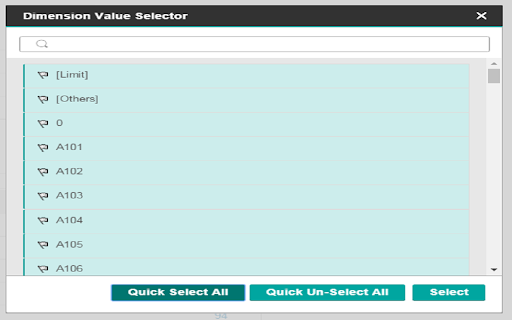
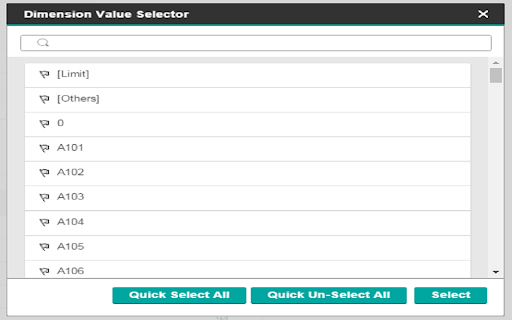
This extension was created to help Select all Items when using the Filter on report Builder
Tealeaf Helper क्या है?
Tealeaf Helper hoggkm द्वारा विकसित एक क्रोम एक्सटेंशन है, और इसकी मुख्य विशेषता है "This extension was created to help Select all Items when using the Filter on report Builder"।
एक्सटेंशन स्क्रीनशॉट्स

एक्सएक्स एक्सटेंशन CRX फ़ाइल डाउनलोड करें
crx प्रारूप में Tealeaf Helper एक्सटेंशन फ़ाइलें डाउनलोड करें, ब्राउज़र में क्रोम एक्सटेंशन को मैन्युअल रूप से स्थापित करें या दोस्तों के साथ crx फ़ाइलों को साझा करें ताकि क्रोम एक्सटेंशन को आसानी से स्थापित किया जा सके।
एक्सटेंशन उपयोग निर्देश
Adds a Select All and Un-Select All button to the filter Modal on the Report Builder page of IBM Teafleaf (Newest Version) एक्सटेंशन की मूल जानकारी
| नाम |  Tealeaf Helper Tealeaf Helper |
| ID | aljdjnpfggihgpjkodffnajhfhedoopa |
| आधिकारिक URL | https://chromewebstore.google.com/detail/tealeaf-helper/aljdjnpfggihgpjkodffnajhfhedoopa |
| विवरण | This extension was created to help Select all Items when using the Filter on report Builder |
| फ़ाइल का आकार | 40.04 KB |
| स्थापना संख्या | 23 |
| वर्तमान संस्करण | 0.0.1 |
| अंतिम अपडेट | 2016-04-29 |
| प्रकाशन तिथि | 2016-04-29 |
| रेटिंग | 5.00/5 कुल 2 रेटिंग्स |
| डेवलपर | hoggkm |
| भुगतान के प्रकार | free |
| समर्थित भाषाएँ | en |
| manifest.json | |
{
    "update_url": "https:\/\/clients2.google.com\/service\/update2\/crx",
    "name": "Tealeaf Helper",
    "version": "0.0.1",
    "manifest_version": 2,
    "description": "This extension was created to help Select all Items when using the Filter on report Builder",
    "homepage_url": "http:\/\/www-01.ibm.com\/software\/info\/tealeaf\/",
    "icons": {
        "16": "icons\/icon16.png",
        "48": "icons\/icon48.png",
        "128": "icons\/icon128.png"
    },
    "permissions": [
        "contentSettings",
        "contextMenus",
        "history",
        "management",
        "notifications",
        "storage",
        "clipboardWrite",
        "clipboardRead"
    ],
    "content_scripts": [
        {
            "matches": [
                "*:\/\/*\/portal\/ReportBuilder*"
            ],
            "js": [
                "js\/jquery\/jquery.min.js",
                "src\/inject\/inject.js"
            ]
        }
    ]
} | |