Top Visited Websites
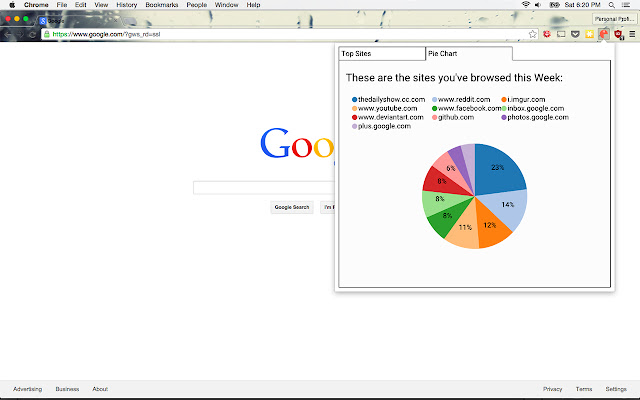
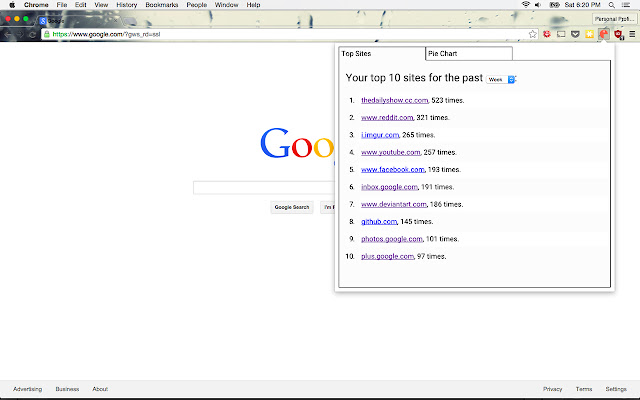
This extension shows your top 10 most visited websites for the past week, month, or year.
Top Visited Websites क्या है?
Top Visited Websites phelan.vendeville द्वारा विकसित एक क्रोम एक्सटेंशन है, और इसकी मुख्य विशेषता है "This extension shows your top 10 most visited websites for the past week, month, or year."।
एक्सटेंशन स्क्रीनशॉट्स
एक्सएक्स एक्सटेंशन CRX फ़ाइल डाउनलोड करें
crx प्रारूप में Top Visited Websites एक्सटेंशन फ़ाइलें डाउनलोड करें, ब्राउज़र में क्रोम एक्सटेंशन को मैन्युअल रूप से स्थापित करें या दोस्तों के साथ crx फ़ाइलों को साझा करें ताकि क्रोम एक्सटेंशन को आसानी से स्थापित किया जा सके।
एक्सटेंशन उपयोग निर्देश
                        This project creates a chrome extension that uses the Chrome History API to pull out websites you've visited during a time-slice. It groups these websites together by domain, and displays the count numbers in tabular and graph format.

The main point of this project is to learn something while making a useful thing. Thanks to Ethan for the codereviews and Jon for the sweet icon.
एक्सटेंशन की मूल जानकारी
| नाम |  Top Visited Websites Top Visited Websites |
| ID | biiandepjhmnifgimjpoadmmmfblgogb |
| आधिकारिक URL | https://chrome.google.com/webstore/detail/top-visited-websites/biiandepjhmnifgimjpoadmmmfblgogb |
| विवरण | This extension shows your top 10 most visited websites for the past week, month, or year. |
| फ़ाइल का आकार | 108 KB |
| स्थापना संख्या | 153 |
| वर्तमान संस्करण | 1.0 |
| अंतिम अपडेट | 2015-08-01 |
| प्रकाशन तिथि | 2015-08-01 |
| रेटिंग | 4.00/5 कुल 2 रेटिंग्स |
| डेवलपर | phelan.vendeville |
| भुगतान के प्रकार | free |
| समर्थित भाषाएँ | en |
| manifest.json | |
{
    "update_url": "https:\/\/clients2.google.com\/service\/update2\/crx",
    "manifest_version": 2,
    "name": "Top Visited Websites",
    "description": "This extension shows your top 10 most visited websites for the past week, month, or year.",
    "version": "1.0",
    "browser_action": {
        "default_icon": "img\/icon128.png",
        "default_popup": "popup.html"
    },
    "icons": {
        "16": "img\/icon16.png",
        "48": "img\/icon48.png",
        "128": "img\/icon128.png"
    },
    "content_security_policy": "script-src 'self' https:\/\/www.google-analytics.com; object-src 'self'",
    "permissions": [
        "activeTab",
        "history"
    ]
} | |