Flip Lichess Knights
Flip the direction of the knights on lichess.org
Flip Lichess Knights क्या है?
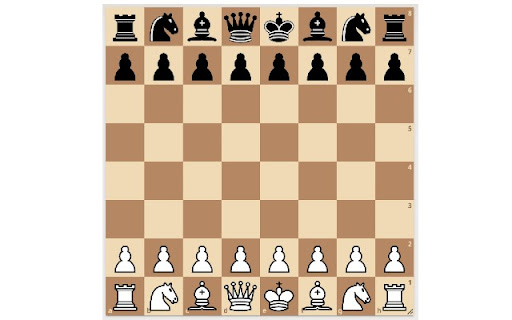
Flip Lichess Knights Sam Sweeney द्वारा विकसित एक क्रोम एक्सटेंशन है, और इसकी मुख्य विशेषता है "Flip the direction of the knights on lichess.org"।
एक्सटेंशन स्क्रीनशॉट्स
एक्सएक्स एक्सटेंशन CRX फ़ाइल डाउनलोड करें
crx प्रारूप में Flip Lichess Knights एक्सटेंशन फ़ाइलें डाउनलोड करें, ब्राउज़र में क्रोम एक्सटेंशन को मैन्युअल रूप से स्थापित करें या दोस्तों के साथ crx फ़ाइलों को साझा करें ताकि क्रोम एक्सटेंशन को आसानी से स्थापित किया जा सके।
एक्सटेंशन उपयोग निर्देश
Flip Lichess Knights allows you to customize your board UI when playing chess on lichess.org. By default knights on Lichess face to the right. Flip Lichess Knights allows you to toggle their direction, so they can face either to the right or to the left. एक्सटेंशन की मूल जानकारी
| नाम |  Flip Lichess Knights Flip Lichess Knights |
| ID | cdkfpbdifpndnncjmfciiphhfjjfbpad |
| आधिकारिक URL | https://chromewebstore.google.com/detail/flip-lichess-knights/cdkfpbdifpndnncjmfciiphhfjjfbpad |
| विवरण | Flip the direction of the knights on lichess.org |
| फ़ाइल का आकार | 30.63 KB |
| स्थापना संख्या | 38 |
| वर्तमान संस्करण | 0.0.0.1 |
| अंतिम अपडेट | 2021-03-18 |
| प्रकाशन तिथि | 2021-03-18 |
| डेवलपर | Sam Sweeney |
| ईमेल | [email protected] |
| भुगतान के प्रकार | free |
| समर्थित भाषाएँ | en |
| manifest.json | |
{
    "update_url": "https:\/\/clients2.google.com\/service\/update2\/crx",
    "name": "Flip Lichess Knights",
    "description": "Flip the direction of the knights on lichess.org",
    "version": "0.0.0.1",
    "manifest_version": 3,
    "background": {
        "service_worker": "background.js"
    },
    "content_scripts": [
        {
            "matches": [
                "https:\/\/*.lichess.org\/*"
            ],
            "js": [
                "flip-knights.js"
            ]
        }
    ],
    "action": {
        "default_popup": "popup.html",
        "default_icon": {
            "16": "icon16.png",
            "48": "icon48.png",
            "128": "icon128.png"
        }
    },
    "icons": {
        "16": "icon16.png",
        "48": "icon48.png",
        "128": "icon128.png"
    },
    "permissions": [
        "storage"
    ]
} | |