Problem To Pickle
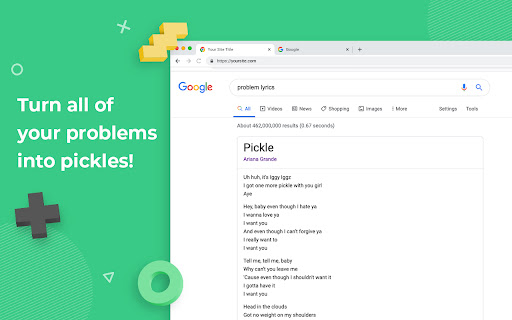
Replaces the word 'problem' with word 'pickle' every where in the text on web page for each web site.
Problem To Pickle क्या है?
Problem To Pickle Unknown द्वारा विकसित एक क्रोम एक्सटेंशन है, और इसकी मुख्य विशेषता है "Replaces the word 'problem' with word 'pickle' every where in the text on web page for each web site."।
एक्सटेंशन स्क्रीनशॉट्स
एक्सएक्स एक्सटेंशन CRX फ़ाइल डाउनलोड करें
crx प्रारूप में Problem To Pickle एक्सटेंशन फ़ाइलें डाउनलोड करें, ब्राउज़र में क्रोम एक्सटेंशन को मैन्युअल रूप से स्थापित करें या दोस्तों के साथ crx फ़ाइलों को साझा करें ताकि क्रोम एक्सटेंशन को आसानी से स्थापित किया जा सके।
एक्सटेंशन उपयोग निर्देश
                        Does it ever feel like there are too many problems in the world? Don't worry, Design Pickle is here to help.

Install this simple extension and all of your problems will turn into delicious pickles!
एक्सटेंशन की मूल जानकारी
| नाम |  Problem To Pickle Problem To Pickle |
| ID | cflkfnipolmhhpjamgipagfbkadimgpb |
| आधिकारिक URL | https://chromewebstore.google.com/detail/problem-to-pickle/cflkfnipolmhhpjamgipagfbkadimgpb |
| विवरण | Replaces the word 'problem' with word 'pickle' every where in the text on web page for each web site. |
| फ़ाइल का आकार | 18.12 KB |
| स्थापना संख्या | 33 |
| वर्तमान संस्करण | 1.0 |
| अंतिम अपडेट | 2020-04-01 |
| प्रकाशन तिथि | 2020-04-01 |
| रेटिंग | 5.00/5 कुल 4 रेटिंग्स |
| डेवलपर | Unknown |
| भुगतान के प्रकार | free |
| एक्सटेंशन वेबसाइट | https://designpickle.com |
| समर्थित भाषाएँ | en |
| manifest.json | |
{
    "update_url": "https:\/\/clients2.google.com\/service\/update2\/crx",
    "manifest_version": 2,
    "name": "Problem To Pickle",
    "version": "1.0",
    "description": "Replaces the word 'problem' with word 'pickle' every where in the text on web page for each web site.",
    "content_scripts": [
        {
            "matches": [
                "*:\/\/*\/*"
            ],
            "js": [
                "contentScript.js"
            ],
            "run_at": "document_end"
        }
    ],
    "icons": {
        "16": "images\/icon16.png",
        "32": "images\/icon32.png",
        "48": "images\/icon48.png",
        "128": "images\/icon128.png"
    },
    "browser_action": {
        "default_icon": "images\/icon32.png"
    }
} | |