Google Calendar: Add AND remove calendars
Chrome extension to turn the "Add a coworker's calendar" field in Google Calendar into a toggle for adding AND removing calendars.
Google Calendar: Add AND remove calendars क्या है?
Google Calendar: Add AND remove calendars Seth Walker द्वारा विकसित एक क्रोम एक्सटेंशन है, और इसकी मुख्य विशेषता है "Chrome extension to turn the "Add a coworker's calendar" field in Google Calendar into a toggle for adding AND removing calendars."।
एक्सएक्स एक्सटेंशन CRX फ़ाइल डाउनलोड करें
crx प्रारूप में Google Calendar: Add AND remove calendars एक्सटेंशन फ़ाइलें डाउनलोड करें, ब्राउज़र में क्रोम एक्सटेंशन को मैन्युअल रूप से स्थापित करें या दोस्तों के साथ crx फ़ाइलों को साझा करें ताकि क्रोम एक्सटेंशन को आसानी से स्थापित किया जा सके।
एक्सटेंशन उपयोग निर्देश
                        Chrome extension to turn the "Add a coworker's calendar" field in Google Calendar into a toggle for adding AND removing calendars.

It also sorts coworkers calendars to put active calendars at the top.
एक्सटेंशन की मूल जानकारी
| नाम | 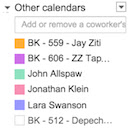 Google Calendar: Add AND remove calendars Google Calendar: Add AND remove calendars |
| ID | dooidmblcmickgannljbomjfccagbhlh |
| आधिकारिक URL | https://chrome.google.com/webstore/detail/google-calendar-add-and-r/dooidmblcmickgannljbomjfccagbhlh |
| विवरण | Chrome extension to turn the "Add a coworker's calendar" field in Google Calendar into a toggle for adding AND removing calendars. |
| फ़ाइल का आकार | 194 KB |
| स्थापना संख्या | 33 |
| वर्तमान संस्करण | 0.1 |
| अंतिम अपडेट | 2014-10-28 |
| प्रकाशन तिथि | 2014-10-28 |
| डेवलपर | Seth Walker |
| भुगतान के प्रकार | free |
| समर्थित भाषाएँ | en |
| manifest.json | |
{
    "update_url": "https:\/\/clients2.google.com\/service\/update2\/crx",
    "name": "Google Calendar: Add AND remove calendars",
    "description": "Chrome extension to turn the \"Add a coworker's calendar\" field in Google Calendar into a toggle for adding AND removing calendars.",
    "version": "0.1",
    "content_scripts": [
        {
            "matches": [
                "https:\/\/www.google.com\/calendar\/*",
                "http:\/\/www.google.com\/calendar\/*"
            ],
            "js": [
                "node_modules\/email-addresses\/lib\/email-addresses.js",
                "node_modules\/underscore\/underscore.js",
                "index.js"
            ],
            "run_at": "document_end"
        }
    ],
    "permissions": [
        "https:\/\/www.google.com\/calendar\/*"
    ],
    "icons": {
        "128": "icon128.png"
    },
    "manifest_version": 2
} | |