ELMS Download Blocker
This extension opens files on ELMS in the browser instead of automatically downloading them. Enjoy!
ELMS Download Blocker क्या है?
ELMS Download Blocker Cameron Payton द्वारा विकसित एक क्रोम एक्सटेंशन है, और इसकी मुख्य विशेषता है "This extension opens files on ELMS in the browser instead of automatically downloading them. Enjoy!"।
एक्सटेंशन स्क्रीनशॉट्स
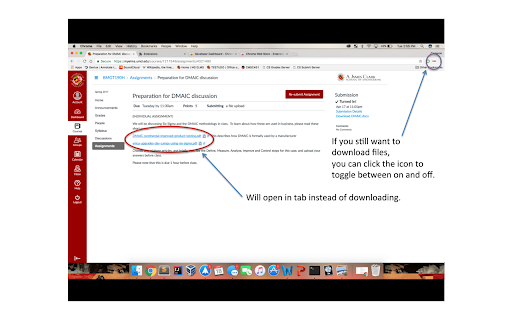
एक्सएक्स एक्सटेंशन CRX फ़ाइल डाउनलोड करें
crx प्रारूप में ELMS Download Blocker एक्सटेंशन फ़ाइलें डाउनलोड करें, ब्राउज़र में क्रोम एक्सटेंशन को मैन्युअल रूप से स्थापित करें या दोस्तों के साथ crx फ़ाइलों को साझा करें ताकि क्रोम एक्सटेंशन को आसानी से स्थापित किया जा सके।
एक्सटेंशन उपयोग निर्देश
Often, University of Maryland professors will upload files to their class web pages that students need to view for assignments. However, most of the time the link is an automatic download, so the file gets stored on your computer. It's fairly annoying and can clutter the student's downloads folder very quickly. It would be much more convenient to simply open the file in the browser instead, and that's exactly what this extension does. Enjoy! This extension is open source, and can be found here: https://github.com/music/ElmsDownloadBlocker एक्सटेंशन की मूल जानकारी
| नाम |  ELMS Download Blocker ELMS Download Blocker |
| ID | ehkdbdbfonglaimdhgoodhcpihbmpefe |
| आधिकारिक URL | https://chromewebstore.google.com/detail/elms-download-blocker/ehkdbdbfonglaimdhgoodhcpihbmpefe |
| विवरण | This extension opens files on ELMS in the browser instead of automatically downloading them. Enjoy! |
| फ़ाइल का आकार | 2.84 MB |
| स्थापना संख्या | 14 |
| वर्तमान संस्करण | 2.4 |
| अंतिम अपडेट | 2018-08-27 |
| प्रकाशन तिथि | 2018-08-27 |
| डेवलपर | Cameron Payton |
| ईमेल | [email protected] |
| भुगतान के प्रकार | free |
| समर्थित भाषाएँ | en |
| manifest.json | |
{
"update_url": "https:\/\/clients2.google.com\/service\/update2\/crx",
"manifest_version": 2,
"name": "ELMS Download Blocker",
"description": "This extension opens files on ELMS in the browser instead of automatically downloading them. Enjoy!",
"version": "2.4",
"background": {
"persistent": true,
"scripts": [
"background.js"
]
},
"browser_action": {
"default_icon": ".\/elms.png"
},
"permissions": [
"activeTab",
" | |