One Click Downloader
Automatically save downloaded files to different folders based on their type or name.
One Click Downloader क्या है?
One Click Downloader Till Haldimann द्वारा विकसित एक क्रोम एक्सटेंशन है, और इसकी मुख्य विशेषता है "Automatically save downloaded files to different folders based on their type or name."।
एक्सटेंशन स्क्रीनशॉट्स


एक्सएक्स एक्सटेंशन CRX फ़ाइल डाउनलोड करें
crx प्रारूप में One Click Downloader एक्सटेंशन फ़ाइलें डाउनलोड करें, ब्राउज़र में क्रोम एक्सटेंशन को मैन्युअल रूप से स्थापित करें या दोस्तों के साथ crx फ़ाइलों को साझा करें ताकि क्रोम एक्सटेंशन को आसानी से स्थापित किया जा सके।
एक्सटेंशन उपयोग निर्देश
                        HOW DOES IT WORK?

Right-click on a download link and choose "Set download folder..." from the context menu.
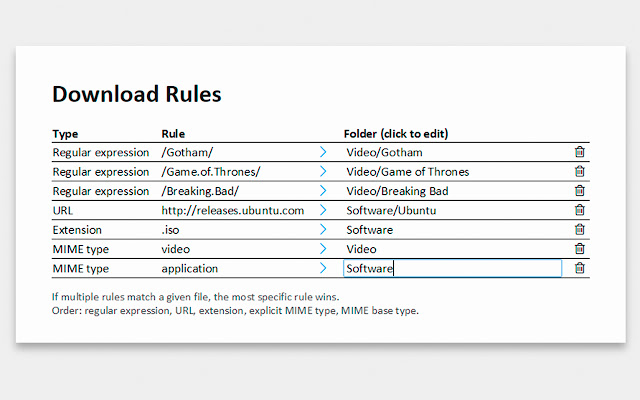
Create a rule for the file, saying in which folder this file and similar ones should be saved.

From now on, you can start downloads with a simple click and the files will end up in the right place.

Files can be identified by their MIME type, file extension, name or URL.
एक्सटेंशन की मूल जानकारी
| नाम |  One Click Downloader One Click Downloader |
| ID | fbhngehflnenfeefgjfkflhbjaaffgkd |
| आधिकारिक URL | https://chrome.google.com/webstore/detail/one-click-downloader/fbhngehflnenfeefgjfkflhbjaaffgkd |
| विवरण | Automatically save downloaded files to different folders based on their type or name. |
| फ़ाइल का आकार | 71.85 KB |
| स्थापना संख्या | 2,875 |
| वर्तमान संस्करण | 1.2.3 |
| अंतिम अपडेट | 2015-03-29 |
| प्रकाशन तिथि | 2015-03-29 |
| रेटिंग | 3.00/5 कुल 15 रेटिंग्स |
| डेवलपर | Till Haldimann |
| भुगतान के प्रकार | free |
| समर्थित भाषाएँ | de,en |
| manifest.json | |
{
    "update_url": "https:\/\/clients2.google.com\/service\/update2\/crx",
    "manifest_version": 2,
    "default_locale": "en",
    "name": "__MSG_appName__",
    "short_name": "__MSG_appName__",
    "description": "__MSG_appDescription__",
    "version": "1.2.3",
    "author": "Till Haldimann",
    "icons": {
        "128": "graphics\/128.png",
        "48": "graphics\/48.png",
        "16": "graphics\/16.png"
    },
    "permissions": [
        "downloads",
        "contextMenus",
        "tabs",
        "storage"
    ],
    "content_security_policy": "script-src 'self' 'unsafe-eval'; object-src 'self'",
    "background": {
        "scripts": [
            "scripts\/event.js"
        ],
        "persistent": false
    },
    "options_page": "pages\/options.html"
} | |