My Screen Grab Extension
It's a tool where you can take screenshot any webpage anytime from your browser.
My Screen Grab Extension क्या है?
My Screen Grab Extension Springfield Search Solutions द्वारा विकसित एक क्रोम एक्सटेंशन है, और इसकी मुख्य विशेषता है "It's a tool where you can take screenshot any webpage anytime from your browser."।
एक्सटेंशन स्क्रीनशॉट्स

एक्सएक्स एक्सटेंशन CRX फ़ाइल डाउनलोड करें
crx प्रारूप में My Screen Grab Extension एक्सटेंशन फ़ाइलें डाउनलोड करें, ब्राउज़र में क्रोम एक्सटेंशन को मैन्युअल रूप से स्थापित करें या दोस्तों के साथ crx फ़ाइलों को साझा करें ताकि क्रोम एक्सटेंशन को आसानी से स्थापित किया जा सके।
एक्सटेंशन उपयोग निर्देश
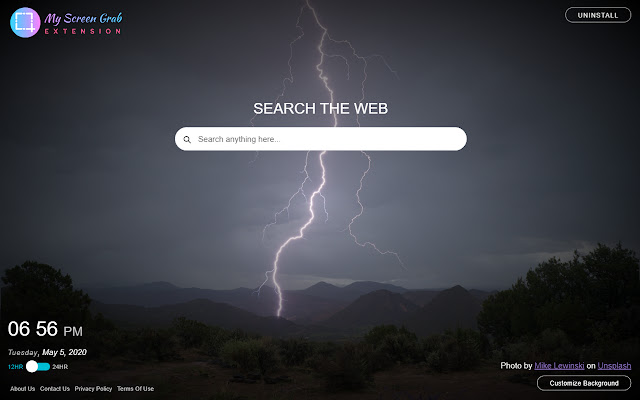
                        My Screen Grab Extension gives you an easy way so that you can take a screenshot of any size webpage anytime from your browser and gives you an easy way to change your Chrome Browser new tab default to look attractive and pleasing to the eye.

This is a free add-on for Chrome Browser where the primary target is to take a screenshot of any size webpage anytime from your browser quickly and easily. Also, set a background from our selective Screenshot images gallery powered by Unsplash in your Chrome Browser default new tab. We are actually changing your Chrome browser default new tab page.

There is also a Digital Clock in new tabs where you can check your current location time in 12 hours/ 24-hour format according to your preference.

Also as an added feature,
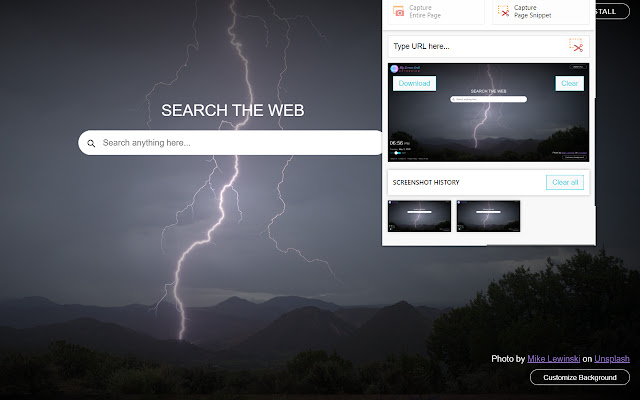
1) Capture entire page
2) Capture page snippet
3) Screenshot history
4) Download, Clear, Clear All screenshot
5) Search your desired information, images, video, and more through Google search.

There is also a Digital Clock in new tabs where you can check your current location time in 12 hour/ 24-hour format according to your preference.

The Extension requires the following permissions:

Active Tab: The extension requires this permission to get temporary access to the currently active tab when the user clicks its browser action.

Tabs: The extension requires this permission in order to get tab information, to capture the visible tab & send the message.

By clicking "Add to Chrome", I accept and agree to install "My Screen Grab" Chrome extension and setting Chrome™ New Tab to that provided by the service and the Privacy (https://www.springfieldsearchsolutions.com/privacy-policy) and Terms of Use (https://www.springfieldsearchsolutions.com/terms-and-conditions).
एक्सटेंशन की मूल जानकारी
| नाम |  My Screen Grab Extension My Screen Grab Extension |
| ID | fohnhpmpkgcoipcbfccoaanjijgblogo |
| आधिकारिक URL | https://chrome.google.com/webstore/detail/my-screen-grab-extension/fohnhpmpkgcoipcbfccoaanjijgblogo |
| विवरण | It's a tool where you can take screenshot any webpage anytime from your browser. |
| फ़ाइल का आकार | 112 KB |
| स्थापना संख्या | 773 |
| वर्तमान संस्करण | 1.2 |
| अंतिम अपडेट | 2020-05-06 |
| प्रकाशन तिथि | 2020-05-06 |
| रेटिंग | 5.00/5 कुल 1 रेटिंग्स |
| डेवलपर | Springfield Search Solutions |
| ईमेल | [email protected] |
| भुगतान के प्रकार | free |
| गोपनीयता नीति पृष्ठ URL | http://www.springfieldsearchsolutions.com/privacy-policy |
| समर्थित भाषाएँ | en-US |
| manifest.json | |
{
"update_url": "https:\/\/clients2.google.com\/service\/update2\/crx",
"manifest_version": 2,
"name": "My Screen Grab Extension",
"description": "It's a tool where you can take screenshot any webpage anytime from your browser.",
"homepage_url": "http:\/\/myscreengrabextension.com\/",
"background": {
"scripts": [
"background.js"
],
"persistent": false
},
"permissions": [
"storage",
"declarativeContent",
"https:\/\/www.springfieldsearchsolutions.com\/myscreengrab\/",
"activeTab",
"tabs",
" | |