Dashlinks - New Tab
New tab extension to organize your websites links.
Dashlinks - New Tab क्या है?
Dashlinks - New Tab Dashlinks द्वारा विकसित एक क्रोम एक्सटेंशन है, और इसकी मुख्य विशेषता है "New tab extension to organize your websites links."।
एक्सटेंशन स्क्रीनशॉट्स

एक्सएक्स एक्सटेंशन CRX फ़ाइल डाउनलोड करें
crx प्रारूप में Dashlinks - New Tab एक्सटेंशन फ़ाइलें डाउनलोड करें, ब्राउज़र में क्रोम एक्सटेंशन को मैन्युअल रूप से स्थापित करें या दोस्तों के साथ crx फ़ाइलों को साझा करें ताकि क्रोम एक्सटेंशन को आसानी से स्थापित किया जा सके।
एक्सटेंशन उपयोग निर्देश
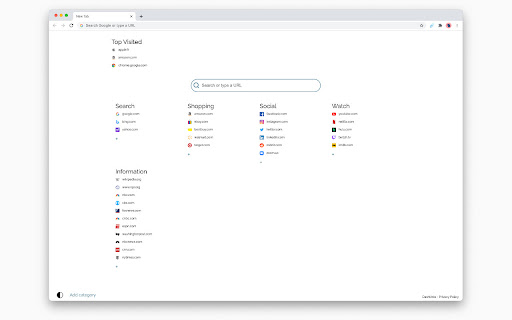
                        Dashlinks is a new tab extension bundled with popular websites links sorted by category.
You can add more links and more categories to organize your new tab as you like.
Your top visited websites appear on top.

By clicking "Add to chrome", I accept and agree to installing the Dashlinks New Tab Chrome extension and setting Chrome™ New Tab to that provided by the service and the Terms of Use and Privacy Policy.

Privacy Policy: https://search4it.net/privacy.php
Terms and Conditions: https://search4it.net/terms.php
About us: https://search4it.net/about.php
एक्सटेंशन की मूल जानकारी
| नाम |  Dashlinks - New Tab Dashlinks - New Tab |
| ID | gfkcocmdmegcelbkamlglehhomiahgjm |
| आधिकारिक URL | https://chromewebstore.google.com/detail/dashlinks-new-tab/gfkcocmdmegcelbkamlglehhomiahgjm |
| विवरण | New tab extension to organize your websites links. |
| फ़ाइल का आकार | 37.52 KB |
| स्थापना संख्या | 33,624 |
| वर्तमान संस्करण | 1.0.2 |
| अंतिम अपडेट | 2022-10-20 |
| प्रकाशन तिथि | 2021-01-10 |
| रेटिंग | 4.86/5 कुल 392 रेटिंग्स |
| डेवलपर | Dashlinks |
| ईमेल | [email protected] |
| भुगतान के प्रकार | free |
| गोपनीयता नीति पृष्ठ URL | https://search4it.net/privacy.php |
| समर्थित भाषाएँ | en |
| manifest.json | |
{
"update_url": "https:\/\/clients2.google.com\/service\/update2\/crx",
"background": {
"service_worker": "service_worker.js"
},
"chrome_url_overrides": {
"newtab": "index.html"
},
"default_locale": "en",
"description": "__MSG_appDesc__",
"icons": {
"128": "128.png"
},
"manifest_version": 3,
"name": "__MSG_appName__",
"permissions": [
"storage",
"topSites"
],
"version": "1.0.2",
"web_accessible_resources": [
{
"resources": [
"128.png"
],
"matches": [
" | |