Youtube Output Devices
This extension allows you to select an output audio device for each youtube video you are watching.
Youtube Output Devices क्या है?
Youtube Output Devices BinaryBench द्वारा विकसित एक क्रोम एक्सटेंशन है, और इसकी मुख्य विशेषता है "This extension allows you to select an output audio device for each youtube video you are watching."।
एक्सटेंशन स्क्रीनशॉट्स
एक्सएक्स एक्सटेंशन CRX फ़ाइल डाउनलोड करें
crx प्रारूप में Youtube Output Devices एक्सटेंशन फ़ाइलें डाउनलोड करें, ब्राउज़र में क्रोम एक्सटेंशन को मैन्युअल रूप से स्थापित करें या दोस्तों के साथ crx फ़ाइलों को साझा करें ताकि क्रोम एक्सटेंशन को आसानी से स्थापित किया जा सके।
एक्सटेंशन उपयोग निर्देश
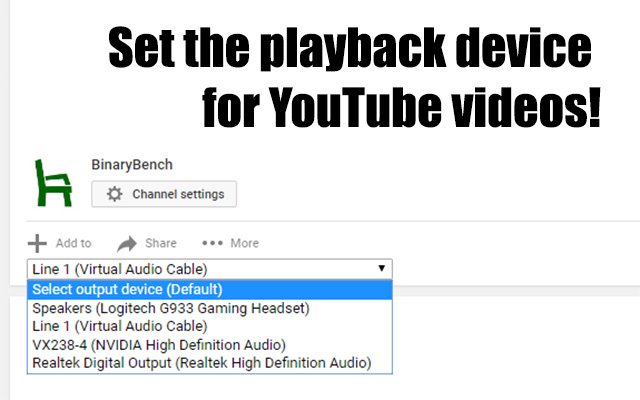
                        This extension allows you to select which device each YouTube video plays to by adding a drop-down right above the video description.  Devices are stored per-session, so the device will not reset when the next video is played via auto-play or a playlist.


This extension is targeted toward streamers who need to play videos into a specific device.  However it is also great for listening to music on your speakers and your headphones at the same time!  (I have no idea why'd you do that, but you do you man, you do you...)
एक्सटेंशन की मूल जानकारी
| नाम |  Youtube Output Devices Youtube Output Devices |
| ID | hecekbdnfioifkbcnemlpnhdfdmgoinj |
| आधिकारिक URL | https://chrome.google.com/webstore/detail/youtube-output-devices/hecekbdnfioifkbcnemlpnhdfdmgoinj |
| विवरण | This extension allows you to select an output audio device for each youtube video you are watching. |
| फ़ाइल का आकार | 11.15 KB |
| स्थापना संख्या | 2,093 |
| वर्तमान संस्करण | 0.2 |
| अंतिम अपडेट | 2017-09-02 |
| प्रकाशन तिथि | 2017-09-02 |
| रेटिंग | 2.78/5 कुल 67 रेटिंग्स |
| डेवलपर | BinaryBench |
| ईमेल | [email protected] |
| भुगतान के प्रकार | free |
| समर्थित भाषाएँ | en-US |
| manifest.json | |
{
    "update_url": "https:\/\/clients2.google.com\/service\/update2\/crx",
    "name": "Youtube Output Devices",
    "short_name": "Yt Devices",
    "version": "0.2",
    "manifest_version": 2,
    "description": "This extension allows you to select an output audio device for each youtube video you are watching.",
    "content_scripts": [
        {
            "matches": [
                "https:\/\/*.youtube.com\/*",
                "http:\/\/*.youtube.com\/*"
            ],
            "js": [
                "content.js"
            ]
        }
    ],
    "permissions": [
        "http:\/\/*.youtube.com\/*",
        "https:\/\/*.youtube.com\/*"
    ],
    "icons": {
        "16": "icons\/icon16.png",
        "48": "icons\/icon48.png",
        "120": "icons\/icon120.png"
    }
} | |