letmegooglethatforyou
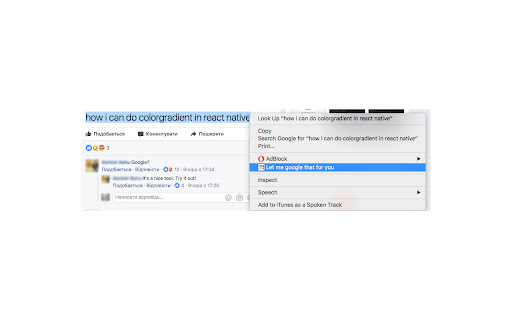
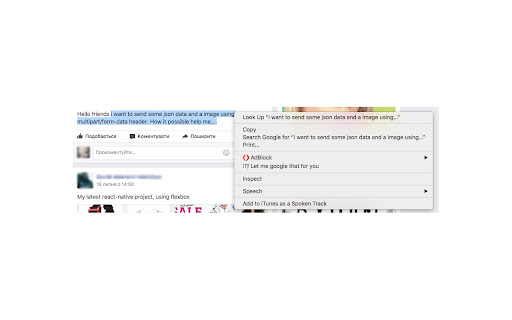
Select text. Click 'Let me google that for you' in the context menu. Link to lmgtfy.com is in the clipboard
letmegooglethatforyou क्या है?
letmegooglethatforyou ilya.zatolokin द्वारा विकसित एक क्रोम एक्सटेंशन है, और इसकी मुख्य विशेषता है "Select text. Click 'Let me google that for you' in the context menu. Link to lmgtfy.com is in the clipboard"।
एक्सटेंशन स्क्रीनशॉट्स

एक्सएक्स एक्सटेंशन CRX फ़ाइल डाउनलोड करें
crx प्रारूप में letmegooglethatforyou एक्सटेंशन फ़ाइलें डाउनलोड करें, ब्राउज़र में क्रोम एक्सटेंशन को मैन्युअल रूप से स्थापित करें या दोस्तों के साथ crx फ़ाइलों को साझा करें ताकि क्रोम एक्सटेंशन को आसानी से स्थापित किया जा सके।
एक्सटेंशन उपयोग निर्देश
                        Tired of stupid questions in groups and forums?
Install the extension -> select text of the stupid question -> right click -> click  the 'Let me google that for you' in the context menu.
'Voila!' you've got a link to https://lmgtfy.com in the clipboard with the text of the stupid question.
Simply paste it as answer.
You rocks!
एक्सटेंशन की मूल जानकारी
| नाम |  letmegooglethatforyou letmegooglethatforyou |
| ID | hnnaigfjnbbmhmgpjdbhjohjopnkpkjd |
| आधिकारिक URL | https://chromewebstore.google.com/detail/letmegooglethatforyou/hnnaigfjnbbmhmgpjdbhjohjopnkpkjd |
| विवरण | Select text. Click 'Let me google that for you' in the context menu. Link to lmgtfy.com is in the clipboard |
| फ़ाइल का आकार | 4.37 KB |
| स्थापना संख्या | 186 |
| वर्तमान संस्करण | 0.1 |
| अंतिम अपडेट | 2017-07-20 |
| प्रकाशन तिथि | 2017-07-20 |
| रेटिंग | 3.00/5 कुल 2 रेटिंग्स |
| डेवलपर | ilya.zatolokin |
| भुगतान के प्रकार | free |
| समर्थित भाषाएँ | en |
| manifest.json | |
{
    "update_url": "https:\/\/clients2.google.com\/service\/update2\/crx",
    "manifest_version": 2,
    "name": "letmegooglethatforyou",
    "description": "Select text. Click 'Let me google that for you' in the context menu. Link to lmgtfy.com is in the clipboard",
    "version": "0.1",
    "permissions": [
        "contextMenus",
        "clipboardWrite"
    ],
    "background": {
        "scripts": [
            "contextMenu.js"
        ]
    },
    "icons": {
        "16": "lmgtfy.png"
    }
} | |