JSFiddle Auto Run & Save
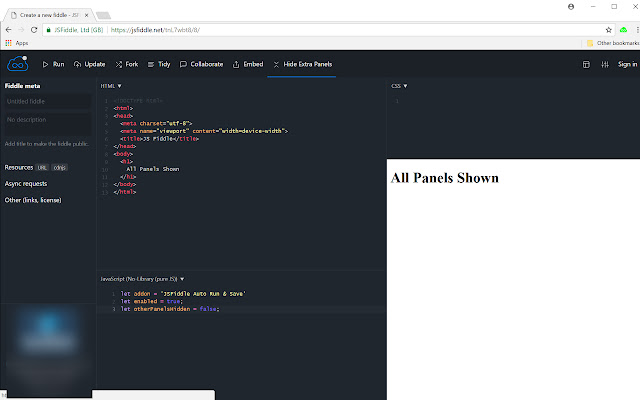
This extension makes JSFiddle automatically run & save while typing, also adds a button to hide panels other than js
JSFiddle Auto Run & Save क्या है?
JSFiddle Auto Run & Save kongyuyu द्वारा विकसित एक क्रोम एक्सटेंशन है, और इसकी मुख्य विशेषता है "This extension makes JSFiddle automatically run & save while typing, also adds a button to hide panels other than js"।
एक्सटेंशन स्क्रीनशॉट्स



एक्सएक्स एक्सटेंशन CRX फ़ाइल डाउनलोड करें
crx प्रारूप में JSFiddle Auto Run & Save एक्सटेंशन फ़ाइलें डाउनलोड करें, ब्राउज़र में क्रोम एक्सटेंशन को मैन्युअल रूप से स्थापित करें या दोस्तों के साथ crx फ़ाइलों को साझा करें ताकि क्रोम एक्सटेंशन को आसानी से स्थापित किया जा सके।
एक्सटेंशन उपयोग निर्देश
                        Features:
1. JSFiddle runs automatically when key strikes stopped for 1.5 seconds.
2. JSFiddle saves automatically with every 25 key strikes.
3. Adds a button on JSFiddle page to hide all panels other than js panel.

Feature 1 & 2 could be turned on/off by toggling the extension icon.
Feature 3 could be toggled with the "Hide/Show Extra Panels" button on JSFiddle Page.

Work in progress:
1. Add a configuration page for customize auto run delay and auto save key counts.

Special thanks to @mechanicious on github. I learnt how to enable auto run on JSFiddle from him, and then built this extension.
एक्सटेंशन की मूल जानकारी
| नाम |  JSFiddle Auto Run & Save JSFiddle Auto Run & Save |
| ID | holmgemnafgpfmphccghdfljgaocpbfj |
| आधिकारिक URL | https://chrome.google.com/webstore/detail/jsfiddle-auto-run-save/holmgemnafgpfmphccghdfljgaocpbfj |
| विवरण | This extension makes JSFiddle automatically run & save while typing, also adds a button to hide panels other than js |
| फ़ाइल का आकार | 24.39 KB |
| स्थापना संख्या | 58 |
| वर्तमान संस्करण | 0.0.1 |
| अंतिम अपडेट | 2018-02-13 |
| प्रकाशन तिथि | 2018-02-13 |
| रेटिंग | 5.00/5 कुल 1 रेटिंग्स |
| डेवलपर | kongyuyu |
| भुगतान के प्रकार | free |
| एक्सटेंशन वेबसाइट | https://github.com/kongyuyu/jsfiddle-chrome-extension |
| सहायता पृष्ठ URL | https://github.com/kongyuyu/jsfiddle-chrome-extension/issues |
| समर्थित भाषाएँ | en-US |
| manifest.json | |
{
    "update_url": "https:\/\/clients2.google.com\/service\/update2\/crx",
    "manifest_version": 2,
    "name": "JSFiddle Auto Run & Save",
    "description": "This extension makes JSFiddle automatically run & save while typing, also adds a button to hide panels other than js",
    "version": "0.0.1",
    "icons": {
        "16": "images\/icon-enabled-16.png",
        "48": "images\/icon-enabled-48.png",
        "128": "images\/icon-enabled-128.png"
    },
    "background": {
        "scripts": [
            "scripts\/background.js"
        ],
        "persistent": false
    },
    "page_action": [],
    "content_scripts": [
        {
            "matches": [
                "https:\/\/jsfiddle.net\/*"
            ],
            "js": [
                "scripts\/jsfiddle-mixin.js"
            ],
            "run_at": "document_end"
        }
    ],
    "permissions": [
        "tabs",
        "storage",
        "declarativeContent"
    ]
} | |