Highlight and Capture
This extension draws a square which can be resized and dragged to highlight whatever part of the page before capturing it.
Highlight and Capture क्या है?
Highlight and Capture chudaol द्वारा विकसित एक क्रोम एक्सटेंशन है, और इसकी मुख्य विशेषता है "This extension draws a square which can be resized and dragged to highlight whatever part of the page before capturing it."।
एक्सटेंशन स्क्रीनशॉट्स

एक्सएक्स एक्सटेंशन CRX फ़ाइल डाउनलोड करें
crx प्रारूप में Highlight and Capture एक्सटेंशन फ़ाइलें डाउनलोड करें, ब्राउज़र में क्रोम एक्सटेंशन को मैन्युअल रूप से स्थापित करें या दोस्तों के साथ crx फ़ाइलों को साझा करें ताकि क्रोम एक्सटेंशन को आसानी से स्थापित किया जा सके।
एक्सटेंशन उपयोग निर्देश
                        Not only allows to capture a visible area of current browser's tab, but also gives an ability to highlight specific areas of it before capturing.

## To highlight areas ##
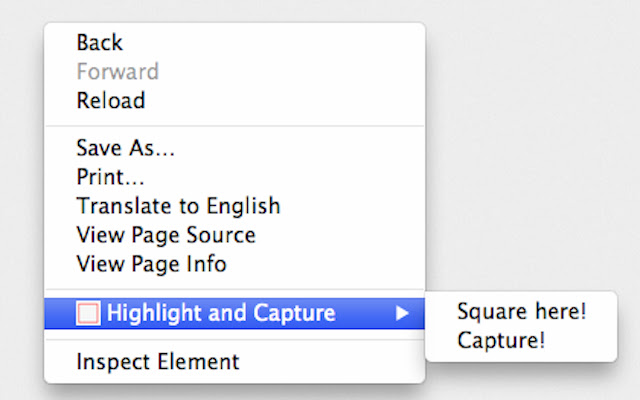
Select Highlight and Capture->Square Here! from the context menu.
The red square appears. You can resize it and drag. Also you can create as many highlighters as you want. To delete them just double-click on them!

## To take screenshot ##
Select Highlight and Capture->Capture! from the context menu.
The image of the visible area of current window opens in new window.
एक्सटेंशन की मूल जानकारी
| नाम |  Highlight and Capture Highlight and Capture |
| ID | icimcjcibbhngphajolgbdbjioidaomg |
| आधिकारिक URL | https://chrome.google.com/webstore/detail/highlight-and-capture/icimcjcibbhngphajolgbdbjioidaomg |
| विवरण | This extension draws a square which can be resized and dragged to highlight whatever part of the page before capturing it. |
| फ़ाइल का आकार | 248 KB |
| स्थापना संख्या | 385 |
| वर्तमान संस्करण | 1.5 |
| अंतिम अपडेट | 2013-10-29 |
| प्रकाशन तिथि | 2013-10-29 |
| रेटिंग | 4.00/5 कुल 8 रेटिंग्स |
| डेवलपर | chudaol |
| भुगतान के प्रकार | free |
| समर्थित भाषाएँ | en |
| manifest.json | |
{
"update_url": "https:\/\/clients2.google.com\/service\/update2\/crx",
"manifest_version": 2,
"name": "Highlight and Capture",
"description": "This extension draws a square which can be resized and dragged to highlight whatever part of the page before capturing it.",
"version": "1.5",
"permissions": [
"contextMenus",
"tabs",
" | |