NojimaLogin Extension
SSO Chrome Extension
NojimaLogin Extension क्या है?
NojimaLogin Extension ntq_upload द्वारा विकसित एक क्रोम एक्सटेंशन है, और इसकी मुख्य विशेषता है "SSO Chrome Extension"।
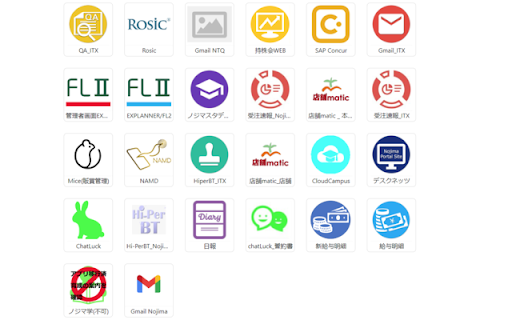
एक्सटेंशन स्क्रीनशॉट्स


एक्सएक्स एक्सटेंशन CRX फ़ाइल डाउनलोड करें
crx प्रारूप में NojimaLogin Extension एक्सटेंशन फ़ाइलें डाउनलोड करें, ब्राउज़र में क्रोम एक्सटेंशन को मैन्युअल रूप से स्थापित करें या दोस्तों के साथ crx फ़ाइलों को साझा करें ताकि क्रोम एक्सटेंशन को आसानी से स्थापित किया जा सके।
एक्सटेंशन उपयोग निर्देश
                        In Nojima company, there are many apps to serve work.
Because of there are so many apps, it is difficult for users to remember login information of each app.
They want to login to apps without remembering login information.
This extension will support users automatic login into company apps.

The main functions on the extension include:
- Show list of user apps
- Automatically log into apps when the user clicks on the app icon.
एक्सटेंशन की मूल जानकारी
| नाम |  NojimaLogin Extension NojimaLogin Extension |
| ID | joeloeifimkfbnifgnhaiedbnmfflhoo |
| आधिकारिक URL | https://chromewebstore.google.com/detail/nojimalogin-extension/joeloeifimkfbnifgnhaiedbnmfflhoo |
| विवरण | SSO Chrome Extension |
| फ़ाइल का आकार | 670 KB |
| स्थापना संख्या | 6,679 |
| वर्तमान संस्करण | 0.1.9 |
| अंतिम अपडेट | 2023-05-23 |
| प्रकाशन तिथि | 2023-05-22 |
| डेवलपर | ntq_upload |
| ईमेल | [email protected] |
| भुगतान के प्रकार | free |
| एक्सटेंशन वेबसाइट | https://sso.nojima.co.jp/ |
| गोपनीयता नीति पृष्ठ URL | https://www.nojima.co.jp/corporation/privacy |
| समर्थित भाषाएँ | ja |
| manifest.json | |
{
    "update_url": "https:\/\/clients2.google.com\/service\/update2\/crx",
    "manifest_version": 3,
    "name": "NojimaLogin Extension",
    "version": "0.1.9",
    "background": {
        "service_worker": "background.bundle.js"
    },
    "action": {
        "default_popup": "popup.html"
    },
    "content_scripts": [
        {
            "matches": [
                "http:\/\/*\/*",
                "https:\/\/*\/*"
            ],
            "js": [
                "content.bundle.js"
            ]
        }
    ],
    "permissions": [
        "cookies",
        "storage",
        "activeTab",
        "webRequest"
    ],
    "host_permissions": [
        "https:\/\/*.nojima.co.jp\/"
    ],
    "icons": {
        "16": "icon16.png",
        "24": "icon24.png",
        "32": "icon32.png",
        "64": "icon64.png",
        "128": "icon128.png"
    },
    "content_security_policy": {
        "extension_pages": "script-src 'self'; object-src 'self'"
    },
    "description": "SSO Chrome Extension"
} | |