Spy Detector
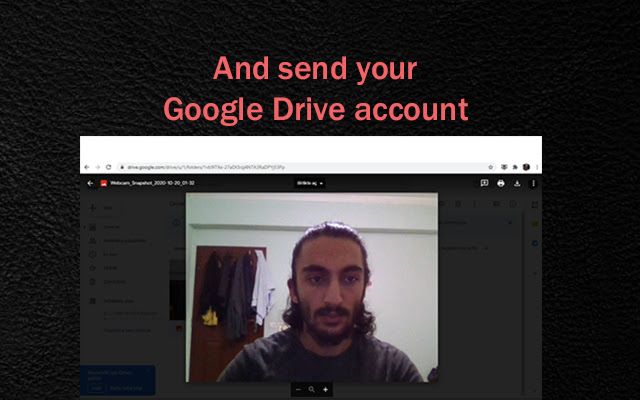
When extension active it will detect face whose in front of PC and takes a snapshot for sending to your Google Drive account.
Spy Detector क्या है?
Spy Detector Kadir EK द्वारा विकसित एक क्रोम एक्सटेंशन है, और इसकी मुख्य विशेषता है "When extension active it will detect face whose in front of PC and takes a snapshot for sending to your Google Drive account."।
एक्सटेंशन स्क्रीनशॉट्स

एक्सएक्स एक्सटेंशन CRX फ़ाइल डाउनलोड करें
crx प्रारूप में Spy Detector एक्सटेंशन फ़ाइलें डाउनलोड करें, ब्राउज़र में क्रोम एक्सटेंशन को मैन्युअल रूप से स्थापित करें या दोस्तों के साथ crx फ़ाइलों को साझा करें ताकि क्रोम एक्सटेंशन को आसानी से स्थापित किया जा सके।
एक्सटेंशन उपयोग निर्देश
                        ⭐Nowadays, everyone has a security problem but with this extension the risks will be reduced. This extension detect human face and takes a snapshot for sending to your Google Drive account.

⭐Let's say you put your PC on the desk and went to kitchen for drink water and before you left you activated this extension. Spy Detector will proceed at the background and wait for to detect human face. As soon as someone look your PC screen it will take a snapshot immediately with webcam and send to your Google Drive account. Also copies that Google Drive image Url to your clipboard.
एक्सटेंशन की मूल जानकारी
| नाम |  Spy Detector Spy Detector |
| ID | joiopjepacfpjmplekfahnnignnoeomb |
| आधिकारिक URL | https://chrome.google.com/webstore/detail/spy-detector/joiopjepacfpjmplekfahnnignnoeomb |
| विवरण | When extension active it will detect face whose in front of PC and takes a snapshot for sending to your Google Drive account. |
| फ़ाइल का आकार | 4.9 MB |
| स्थापना संख्या | 34 |
| वर्तमान संस्करण | 1.5 |
| अंतिम अपडेट | 2020-10-26 |
| प्रकाशन तिथि | 2020-10-26 |
| रेटिंग | 5.00/5 कुल 2 रेटिंग्स |
| डेवलपर | Kadir EK |
| ईमेल | [email protected] |
| भुगतान के प्रकार | free |
| समर्थित भाषाएँ | en,tr,ro,ru |
| manifest.json | |
{
    "background": {
        "scripts": [
            "scripts\/background.js"
        ]
    },
    "browser_action": {
        "default_icon": {
            "19": "images\/icon-19.png",
            "38": "images\/icon-38.png"
        },
        "default_popup": "popup.html",
        "default_title": "Start to Detect"
    },
    "default_locale": "en",
    "description": "__MSG_appDescription__",
    "icons": {
        "128": "images\/icon-128.png",
        "16": "images\/icon-16.png"
    },
    "key": "MIIBIjANBgkqhkiG9w0BAQEFAAOCAQ8AMIIBCgKCAQEAj6EIBgBlvpfqXhTNkRv2K00gP3NXtvgSwMC+JcpAwBRGbEJDAUXoCzLSRmq\/K8N6D3jMaRZQnxSv1Ezn5TNjX3apAtQpgcoh3N61Vq5zzYfQUAaU19JeOm5NvPSNB7CiuFXyPJuL\/KQD\/s4vmtL+hQkuxy1+rvn8JKG3k0TzAlPhqUSZB80isR4TK1Pgs0YpbwEM8XY5GWdXFC4PqqCNQAyMdc6FzmCsaW\/+xN+xJxan2tcYBwcBVCmrZ8ZsCOHYuiI\/G21hqkVklVbHcW8bpmakp8UiwGmgS3o8tfcQCHSC9uFNPUOLaGHDX4gtXALWyIFH9shIxN3QOisQrB9gXQIDAQAB",
    "manifest_version": 2,
    "name": "__MSG_appName__",
    "oauth2": {
        "client_id": "109152884553-5k0l14ohvrmpp810hv2vshstupvdto6d.apps.googleusercontent.com",
        "scopes": [
            "https:\/\/www.googleapis.com\/auth\/drive.file"
        ]
    },
    "options_ui": {
        "chrome_style": true,
        "page": "options.html"
    },
    "permissions": [
        "storage",
        "identity"
    ],
    "update_url": "https:\/\/clients2.google.com\/service\/update2\/crx",
    "version": "1.5"
} | |