Chrome Tasks
This extension replaces the new tab page with an app for managing Google Tasks
Chrome Tasks क्या है?
Chrome Tasks http://www.codeboss.se द्वारा विकसित एक क्रोम एक्सटेंशन है, और इसकी मुख्य विशेषता है "This extension replaces the new tab page with an app for managing Google Tasks"।
एक्सटेंशन स्क्रीनशॉट्स
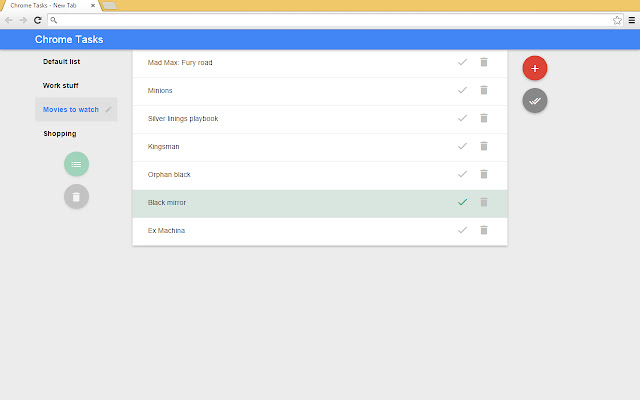
एक्सएक्स एक्सटेंशन CRX फ़ाइल डाउनलोड करें
crx प्रारूप में Chrome Tasks एक्सटेंशन फ़ाइलें डाउनलोड करें, ब्राउज़र में क्रोम एक्सटेंशन को मैन्युअल रूप से स्थापित करें या दोस्तों के साथ crx फ़ाइलों को साझा करें ताकि क्रोम एक्सटेंशन को आसानी से स्थापित किया जा सके।
एक्सटेंशन उपयोग निर्देश
Replaces the default new tab page in Chrome with an app for managing your google tasks. एक्सटेंशन की मूल जानकारी
| नाम |  Chrome Tasks Chrome Tasks |
| ID | kihfdbcaikfhlopdnaiokmogkhbofmgo |
| आधिकारिक URL | https://chrome.google.com/webstore/detail/chrome-tasks/kihfdbcaikfhlopdnaiokmogkhbofmgo |
| विवरण | This extension replaces the new tab page with an app for managing Google Tasks |
| फ़ाइल का आकार | 477 KB |
| स्थापना संख्या | 324 |
| वर्तमान संस्करण | 0.1.1 |
| अंतिम अपडेट | 2015-06-10 |
| प्रकाशन तिथि | 2015-06-10 |
| रेटिंग | 2.80/5 कुल 5 रेटिंग्स |
| डेवलपर | http://www.codeboss.se |
| भुगतान के प्रकार | free |
| समर्थित भाषाएँ | en-US |
| manifest.json | |
{
    "update_url": "https:\/\/clients2.google.com\/service\/update2\/crx",
    "manifest_version": 2,
    "name": "Chrome Tasks",
    "description": "This extension replaces the new tab page with an app for managing Google Tasks",
    "version": "0.1.1",
    "chrome_url_overrides": {
        "newtab": "myPage.html"
    },
    "content_scripts": [
        {
            "matches": [
                "http:\/\/www.google.com\/robots.txt*"
            ],
            "js": [
                "oauth2\/oauth2_inject.js"
            ],
            "run_at": "document_start"
        }
    ],
    "icons": {
        "128": "icon128.png"
    },
    "permissions": [
        "activeTab",
        "https:\/\/www.googleapis.com\/",
        "https:\/\/accounts.google.com\/o\/oauth2\/token"
    ],
    "web_accessible_resources": [
        "oauth2\/oauth2.html"
    ]
} | |