osTicket Checker
osTicket checker and manager
osTicket Checker क्या है?
osTicket Checker Plamen Vasilev Vasilev द्वारा विकसित एक क्रोम एक्सटेंशन है, और इसकी मुख्य विशेषता है "osTicket checker and manager"।
एक्सटेंशन स्क्रीनशॉट्स
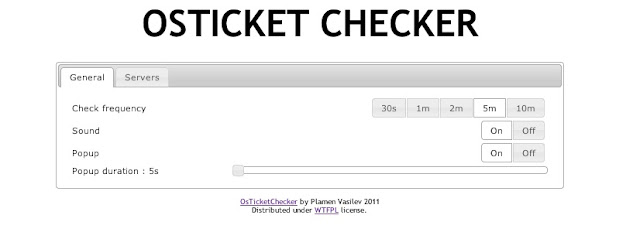

एक्सएक्स एक्सटेंशन CRX फ़ाइल डाउनलोड करें
crx प्रारूप में osTicket Checker एक्सटेंशन फ़ाइलें डाउनलोड करें, ब्राउज़र में क्रोम एक्सटेंशन को मैन्युअल रूप से स्थापित करें या दोस्तों के साथ crx फ़ाइलों को साझा करें ताकि क्रोम एक्सटेंशन को आसानी से स्थापित किया जा सके।
एक्सटेंशन उपयोग निर्देश
                        This extension checks for new tickets in one or more OsTicket systems.

Change log:
Version 1.0.0:
 * The plugin is rewritten to work on Chrome version >30
 * fixed Chrome desktop notifications
 * now it is working with the latest version of osTicket 1.8+ and 1.9+
 * the source is public in Github

Version 0.2.1:
 * check for valid login

Version 0.2:
 * fixed multiple servers connection and notification.
एक्सटेंशन की मूल जानकारी
| नाम |  osTicket Checker osTicket Checker |
| ID | kkcdfipbekoniikpigpklbioladkilig |
| आधिकारिक URL | https://chrome.google.com/webstore/detail/osticket-checker/kkcdfipbekoniikpigpklbioladkilig |
| विवरण | osTicket checker and manager |
| फ़ाइल का आकार | 394 KB |
| स्थापना संख्या | 1,000 |
| वर्तमान संस्करण | 1.0.1 |
| अंतिम अपडेट | 2014-09-11 |
| प्रकाशन तिथि | 2014-09-11 |
| रेटिंग | 3.72/5 कुल 18 रेटिंग्स |
| डेवलपर | Plamen Vasilev Vasilev |
| भुगतान के प्रकार | free |
| एक्सटेंशन वेबसाइट | https://github.com/PlamenVasilev/osTicket-chrome |
| समर्थित भाषाएँ | en |
| manifest.json | |
{
    "manifest_version": 2,
    "name": "osTicket Checker",
    "version": "1.0.1",
    "description": "osTicket checker and manager",
    "homepage_url": "https:\/\/github.com\/PlamenVasilev\/osTicket-chrome",
    "minimum_chrome_version": "30",
    "icons": {
        "128": "icons\/128.png",
        "48": "icons\/48.png"
    },
    "browser_action": {
        "default_icon": "icons\/kenguru.png",
        "default_title": "osTicket checker",
        "default_popup": "html\/popup.html"
    },
    "author": "Plamev Vasilev",
    "background": {
        "scripts": [
            "\/js\/lib\/jquery-1.8.3.min.js",
            "\/js\/checker.js",
            "\/js\/configuration.js",
            "\/js\/background.js"
        ]
    },
    "options_page": "html\/options.html",
    "permissions": [
        "notifications",
        "tabs",
        "http:\/\/*\/*",
        "https:\/\/*\/*"
    ],
    "content_security_policy": "script-src 'self' 'unsafe-eval'; object-src 'self'",
    "update_url": "https:\/\/clients2.google.com\/service\/update2\/crx",
    "offline_enabled": false,
    "web_accessible_resources": [
        "icons\/48.png"
    ]
} | |