Tabs saver
You could save opened tabs, if you may need them in future
Tabs saver क्या है?
Tabs saver sujeet-adam द्वारा विकसित एक क्रोम एक्सटेंशन है, और इसकी मुख्य विशेषता है "You could save opened tabs, if you may need them in future"।
एक्सटेंशन स्क्रीनशॉट्स


एक्सएक्स एक्सटेंशन CRX फ़ाइल डाउनलोड करें
crx प्रारूप में Tabs saver एक्सटेंशन फ़ाइलें डाउनलोड करें, ब्राउज़र में क्रोम एक्सटेंशन को मैन्युअल रूप से स्थापित करें या दोस्तों के साथ crx फ़ाइलों को साझा करें ताकि क्रोम एक्सटेंशन को आसानी से स्थापित किया जा सके।
एक्सटेंशन उपयोग निर्देश
                        You could save opened tabs, if you may need them in future

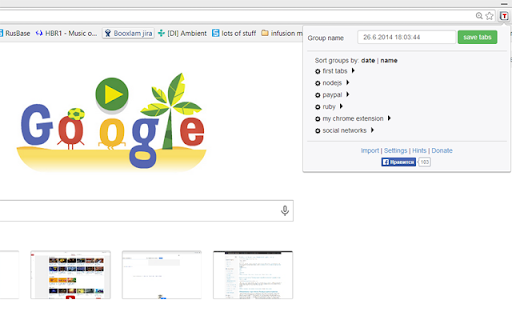
With that extension you could save all opened tabs in current window. This is realy good, when you often need to open many tabs on diferent subjects.

Features:
1. Ability to save opened tabs with unique name and reopening them in futher
2. Ability to export all tabs group to Json Blob and share link to social networks: Twitter, LinkedIn and Facebook(auto post api post)
3. Ability to open different tabs in previously saved group
4. Ability to delete tabs group or separate tab in group
5. Ability to add new tab to existing tabs group
6. Ability to rename existing tabs group
7. Ability to Update existing tabs group with the current open tabs
8. Ability to Export and import all your saved tabs groups to local disk

Hints:

Use shift+click if you wanna open tabs group in new window when default mode is used.
Use shift+click if you wanna open tabs group in current window when "new window" mode is used.

If you will click on gear button, then you will get group control menu, where:

Cross icon - deleting group
Plus icon - adding current selected tab in window to the group
Disk icon - updating group with the current opened tabs in window
Select cursor icon - rename group

Use ctrl+click or middle mouse button if you do not need close already opened tabs and open one of saved tabs group.
You may use "enter" key when you rename, or save tabs group.

Bug report mail: [email protected]
एक्सटेंशन की मूल जानकारी
| नाम |  Tabs saver Tabs saver |
| ID | kmabfaomlcjlnplkoflgenkmmpilmead |
| आधिकारिक URL | https://chromewebstore.google.com/detail/tabs-saver/kmabfaomlcjlnplkoflgenkmmpilmead |
| विवरण | You could save opened tabs, if you may need them in future |
| फ़ाइल का आकार | 184 KB |
| स्थापना संख्या | 30,942 |
| वर्तमान संस्करण | 2.5.6 |
| अंतिम अपडेट | 2024-01-31 |
| प्रकाशन तिथि | 2014-06-26 |
| रेटिंग | 3.64/5 कुल 313 रेटिंग्स |
| डेवलपर | sujeet-adam |
| ईमेल | [email protected] |
| भुगतान के प्रकार | free |
| एक्सटेंशन वेबसाइट | http://tabsmaster.freehosting.com/privacy.html |
| गोपनीयता नीति पृष्ठ URL | https://sites.google.com/view/sujeet-saket/home |
| समर्थित भाषाएँ | en |
| manifest.json | |
{
    "update_url": "https:\/\/clients2.google.com\/service\/update2\/crx",
    "manifest_version": 3,
    "name": "Tabs saver",
    "description": "You could save opened tabs, if you may need them in future",
    "version": "2.5.6",
    "icons": {
        "128": "icons\/logo_128X128.png"
    },
    "permissions": [
        "declarativeNetRequest",
        "tabs",
        "storage"
    ],
    "host_permissions": [
        "*:\/\/twitter.com\/*",
        "*:\/\/*.linkedin.com\/*",
        "*:\/\/*.facebook.com\/*",
        "*:\/\/jsonblob.com\/*"
    ],
    "background": {
        "type": "module",
        "service_worker": "background.js"
    },
    "action": {
        "default_icon": {
            "48": "\/icons\/logo_48X48.png"
        },
        "default_title": "Tab saver",
        "default_popup": "popup.html"
    },
    "options_ui": {
        "open_in_tab": true,
        "page": "options.html"
    },
    "content_scripts": [
        {
            "matches": [
                "*:\/\/*.facebook.com\/*",
                "*:\/\/*.linkedin.com\/*",
                "*:\/\/jsonblob.com\/*",
                "*:\/\/twitter.com\/*"
            ],
            "js": [
                "content-scripts\/content.js"
            ]
        }
    ]
} | |