Myles
Compare rewards across various affiliate programs
Myles क्या है?
Myles Harsh Gosar द्वारा विकसित एक क्रोम एक्सटेंशन है, और इसकी मुख्य विशेषता है "Compare rewards across various affiliate programs"।
एक्सटेंशन स्क्रीनशॉट्स

एक्सएक्स एक्सटेंशन CRX फ़ाइल डाउनलोड करें
crx प्रारूप में Myles एक्सटेंशन फ़ाइलें डाउनलोड करें, ब्राउज़र में क्रोम एक्सटेंशन को मैन्युअल रूप से स्थापित करें या दोस्तों के साथ crx फ़ाइलों को साझा करें ताकि क्रोम एक्सटेंशन को आसानी से स्थापित किया जा सके।
एक्सटेंशन उपयोग निर्देश
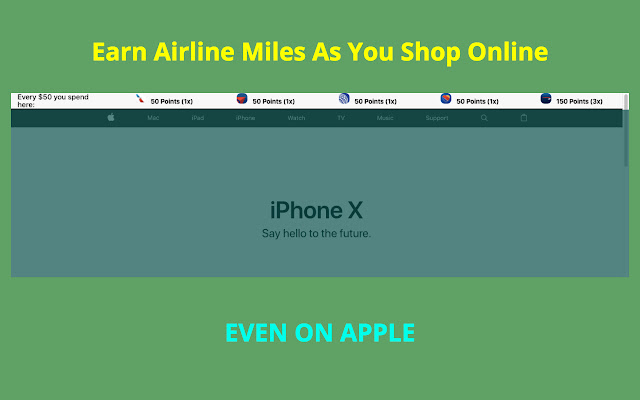
                        Compare your rewards earnings for Ebates, American Airlines, Delta Airlines, United Ailrines, Southwest Airlines shopping portal

[Points updated for Feb 2018]

Disclaimer:
1) This chrome extension is not perfect and I don't guarantee the accuracy of the points depicted.
2) I am not liable for any of your shopping decisions and points received.
3) The airline decides their own policy and it's up to you to read that.
4) Points may not be exact and you agree to confirm them yourself.

You agree to these terms by downloading the extension.

Email your suggestions to [email protected] .
एक्सटेंशन की मूल जानकारी
| नाम |  Myles Myles |
| ID | knjgohecfkkdfmhknimolilgfcgmephf |
| आधिकारिक URL | https://chrome.google.com/webstore/detail/myles/knjgohecfkkdfmhknimolilgfcgmephf |
| विवरण | Compare rewards across various affiliate programs |
| फ़ाइल का आकार | 1.01 MB |
| स्थापना संख्या | 51 |
| वर्तमान संस्करण | 1.0.5 |
| अंतिम अपडेट | 2018-02-27 |
| प्रकाशन तिथि | 2018-02-27 |
| रेटिंग | 5.00/5 कुल 6 रेटिंग्स |
| डेवलपर | Harsh Gosar |
| ईमेल | [email protected] |
| भुगतान के प्रकार | free |
| एक्सटेंशन वेबसाइट | http://thatmilesapp.com |
| गोपनीयता नीति पृष्ठ URL | http://gosar.us/privacy.html |
| समर्थित भाषाएँ | en-US |
| manifest.json | |
{
    "update_url": "https:\/\/clients2.google.com\/service\/update2\/crx",
    "manifest_version": 2,
    "name": "Myles",
    "description": "Compare rewards across various affiliate programs",
    "version": "1.0.5",
    "icons": {
        "16": "icons\/16.png",
        "48": "icons\/64.png",
        "128": "icons\/128.png"
    },
    "background": {
        "persistent": false,
        "scripts": [
            "background\/location.js",
            "background\/main.js"
        ]
    },
    "browser_action": {
        "default_popup": "popup\/popup.html"
    },
    "permissions": [
        "activeTab",
        "identity",
        "tabs",
        "geolocation",
        "storage"
    ],
    "content_scripts": [
        {
            "matches": [
                "http:\/\/www.amazon.com\/",
                "https:\/\/www.amazon.com\/"
            ],
            "css": [
                "lib\/font.css",
                "content\/amazon-home\/style.css"
            ],
            "js": [
                "lib\/jquery.js",
                "lib\/tether.js",
                "lib\/bootstrap.min.js",
                "content\/amazon-home\/script.js"
            ]
        },
        {
            "matches": [
                "http:\/\/*\/*",
                "https:\/\/*\/*"
            ],
            "exclude_globs": [
                "http:\/\/www.amazon.com\/*",
                "https:\/\/www.amazon.com\/*"
            ],
            "css": [
                "lib\/font.css",
                "header\/style.css"
            ],
            "js": [
                "lib\/jquery.js",
                "lib\/tether.js",
                "lib\/bootstrap.min.js",
                "content\/db\/db_us.js",
                "content\/db\/db_in.js",
                "content\/helper\/domain_extract.js",
                "content\/header\/header_us.js",
                "content\/header\/header_in.js",
                "content\/script.js"
            ]
        },
        {
            "matches": [
                "https:\/\/shop.jetprivilege.com\/",
                "http:\/\/shop.jetprivilege.com\/"
            ],
            "css": [],
            "js": [
                "lib\/jquery.js",
                "content\/jet\/script.js"
            ]
        }
    ],
    "content_security_policy": "script-src 'self' https:\/\/ssl.google-analytics.com; object-src 'self'"
} | |