Journal access through HKU library
A simple chrome extension that let you access journal through HKU library resources (HKU ID needed).
Journal access through HKU library क्या है?
Journal access through HKU library junyichen द्वारा विकसित एक क्रोम एक्सटेंशन है, और इसकी मुख्य विशेषता है "A simple chrome extension that let you access journal through HKU library resources (HKU ID needed)."।
एक्सटेंशन स्क्रीनशॉट्स


एक्सएक्स एक्सटेंशन CRX फ़ाइल डाउनलोड करें
crx प्रारूप में Journal access through HKU library एक्सटेंशन फ़ाइलें डाउनलोड करें, ब्राउज़र में क्रोम एक्सटेंशन को मैन्युअल रूप से स्थापित करें या दोस्तों के साथ crx फ़ाइलों को साझा करें ताकि क्रोम एक्सटेंशन को आसानी से स्थापित किया जा सके।
एक्सटेंशन उपयोग निर्देश
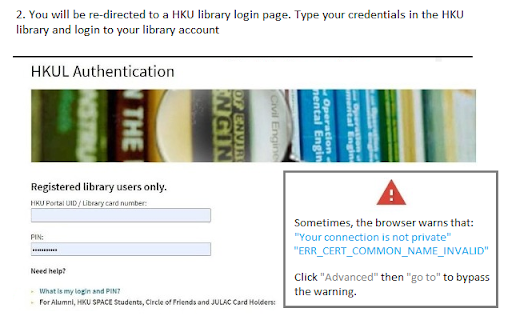
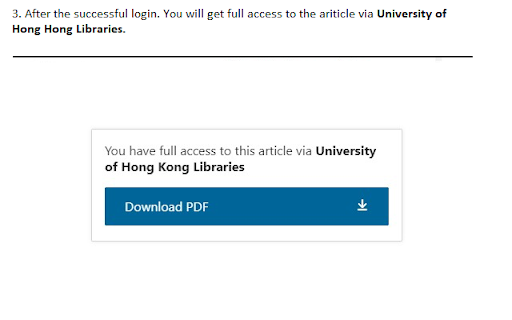
An extension that redirect you from the journal page to the HKU library portal. You need to login the HKU library. The extension will automatically parse the current URL of the current paper page to the HKU library address. एक्सटेंशन की मूल जानकारी
| नाम |  Journal access through HKU library Journal access through HKU library |
| ID | lcnnijjgcjfpcfjgnahbcpapbmkiceld |
| आधिकारिक URL | https://chromewebstore.google.com/detail/journal-access-through-hk/lcnnijjgcjfpcfjgnahbcpapbmkiceld |
| विवरण | A simple chrome extension that let you access journal through HKU library resources (HKU ID needed). |
| फ़ाइल का आकार | 47.64 KB |
| स्थापना संख्या | 135 |
| वर्तमान संस्करण | 0.0.1 |
| अंतिम अपडेट | 2021-09-02 |
| प्रकाशन तिथि | 2021-08-04 |
| डेवलपर | junyichen |
| ईमेल | [email protected] |
| भुगतान के प्रकार | free |
| समर्थित भाषाएँ | en-US |
| manifest.json | |
{
    "update_url": "https:\/\/clients2.google.com\/service\/update2\/crx",
    "manifest_version": 2,
    "name": "Journal access through HKU library",
    "short_name": "HKULibJ",
    "description": "A simple chrome extension that let you access journal through HKU library resources (HKU ID needed).",
    "version": "0.0.1",
    "minimum_chrome_version": "38",
    "permissions": [
        "contextMenus",
        "tabs"
    ],
    "icons": {
        "16": "assets\/icon16.png",
        "128": "assets\/icon128.png"
    },
    "background": {
        "page": "background.html"
    }
} | |