YouTube video length
Shows video length next to YouTube video links
YouTube video length क्या है?
YouTube video length Brian द्वारा विकसित एक क्रोम एक्सटेंशन है, और इसकी मुख्य विशेषता है "Shows video length next to YouTube video links"।
एक्सटेंशन स्क्रीनशॉट्स
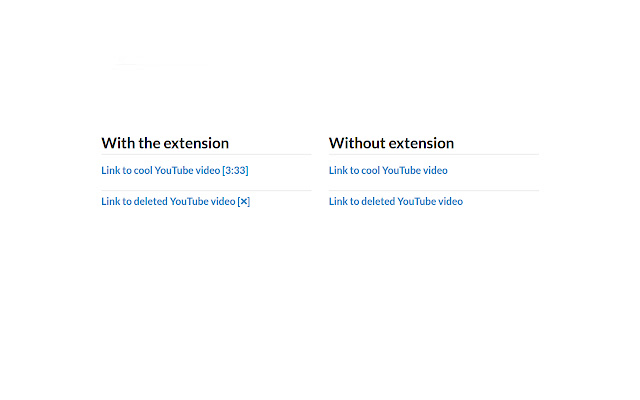

एक्सएक्स एक्सटेंशन CRX फ़ाइल डाउनलोड करें
crx प्रारूप में YouTube video length एक्सटेंशन फ़ाइलें डाउनलोड करें, ब्राउज़र में क्रोम एक्सटेंशन को मैन्युअल रूप से स्थापित करें या दोस्तों के साथ crx फ़ाइलों को साझा करें ताकि क्रोम एक्सटेंशन को आसानी से स्थापित किया जा सके।
एक्सटेंशन उपयोग निर्देश
                        Shows video duration next to YouTube links. For example "Cool video [2:30]".

Also a tooltip showing additional video information appears when your mouse hovers over a YouTube link showing.


More information:
 - Shows when a video is unavailable - [❌]
 - Shows when a video is blocked in your region - [❌ country blocked]
 - Shows when a video is age restricted - [18+]
 - Works on text and image links
 - Accounts for videos with an offset. A 2 minute video with a 1 minute offset is shown as having a 1 minute duration.

If you have any issues please leave a comment here or log them on Github.

Code available on Github: https://github.com/Brian-Gaffney/YouTube-video-length-Chrome-extension
एक्सटेंशन की मूल जानकारी
| नाम |  YouTube video length YouTube video length |
| ID | lfkbfhglojdeoebdkpmgmphplhanchff |
| आधिकारिक URL | https://chrome.google.com/webstore/detail/youtube-video-length/lfkbfhglojdeoebdkpmgmphplhanchff |
| विवरण | Shows video length next to YouTube video links |
| फ़ाइल का आकार | 120 KB |
| स्थापना संख्या | 482 |
| वर्तमान संस्करण | 2.1.1 |
| अंतिम अपडेट | 2017-07-30 |
| प्रकाशन तिथि | 2017-07-30 |
| रेटिंग | 4.20/5 कुल 10 रेटिंग्स |
| डेवलपर | Brian |
| भुगतान के प्रकार | free |
| एक्सटेंशन वेबसाइट | https://github.com/Brian-Gaffney/YouTube-video-length-Chrome-extension |
| समर्थित भाषाएँ | en-US |
| manifest.json | |
{
"update_url": "https:\/\/clients2.google.com\/service\/update2\/crx",
"manifest_version": 2,
"name": "YouTube video length",
"description": "Shows video length next to YouTube video links",
"version": "2.1.1",
"permissions": [
"https:\/\/api.youtube.com\/"
],
"background": {
"scripts": [
"background.js"
],
"persistent": false
},
"icons": {
"48": "48.png",
"128": "128.png"
},
"browser_action": {
"default_title": "Shows video length next to YouTube video links",
"default_icon": {
"19": "icon.png"
}
},
"content_scripts": [
{
"matches": [
" | |