WCAG Luminosity Contrast Ratio Analyzer
Pick colors from your Web, compute contrast, get suggestions. Preview with challenged visions. Versatile Color Dev Extension Tool
WCAG Luminosity Contrast Ratio Analyzer क्या है?
WCAG Luminosity Contrast Ratio Analyzer Horia Tudosie द्वारा विकसित एक क्रोम एक्सटेंशन है, और इसकी मुख्य विशेषता है "Pick colors from your Web, compute contrast, get suggestions. Preview with challenged visions. Versatile Color Dev Extension Tool"।
एक्सटेंशन स्क्रीनशॉट्स
एक्सएक्स एक्सटेंशन CRX फ़ाइल डाउनलोड करें
crx प्रारूप में WCAG Luminosity Contrast Ratio Analyzer एक्सटेंशन फ़ाइलें डाउनलोड करें, ब्राउज़र में क्रोम एक्सटेंशन को मैन्युअल रूप से स्थापित करें या दोस्तों के साथ crx फ़ाइलों को साझा करें ताकि क्रोम एक्सटेंशन को आसानी से स्थापित किया जा सके।
एक्सटेंशन उपयोग निर्देश
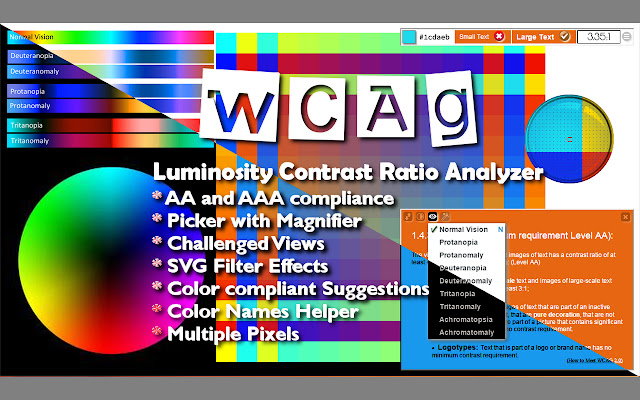
The extension allows you to pick colors from a web site and test the contrast compliance with WCAG 2.0.
A color picker with a magnifier glass facilitates the correct selection of the desired pixel, and even averages multiple pixels.
Picked colors shows in the toolbar as background or foreground of text.
The tool bar evaluates and displays the contrast and the success criteria.
The toolbar menu offers choices for 10 challenged visions and some effects.
A sample Text window lets you better see the look of your choices of color.
It offers up to 3 choices for foreground colors with AAA compliant contrast. एक्सटेंशन की मूल जानकारी
| नाम |  WCAG Luminosity Contrast Ratio Analyzer WCAG Luminosity Contrast Ratio Analyzer |
| ID | lllpnmpooomecmbmijbmbikaacgfdagi |
| आधिकारिक URL | https://chrome.google.com/webstore/detail/wcag-luminosity-contrast/lllpnmpooomecmbmijbmbikaacgfdagi |
| विवरण | Pick colors from your Web, compute contrast, get suggestions. Preview with challenged visions. Versatile Color Dev Extension Tool |
| फ़ाइल का आकार | 370 KB |
| स्थापना संख्या | 5,000 |
| वर्तमान संस्करण | 1.0.5.29 |
| अंतिम अपडेट | 2018-04-18 |
| प्रकाशन तिथि | 2018-04-18 |
| रेटिंग | 4.25/5 कुल 16 रेटिंग्स |
| डेवलपर | Horia Tudosie |
| ईमेल | [email protected] |
| भुगतान के प्रकार | free |
| समर्थित भाषाएँ | en |
| manifest.json | |
{
"update_url": "https:\/\/clients2.google.com\/service\/update2\/crx",
"manifest_version": 2,
"name": "WCAG Luminosity Contrast Ratio Analyzer",
"version": "1.0.5.29",
"description": "Pick colors from your Web, compute contrast, get suggestions. Preview with challenged visions. Versatile Color Dev Extension Tool",
"icons": {
"16": "\/images\/logos\/16.png",
"48": "\/images\/logos\/48.png",
"128": "\/images\/logos\/128.png"
},
"browser_action": {
"default_icon": "\/images\/icon.png",
"default_popup": "\/inc\/html\/popup.html"
},
"background": {
"page": "\/inc\/html\/background.html",
"persistent": true
},
"options_page": "\/inc\/html\/options.html",
"permissions": [
"tabs",
"activeTab",
" | |