YouTube Timed Comments
Show comments with timestamps
YouTube Timed Comments क्या है?
YouTube Timed Comments lerxst द्वारा विकसित एक क्रोम एक्सटेंशन है, और इसकी मुख्य विशेषता है "Show comments with timestamps"।
एक्सटेंशन स्क्रीनशॉट्स
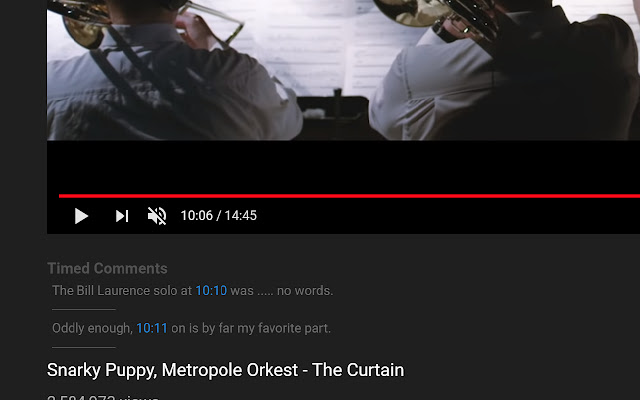
एक्सएक्स एक्सटेंशन CRX फ़ाइल डाउनलोड करें
crx प्रारूप में YouTube Timed Comments एक्सटेंशन फ़ाइलें डाउनलोड करें, ब्राउज़र में क्रोम एक्सटेंशन को मैन्युअल रूप से स्थापित करें या दोस्तों के साथ crx फ़ाइलों को साझा करें ताकि क्रोम एक्सटेंशन को आसानी से स्थापित किया जा सके।
एक्सटेंशन उपयोग निर्देश
                        See comments that have timestamps, show up at the appropriate time.

Note: Only comments that have loaded on the page will show up.
एक्सटेंशन की मूल जानकारी
| नाम |  YouTube Timed Comments YouTube Timed Comments |
| ID | mfmjnhncafdcdegeiamnjpnjgmmkkaal |
| आधिकारिक URL | https://chrome.google.com/webstore/detail/youtube-timed-comments/mfmjnhncafdcdegeiamnjpnjgmmkkaal |
| विवरण | Show comments with timestamps |
| फ़ाइल का आकार | 96.02 KB |
| स्थापना संख्या | 159 |
| वर्तमान संस्करण | 0.0.0.1 |
| अंतिम अपडेट | 2019-09-03 |
| प्रकाशन तिथि | 2019-09-03 |
| रेटिंग | 3.33/5 कुल 3 रेटिंग्स |
| डेवलपर | lerxst |
| ईमेल | [email protected] |
| भुगतान के प्रकार | free |
| समर्थित भाषाएँ | en-US |
| manifest.json | |
{
    "update_url": "https:\/\/clients2.google.com\/service\/update2\/crx",
    "manifest_version": 2,
    "name": "YouTube Timed Comments",
    "description": "Show comments with timestamps",
    "version": "0.0.0.1",
    "content_scripts": [
        {
            "matches": [
                "https:\/\/www.youtube.com\/*"
            ],
            "js": [
                "third-party-scripts\/jquery-3.3.1.js",
                "third-party-scripts\/arrive.min.js",
                "third-party-scripts\/clamp.min.js",
                "content-script.js"
            ]
        }
    ],
    "permissions": [
        "contextMenus",
        "webNavigation",
        "tabs"
    ],
    "background": {
        "scripts": [
            "event-page.js"
        ],
        "persistent": false
    },
    "web_accessible_resources": [
        "third-party-scripts\/jquery-3.3.1.js",
        "third-party-scripts\/mustache.min.js",
        "third-party-scripts\/arrive.min.js",
        "third-party-scripts\/clamp.min.js",
        "page-script.js"
    ],
    "icons": {
        "16": "icons\/icon-16.png",
        "32": "icons\/icon-32.png",
        "192": "icons\/icon-192.png"
    }
} | |