Harambe
Dicks Out For Harambe
Harambe क्या है?
Harambe Steven Jin द्वारा विकसित एक क्रोम एक्सटेंशन है, और इसकी मुख्य विशेषता है "Dicks Out For Harambe"।
एक्सटेंशन स्क्रीनशॉट्स

एक्सएक्स एक्सटेंशन CRX फ़ाइल डाउनलोड करें
crx प्रारूप में Harambe एक्सटेंशन फ़ाइलें डाउनलोड करें, ब्राउज़र में क्रोम एक्सटेंशन को मैन्युअल रूप से स्थापित करें या दोस्तों के साथ crx फ़ाइलों को साझा करें ताकि क्रोम एक्सटेंशन को आसानी से स्थापित किया जा सके।
एक्सटेंशन उपयोग निर्देश
                        Have a friend you want to prank? Hate that jerk Todd and want to get even?
Share with them the joy of Harambe

It's Easy:
While they're away from their computer:
Step 1. Go to Chrome
Step 2. Go to the extensions page by googling "Chrome Extensions" & clicking on the first link
Step 3. Search in extensions search "Harambe Pictures"
Step 4. install the top result

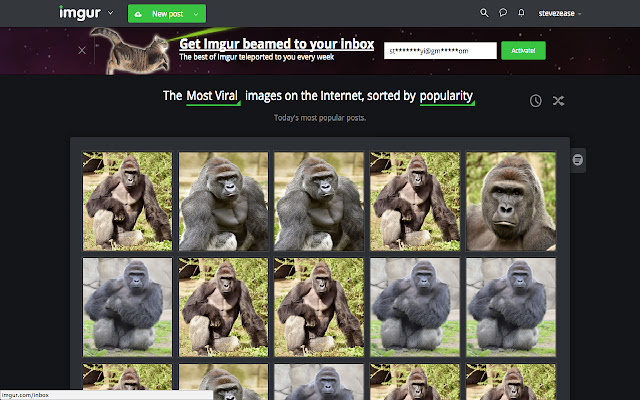
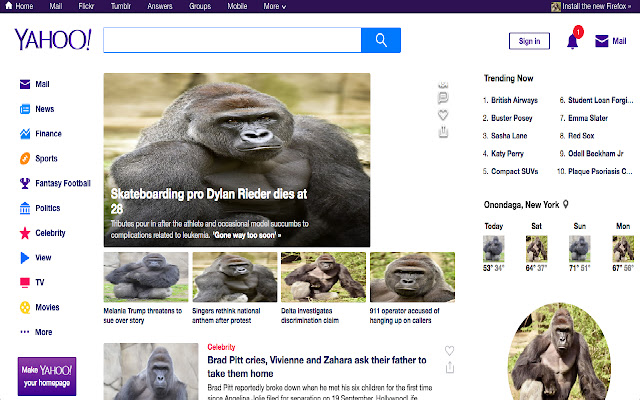
Now all of his/her pictures will turn into Harambe
Want to go one step further? Right click on the extension and click: "Hide in Chrome Menu."
They'll be freaking out for the next hour

This extension changes all images on a page to Harambe which then checks for changes on a 10 second interval.
एक्सटेंशन की मूल जानकारी
| नाम |  Harambe Harambe |
| ID | mkghponibaehackhmaijeonapklpndlc |
| आधिकारिक URL | https://chrome.google.com/webstore/detail/harambe/mkghponibaehackhmaijeonapklpndlc |
| विवरण | Dicks Out For Harambe |
| फ़ाइल का आकार | 1.98 MB |
| स्थापना संख्या | 16 |
| वर्तमान संस्करण | 1.3.1 |
| अंतिम अपडेट | 2018-01-07 |
| प्रकाशन तिथि | 2018-01-07 |
| रेटिंग | 2.83/5 कुल 6 रेटिंग्स |
| डेवलपर | Steven Jin |
| ईमेल | [email protected] |
| भुगतान के प्रकार | free |
| समर्थित भाषाएँ | en |
| manifest.json | |
{
    "update_url": "https:\/\/clients2.google.com\/service\/update2\/crx",
    "manifest_version": 2,
    "name": "Harambe",
    "description": "Dicks Out For Harambe",
    "version": "1.3.1",
    "content_scripts": [
        {
            "matches": [
                "http:\/\/*\/*",
                "https:\/\/*\/*"
            ],
            "js": [
                "harambe.js",
                "textswapper.js"
            ]
        }
    ],
    "web_accessible_resources": [
        "1.jpg",
        "2.jpg",
        "3.jpg",
        "4.jpg",
        "5.jpg",
        "6.jpg",
        "7.jpg",
        "8.jpg",
        "9.jpg",
        "10.jpg"
    ],
    "browser_action": {
        "default_icon": "icon.png",
        "default_popup": "popup.html"
    },
    "permissions": [
        "activeTab",
        "https:\/\/ajax.googleapis.com\/"
    ]
} | |